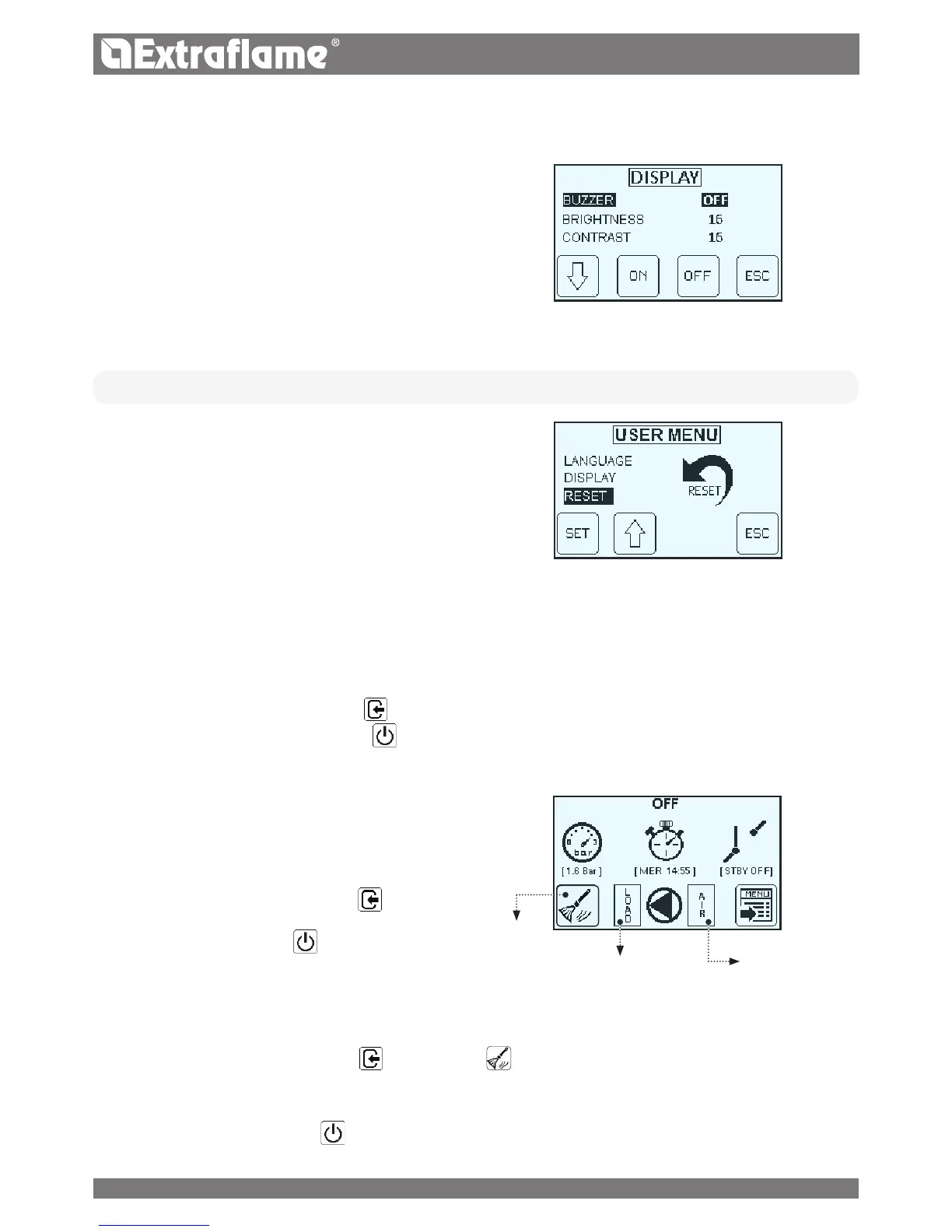
� BUZZER
When set to "OFF" the acoustic signal is disabled.
� BRIGHTNESS
It allows you to adjust the backlight of the display.
The possible settings range from OFF - 10 to 30.
Activating OFF, the back light of the display will go o after a
preset delay.
The back light will go on as soon as a key is pressed or if an
alarm should be triggered in the machine.
� CONTRAST
Allows you to change the display contrast.
(Range from 2-50)
• RESET
Allows to reset all values modiable by the user to the default
values.
OTHER FUNCTIONS
AIR DISCHARGE
This function allows to bleed any air in the thermal-product. (For 15 minutes the pump operates alternately, 30 seconds on and 30 seconds o)
To activate the function:
With the generator
cold and in "OFF" state press
and then "air" for 5 secs.
To stop the "air Bleeding function press the button
FIRST LOAD
This function allows to activate the pellet feeding motor reducer for
continuous functioning.
To activate the function:
With the generator cold and in "OFF" state press
and then "LOAD"
for 5 secs.
To stop the "First load" press the key
COMBUSTION CHAMBER CLEANING
This feature allows you to open the bottom brazier, facilitating the cleaning of the combustion chamber.
To activate the function:
With the generator cold and in "OFF" state press
and subsequently for 5 sec.
With the ash hook supplied as standard scrape the walls of the combustion chamber and transfer the residual ash in the brazier room
a
into the ash tray.
After cleaning, press and hold the button
.
OPEN THE DOOR ONLY WHEN THE OPERATION IS PERFORMED! THE DISPLAY WILL INDICATE THE SUCCESSFUL OPENING!
AIR DISCHARGEFIRST LOAD
CLEANING
23


 To Next Page