DTP CrossPoint 4K Series Matrix Switchers • Operation 36
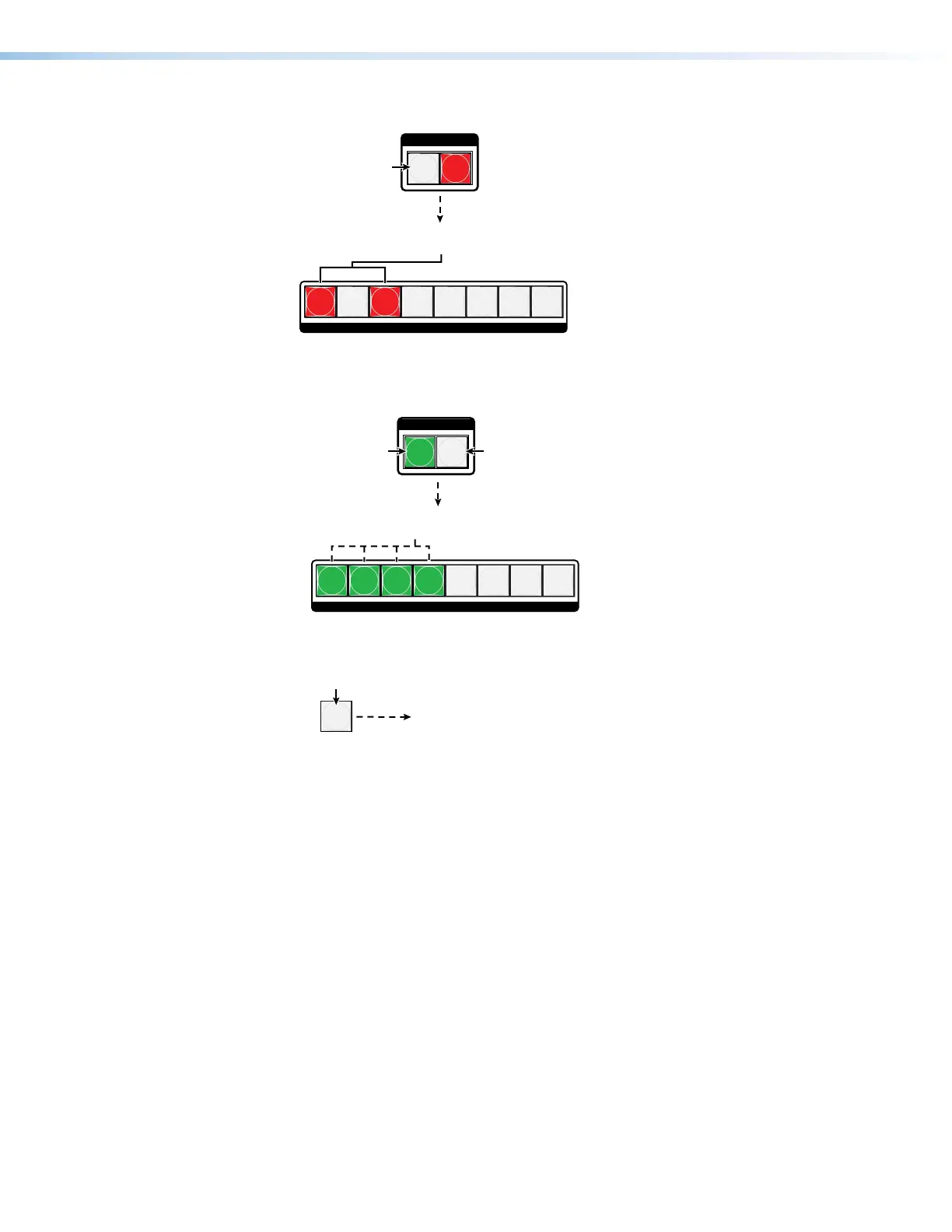
5. Deselect video: Press and release the Video button.
I / O
VIDEO AUDIO
12345678
OUTPUTS
utton is unlit or
kground illuminated
when deselected.
The Audio button
remains lit red to
indicate that only
audio is selected.
The output buttons for outputs that are not tied to
Input 5 are either unlit or background illuminated.
The output buttons for outputs that are tied to input 5
light red to indicate audio ties (audio breakaway).
6. Toggle audio off and video on: Press and release the Video button and the Audio
button.
I / O
VIDEO AUDIO
12345678
OUTPUTS
utton lights
when selected.
The button is unlit
or background
illuminated when
deselected.
The output buttons for outputs that are not tied to
Input 5 are either unlit or background illuminated.
The output buttons for outputs that are tied to Input 5
light green to indicate video ties (audio breakaway).
7. Exit View-only mode: Press and release the View button.
All input buttons and output buttons
return to unlit or bac
VIEW
Press the button.
The View button returns to unlit or background illumination.


 To Next Page