DTP CrossPoint 4K Series Matrix Switchers • Matrix Software 78
• Settings — Displays a wide assortment of hardware and communication settings.
Select settings can be changed:
• Device name
• Date and time
• Administrator and user passwords
NOTE: An administrator password must be assigned before a user password.
• RS-232 baud rate for the rear panel Remote port
• TCP/IP settings (DHCP, IP and gateway addresses, subnet mask, and DNS server)
• Reset Device... — Opens a dialog box that allows you to initiate three levels of matrix
switcher reset.
• Backup — Issues an SIS command for the firmware to create a file of the current scaler
settings that the software itself cannot save. Saves a .cfg file on the PC.
• Restore — Issues an SIS command for the firmware to load the backup file.
• Update Firmware... — Calls a utility within Product Configuration Software that loads
new firmware (see Updating the Firmware on the next page).
• Product Help — Opens the device help file.
• About This Module... — Shows the version of the unit-specific part of the software.
Assigning and Unassigning Logos
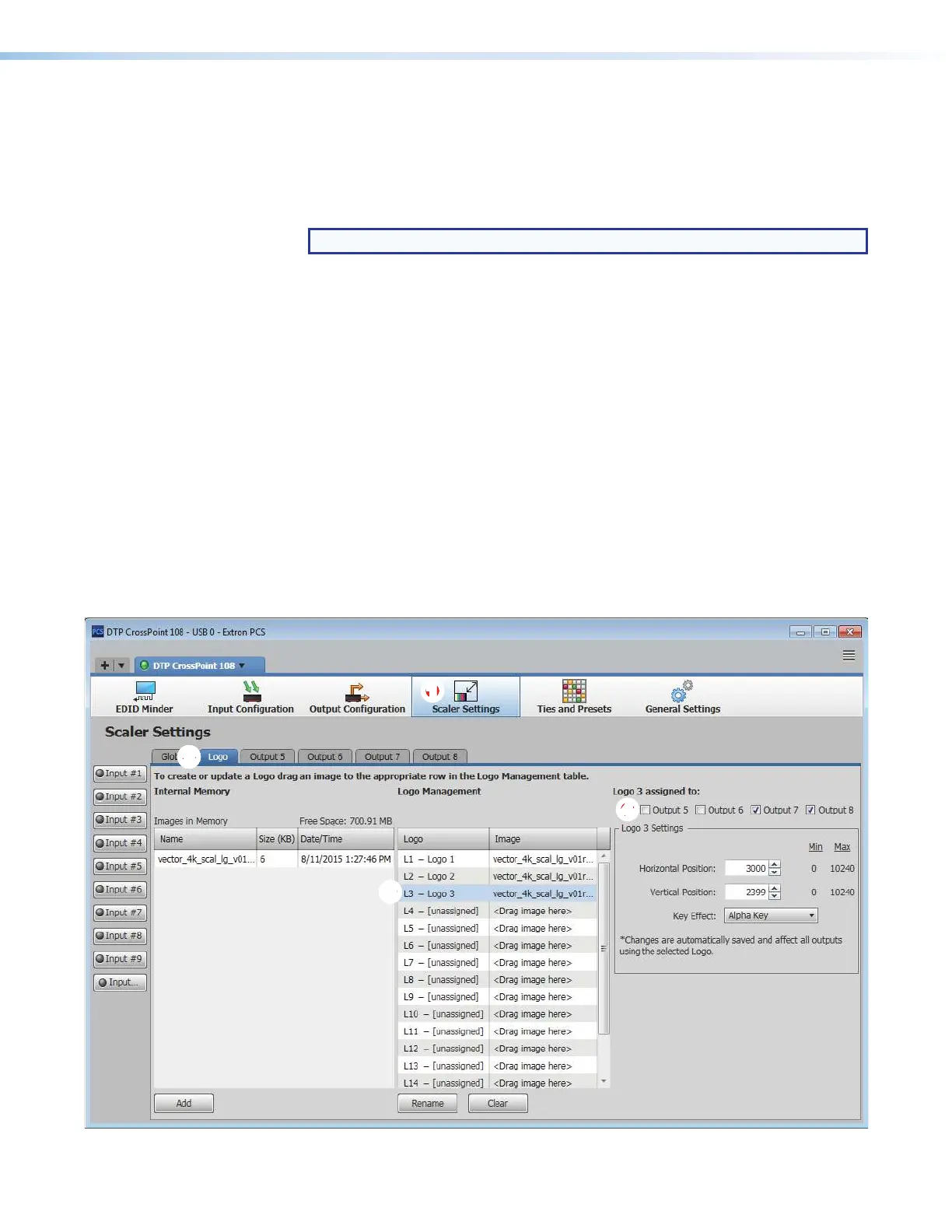
Assign and unassign a logo to one or more scaled outputs (outputs 5 through 8) as follows:
1. Click the Scaler Settings tab (see figure 38,
1
). The Scaler Settings panel displays.
1111111111
22
22222222
33
33333333
44
44444444
Figure 38. Scaler Settings Panel


 To Next Page