DTP CrossPoint 4K Series Matrix Switchers • Operation 25
Control Buttons
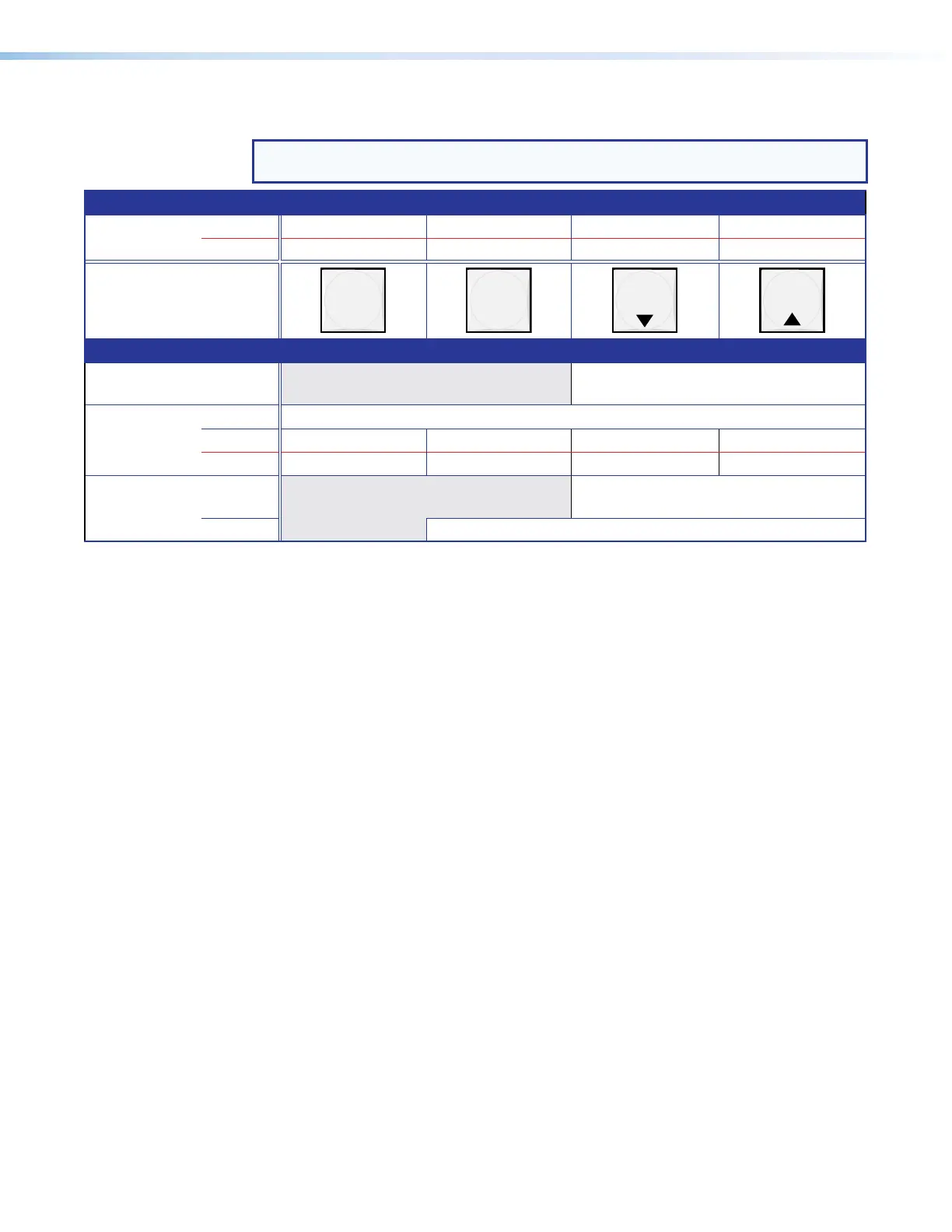
NOTE: See Front Panel Operations, beginning on page 29 for detailed descriptions of
the following operations.
Primary functions
Action Save changes Select Preset mode Select View mode Cancel or escape
Indication Blink: Save needed Recall preset View mode selected Blinks once
ENTER PRESET
VIEW
ESC
Secondary functions
Input audio
configuration
Indication Blink: Input Audio Configuration Mode.
Port
configuration
Action 1: Select Configuration mode.
Action 2: Select 9600 baud Select 19200 baud Select 38400 baud Select 115200 baud
Indication Blink: 9600 baud Blink: 19200 baud Blink: 38400 baud Blink: 115200 baud
Front panel
locks
Action 1: Select Lock mode 1 or toggle between
mode 2 and mode 1.
Action 2: Select Lock mode 2 or toggle between mode 0 and mode 2.
D
Enter button (see
figure 18 on page 22)— The Enter button has two primary
functions (❏) and two secondary functions (•):
❏ Saves configuration or other changes that you make on the front panel. To create a
simple configuration:
1. Specify video, audio, or both (see I/O buttons [item
H
] and [item
I
]).
2. Press the desired input button (item
A
).
3. Press the desired output button or buttons (item
B
).
4. Press the Enter button.
❏ Indicates that a potential tie or other change has been created but not saved.
• With the Preset, View, and Esc buttons , selects Serial Port Configuration mode.
• Selects 9600 baud for the rear panel Remote port in Serial Port Configuration mode
and indicates the selection.
E
Preset button (see figure 18)— The Preset button has one primary function (❏) and
three secondary functions (•):
❏ Activates Recall Preset mode to activate a previously-defined preset and indicates
the selection.
• With the Enter, View, and Esc buttons, selects Serial Port Configuration mode.
• Selects 19200 baud for the rear panel Remote port in Serial Port Configuration
mode and indicates the selection.
• With the View and Esc buttons, selects front panel security Lock mode 2 or
toggles between mode 0 (unlocked) and mode 2.


 To Next Page