DTP CrossPoint 4K Series Matrix Switchers • Operation 37
Recalling Presets
A full or partial configuration, plus all signal processor settings can be saved as 1 of 32
presets. Presets are created via the DSP Configurator software (see Save a preset on
page 111) and Product Configuration Software (PCS) only. When a preset is recalled from
memory, it becomes either the current configuration or part of the current configuration, with
all of the associated saved audio settings.
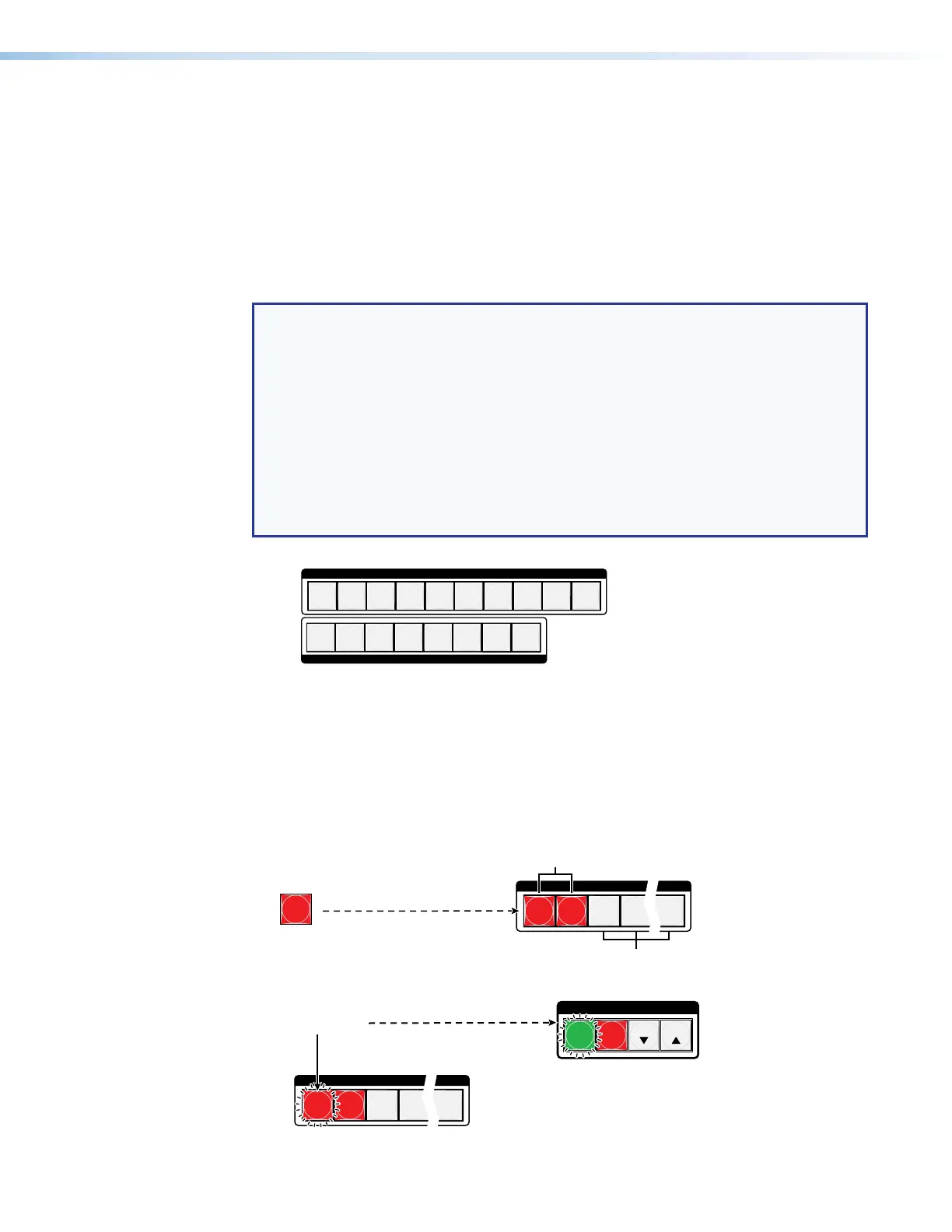
Presets 1 through 18 are assigned to the input buttons and output buttons and can be
recalled from the front panel (see figure 23). Preset numbers 19 through 32 can be recalled
via Ethernet, USB, or RS-232 control only.
NOTES:
• Presets cannot be viewed from the front panel unless they are recalled as the
current configuration.
• Although most audio adjustments cannot be made in PCS, a preset saved in PCS
includes any audio settings created in DSP Configurator.
• The current configuration and all presets are stored in non-volatile memory. When
power is removed and restored, the current configuration is still active and all
presets are retained.
• When a preset is recalled, it replaces all or part of the current configuration, which
is lost unless it is also stored as a preset. The recalled preset overwrites current
configuration ties in favor of the preset configuration ties.
uttons
uttons
1
6
7
3
8
4
5
2
Preset
Preset
Preset
Preset
9
10
Preset
Preset
Preset
Preset
1
2
3
4
1
2
3
4
5
6
7
8
INPUTS
OUTPUTS
9
10
5
6
7
8
Figure 23. DTP CrossPoint 108 4K Preset Locations
Example 5: Recalling a preset
In the following example, a preset is recalled to become the current configuration. The steps
show the front panel indications that result from your action.
1. Clear all selections: Press and release the Esc button.
2. Select Recall Preset mode: Press and release the Preset button.
PRESET
1
2
3
4
10
Preset button.
utton lights.
All input and output buttons
with assigned presets light red.
Preset Assigned
No Preset Assigned
3. Select the preset: Press and release the input or output button for the desired preset.
C O N T R O L
PRESET
ENTER
ESCVIEW
1
2
3
4
10
The Enter button blinks to
indicate the need to recall
the preset.
utton.
The button blinks to indicate that this
preset number is selected but not recalled.


 To Next Page