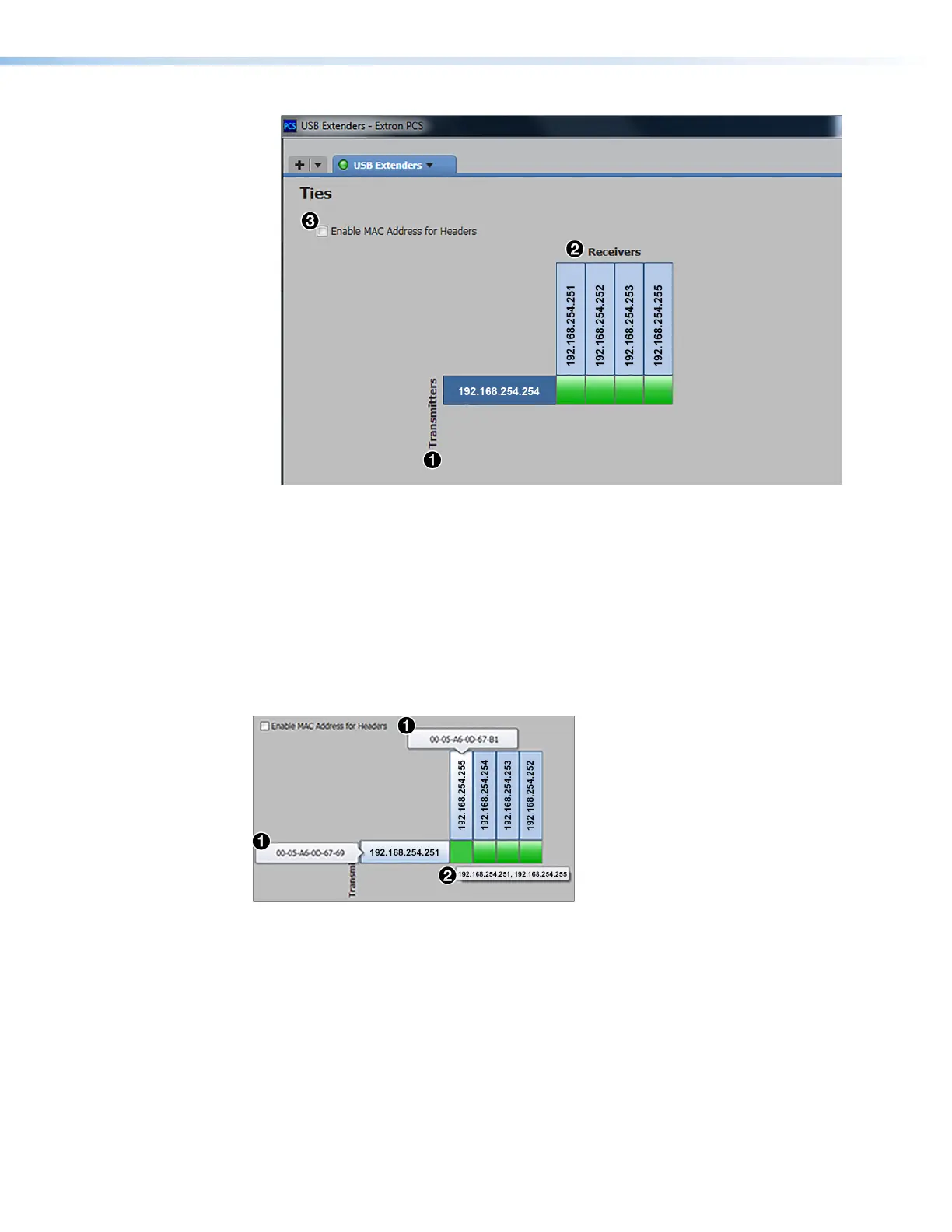
Figure 31. USB Extenders Ties Screen
In the table on the Ties screen, transmitters that are connected to the network are
listed by their IP addresses in the rows (
1
). Receivers are listed in the columns (
2
). To
list the devices by their MAC addresses instead of the IP addresses, select the Enable
MAC for Headers checkbox (
3
).
Viewing MAC addresses on the Ties screen
If you want to view the MAC address of a transmitter or receiver without changing the entire
display, hover the mouse pointer over the desired IP address to show the MAC address in a
pop-up box (see figure 32,
1
).
Figure 32. MAC Addresses in Pop-up Boxes
If the screen is set to display MAC addresses, you can view an individual IP address by
positioning the pointer over the MAC address.
To display the addresses of tied products, hover the cursor over the green connection box
in the matrix. The addresses of both tied products are displayed in a pop-up (
2
).
USB Extender Plus Series • Remote Configuration and Control 35


 To Next Page