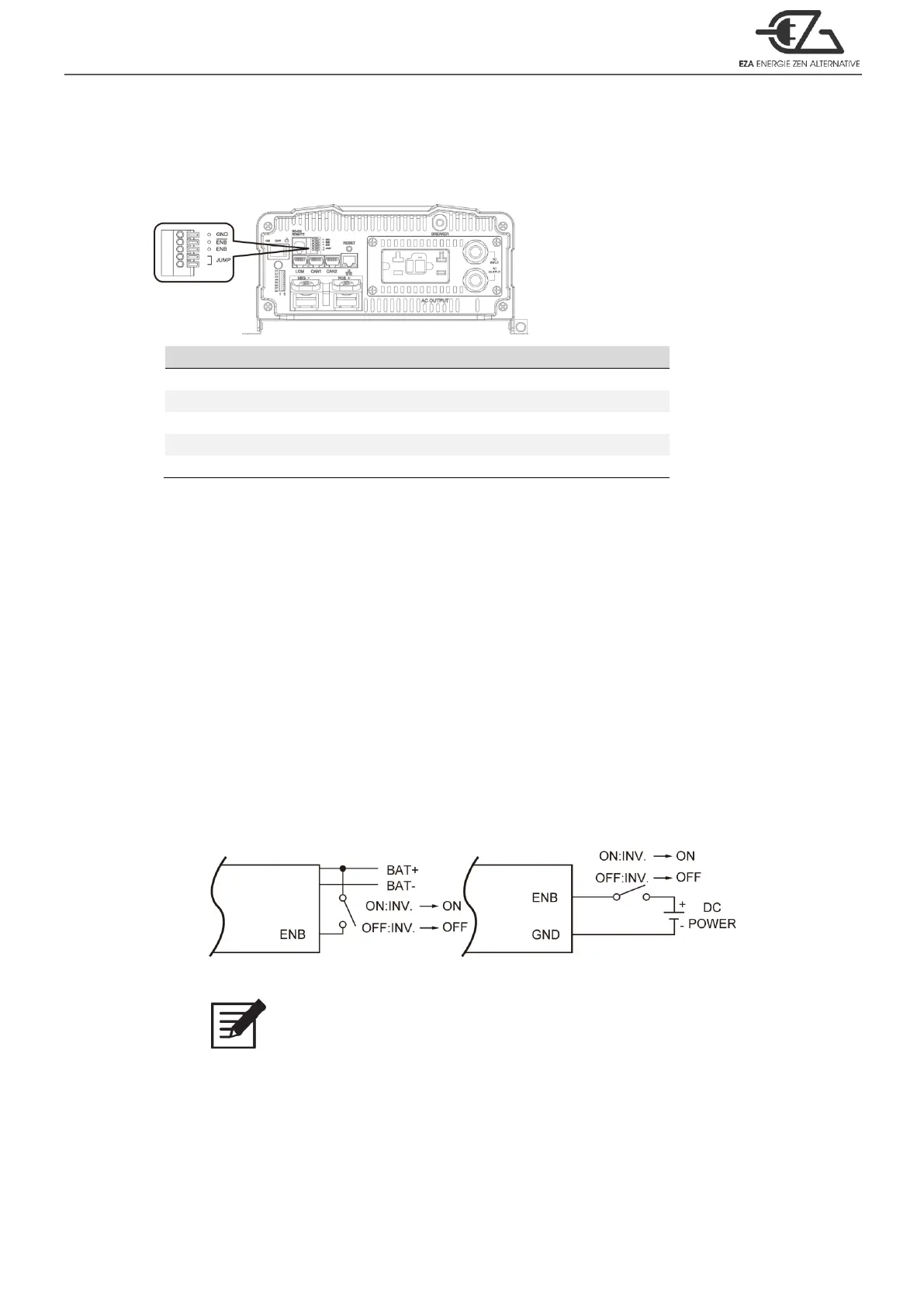
Table 12. Green terminal PIN assignment
3-14-1. Parallel Jump Function (please refer to section 5 for further detailed info.)
1. Before installing the inverter, you need to ensure the main switch is in the
OFF position.
2. Use 20 ~ 24 #AWG wire to connect the parallel jump terminal.
3-14-2. Remote Control Function
1. Before installing the inverter, please ensure that the main switch is in the
OFF position.
2. Before using the remote control terminal, please ensure the main switch is
in the REMOTE position.
3. Use 20 ~ 24 #AWG wire to connect the remote control terminal.
4. Remote control ON/OFF inverter setup status.
Figure 12. Remote control function setting
Note
The above 4 methods can be used to turn ON/OFF.
3-15. RS-232 Port
RS-232 Port:Serial port monitoring and control through computer’s interface.



 To Next Page