ATR833A / P/N 833A-(xxx)-(1xx)
Operation and Installation
19 Dokument-Nr.: 01.1411.010.71e / Revision: 3.00
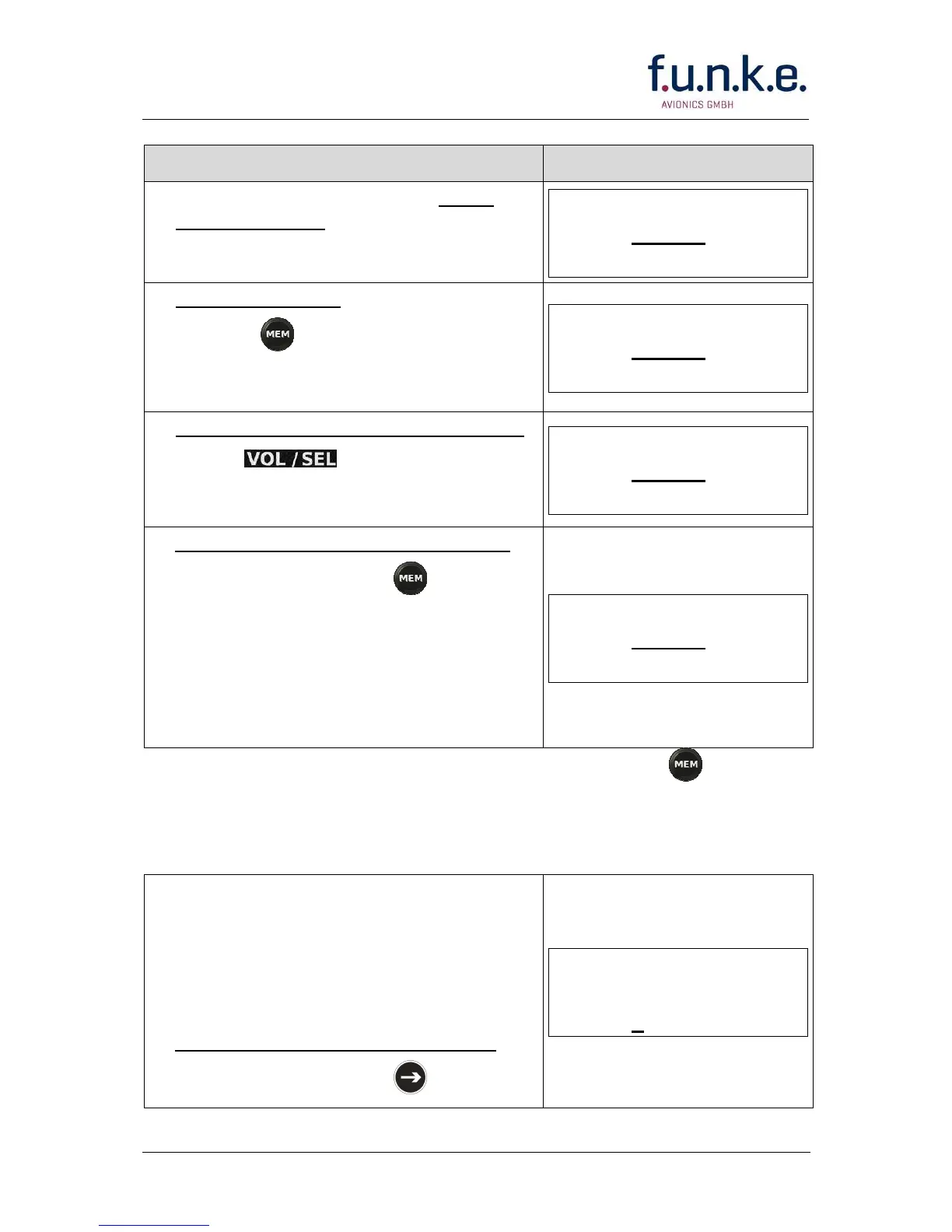
Step • Display (Example)
1. Have frequency to be stored set as
active frequency
ACT
2. Enter memory list:
• Press once in order to access
the user memory. (This overwrites the
former standby frequency.)
ACT
3. Select the memory position to be used
• with
ACT
4. Overwrite the selected memory entry
• with a long press of .
• The success is indicated by copying
the active frequency into the memory
entry (same as standby frequency).
• A previously defined name is
automatically cleared.
ACT
You can now leave the user memory access by pressing twice or by
waiting for the timeout.
Alternatively, you can add a name of up to 8 characters to the
selected memory entry:
While having the memory entry
selected, i.e. coming from step 4 above
when adding the name to the new
stored frequency, or else coming from
step 3 above when adding the name to
an existing memory entry:
5. Place the cursor into the name field
• with a long press of
ACT



 To Next Page