EasyManua.ls Logo

F.u.n.k.e. ATR833A-OLED - 2 Operation; Controls

F.u.n.k.e. ATR833A-OLED
52 pages
Print Icon
To Next Page IconTo Next Page
To Previous Page IconTo Previous Page
Loading...
ATR833A / P/N 833A-(xxx)-(1xx)
Operation and Installation
7 Dokument-Nr.: 01.1411.010.71e / Revision: 3.00
2 OPERATION
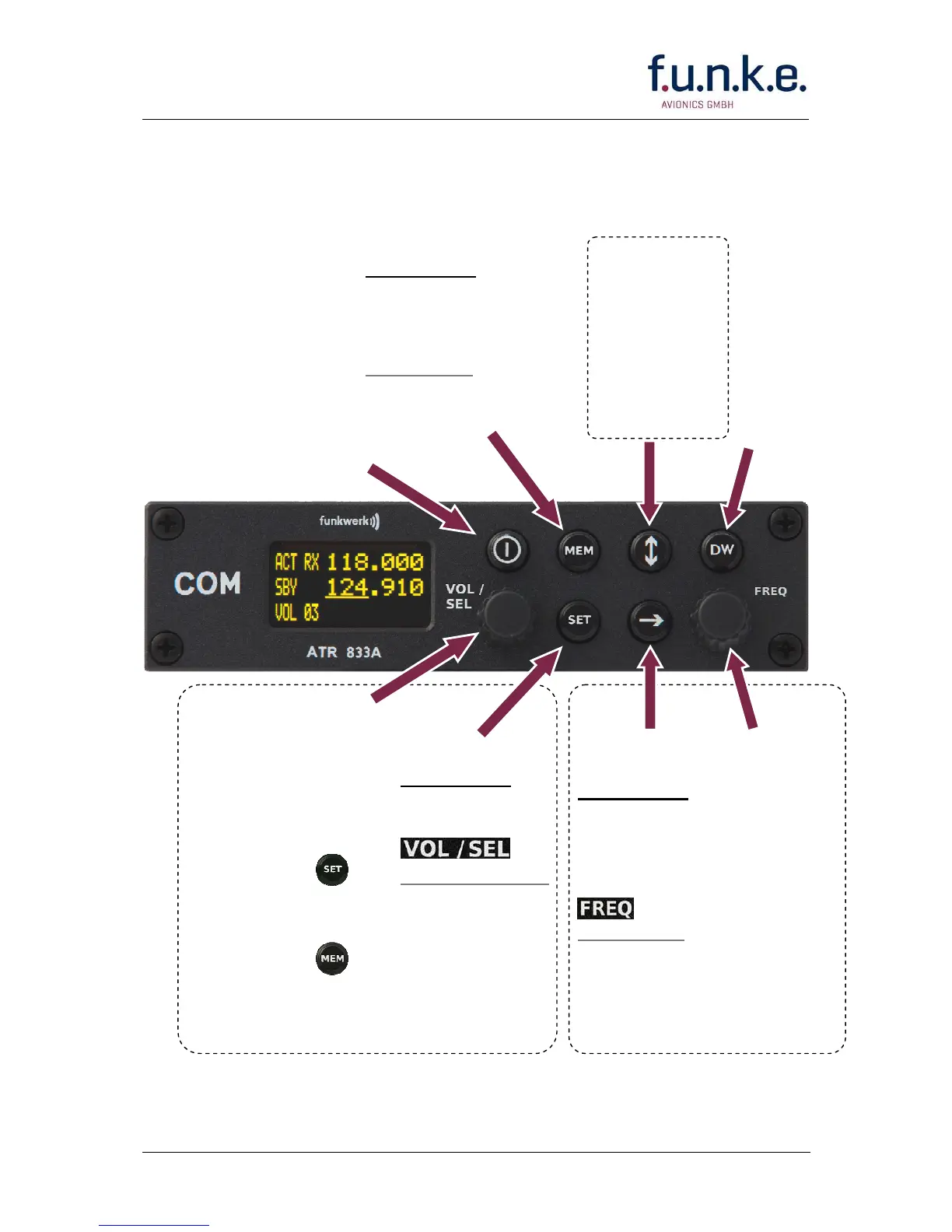
2.1 Controls
CHANGE
Interchange
active and
standby
frequency
DW
Activate /
Deactivate
dual watch
reception of
standby
frequency
SET
Short press:
Choose item to
be adjusted with
Very long press:
Access
configuration
menu
FREQ
Rotary
knob
Change
underlined
value
ON/OFF
VOL/S
EL
Rotary knob
Adjust value or
select item given
within the display’s
lower left corner:
Choosen with :
adjust VOLume,
squelch, etc.
Choosen with :
SELect item from list
of frequencies
CURSOR
Short press:
Set underline
to select which
value to be
changed with
Long press:
In MEM only:
add name to
memory item
MEM
Short press:
Access user frequency
memory / list of last
used frequencies
Long press:
In MEM only: store
frequency/name
Use together to adjust
volume, squelch or other setting
Use together to change
standby frequency

Table of Contents

Related product manuals