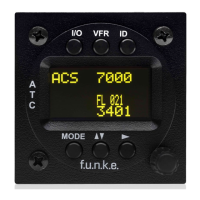
TRT800H / P/N 800ATC-H-(2xx)-(2xx)
Operation and Installation
Document-No: 03.2124.010.71e / Revision: 2.10
Switch ON press button for approx. 0,5 s
Switch OFFpress button for approx. 3 s
activate/deactivate VFR Squawk
(press shortly)
store active Squawk as VFR/VFRW-Squawk
(press button 3 s, →2.8)
change between active and standby-Squawk
works as cursor back button (opposite function
of the cursor button) during entering values and
also for navigating backwards through the
configuration menu (→4.5.4)
„Squawk Ident“, sends Ident marking (SPI) for
18 s (→ 2.9)
Enter Flight-ID (FID) setup (in standby mode,
press button for approx. 5s)
Select transponder operational mode (→ 2.6)
Adjust/Enter values at current cursor position,
select options; set standby Squawk (→ 2.7)


 To Next Page