TRT800H / P/N 800ATC-H-(2xx)-(2xx)
Operation and Installation
Document-No: 03.2124.010.71e / Revision: 2.10
If no 24-bit address (AA) was defined or entered as “000000“ the
transponder operates as a Mode A/C transponder, in that case the
following Modes are possible apart from Standby:
A C – „Mode A+C“
Transponder replies only on Mode A and Mode-C interrogations.
A – – „Mode A“
Transponder replies only on Mode A interrogations.
In STBY (Standby) mode, all transponder transmissions
are disabled completely! Therefore, the transponder is not
visible in this mode to air traffic control or the anti-collision
systems onboard other aircrafts.
Never use the STBY mode in flight unless you are requested
to do so by air traffic control. Always remember to put the
transponder in active mode prior to take off!
2.7 Squawk-Setting
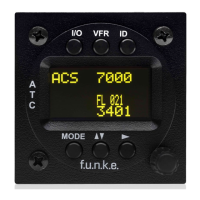
The active Squawk is displayed in the upper line, while the standby
Squawk is presented at the lower line.
Setting the Standby Squawk:
Press ► to set the cursor („^“), turn rotary knob to set numbers
of the standby Squawk.
Press ▼▲ to activate the Standby Squawk (this moves the
current active Squawk into Standby)
2.8 VFR – Squawk
The transponder features a user-defined squawk code for VFR-flight
(factory setting: 7000):
Activate VFR-Squawk:
Press VFR („VFR“ is indicated), now the active Squawk is
moved into Standby but not visible because the indication of the
Standby Squawk is overlapped by „VFR“


 To Next Page