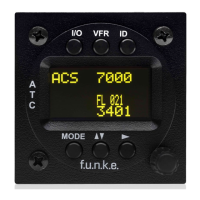
2.5.2 Configure Flight-ID
Press MODE (repeatedly) until „STBY“ appears
Press and hold ID while a counter is shown beside the active squawk.
Release ID when “CHANGE FID” is displayed
Enter Flight-Id with cursor button ► and rotary knob
Press MODE to save and return to STBY
Please refer to section 4.5.4 for configuration of the 24-bit Address (AA)
and Aircraft Category (AC).
2.6 Transponder Mode selection
Press MODE (repeatedly) to select from following Modes:
STBY „Standby“
Transponder does not respond to any interrogation. Squitter and
ADS-B output is not active.
A C S „Mode A+C+S“
Standard condition; transponder responds to mode A, C and S
interrogations.
A – S „Mode A+S, no C“
Altitude is not transmitted (neither on C nor on S requests). All
other Mode-S data as well as Mode-A replies are transmitted.
Enter FID left-aligned, without any blanks or dashes (!), e.g.
12345621DEFAV for the marking D-EFAV. The last
remaining digits shall be filled with blanks


 To Next Page