The VIPRION Platform
Platform Guide: VIPRION
®
1 - 3
About blades
A blade is the primary component that handles the traffic management
within the VIPRION platform. You can install up to four blades in a
VIPRION chassis. These blades comprise a group, called a cluster. The
chassis includes blanks in the slots where blades are not installed. Blanks
must be installed in all unused slots, as they help ensure proper airflow
within the chassis and EMC compliance of the unit.
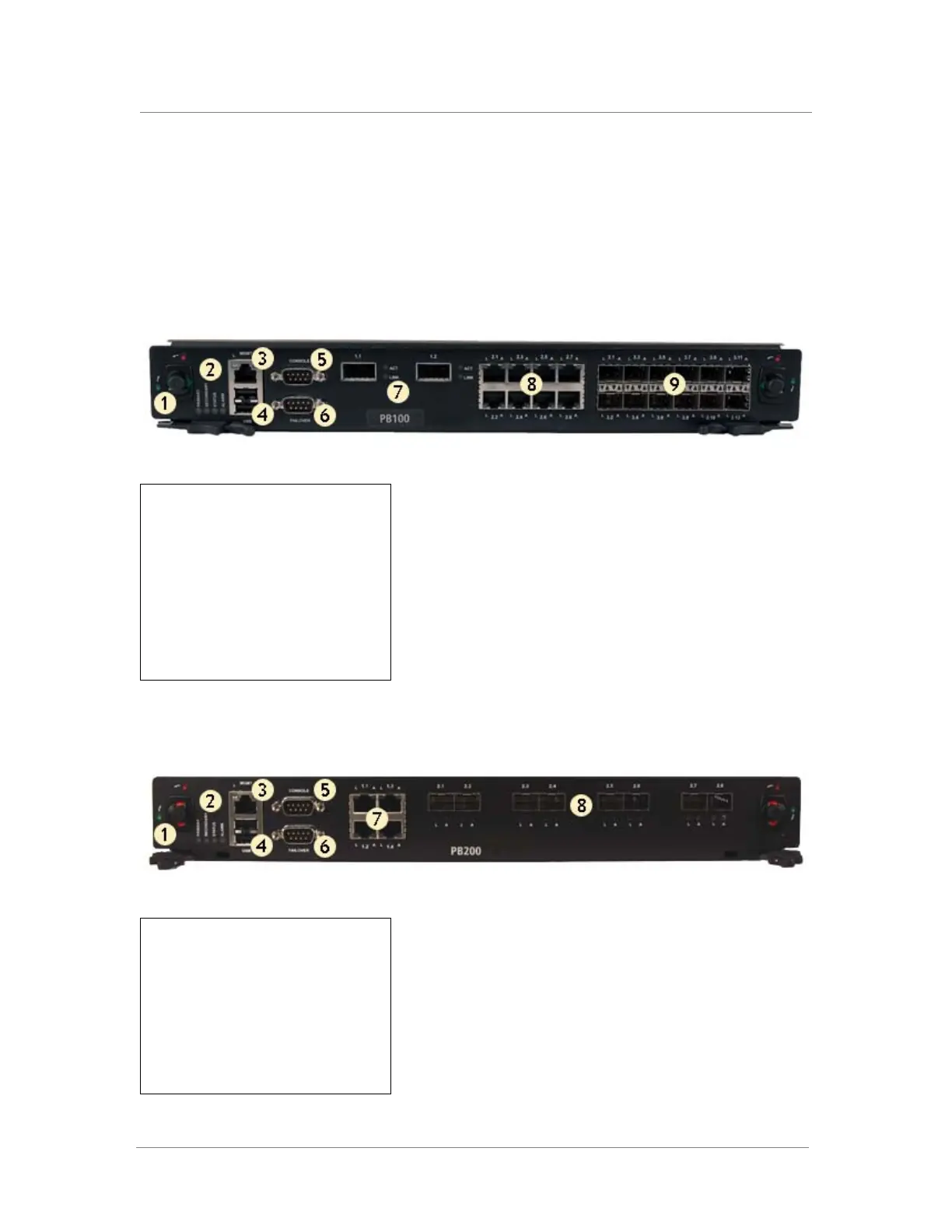
1. Compression screw
2. Indicator LEDs
3. Management port
4. USB ports
5. Console port
6. Hard-wired failover port
7. XFP ports
8. 10/100/1000 interfaces
9. SFP ports
Figure 1.2 Front view of the PB100 blade
1. Compression screw
2. Indicator LEDs
3. Management port
4. USB ports
5. Console port
6. Hard-wired failover port
7. 10/100/1000 interfaces
8. SFP+ ports
Figure 1.3 Front view of the PB200 blade



 To Next Page