BEISSBARTH MT 740/ 745, 741/ 746
9-2
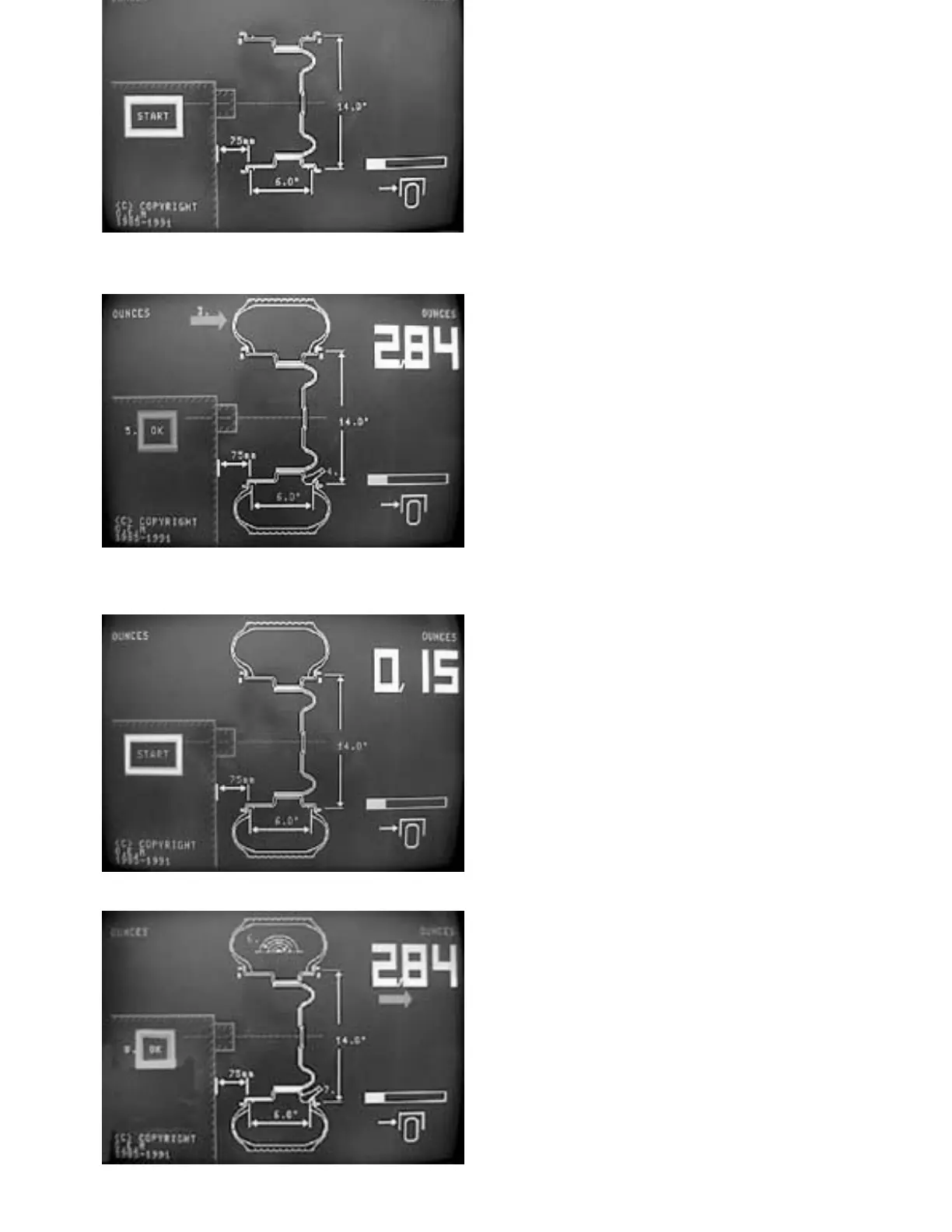
The next step "START" appears on the screen.
- Close safety hood and start the machine at
start key (15).
After the rim has been braked, the static
imbalance value for the rim appears in yellow
figures in the top right-hand section of the
screen.
The following steps are also prompted:
a flashing red arrow with the allocation
number 3 for fitting the tyre to the rim, the
flashing valve with the allocation number 4
for turning the wheel vertically beneath the
wheel-balancing shaft, and the flashing "OK"
with the allocation number 5 for pressing the
OK key.
3.Mount tyre on rim and re-attach to wheel-
balancing flange.
4.Screw in the wheel with the valve vertically
beneath the wheel-balancing shaft (six
o'clock position).
5.Press OK key (13).
The next step "START" appears on the screen
and flashes.
- Close the safety hood and start the machine.
After the rim has been braked, the static
imbalance value of the rim appears in yellow
figures in the top right-hand section of the
screen.
The red arrow to signal turning of the wheel
appears below it.
The following steps are also indicated:
a flashing symbol with the allocation number
6 for turning the tyre on the rim, a flashing
valve with the allocation number 7 for turning
the wheel with the valve vertically beneath
the wheel-balancing shaft, and the flashing
"OK" with the allocation number 8 for
pressing the OK key.



 To Next Page