$
1 2a
2b
2c
English
21 EN
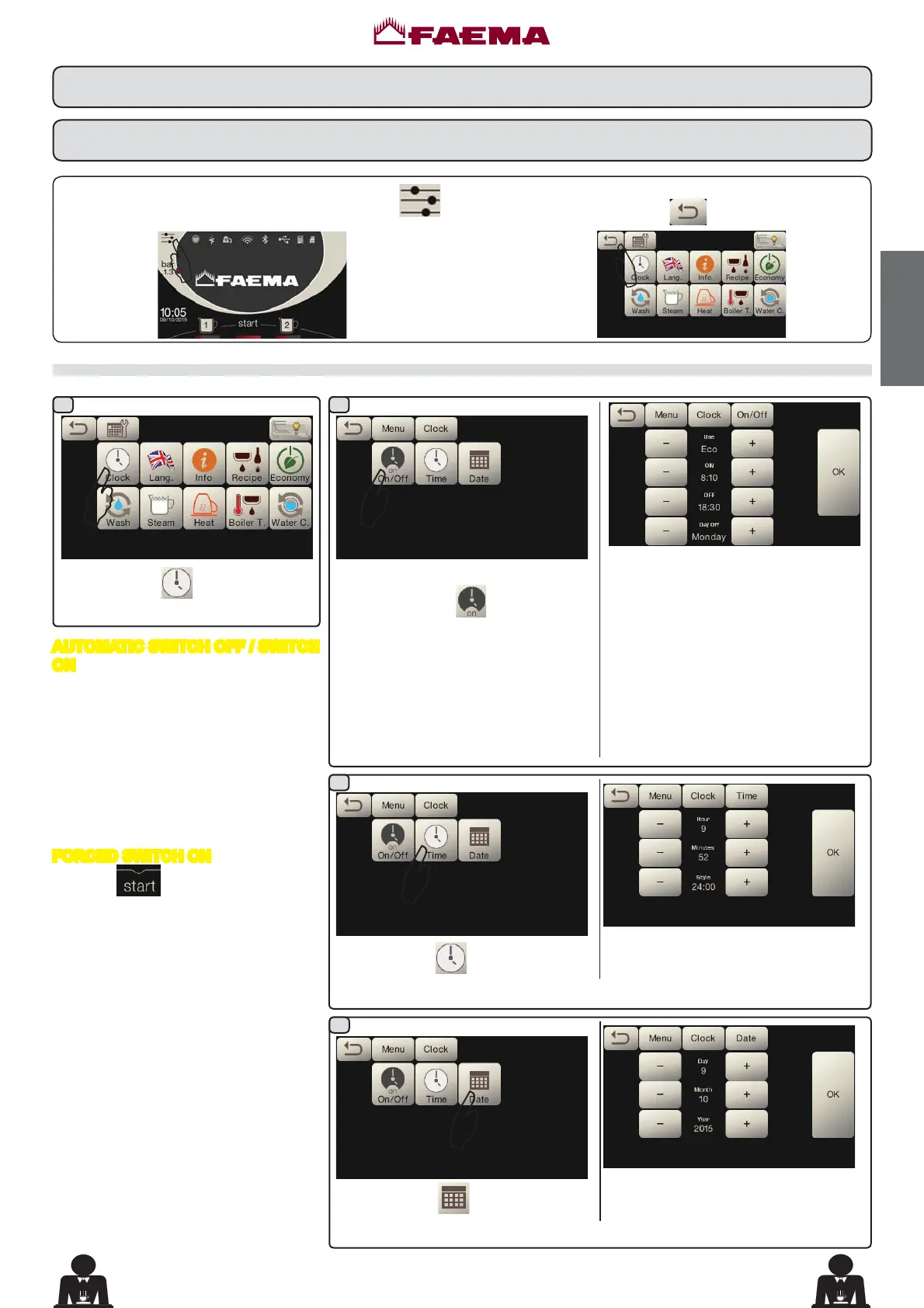
Access the programming menu by pressing the icon .
Service time menu
Access the service hours menu by
pressing the icon
.
7KHVHSDUDPHWHUVFDQEHFRQ¿JXUHG
USE - timed switch-on/switch-off:
YES, NO, Eco (during the switch-off
phase, the machine resistance is not
completely disabled and allows the
ERLOHUSUHVVXUHWRUHPDLQDWEDU
ONVZLWFKRQWLPH
OFFVZLWFKRIIWLPH
CLOSED - (day of closure).
Press the icon
to set the time.
7KHVHSDUDPHWHUVFDQEHFRQ¿JXUHG
HOUR, MINUTES, STYLERU
AM/PM).
Press the icon
to set the date.
7KHVHSDUDPHWHUVFDQEHFRQ¿JXUHG
DAY, MONTH, YEAR.
Return to the previous menu or exit the programming
menu by pressing the icon
.
$
Press the icon .
$
$
$
$
AUTOMATIC SWITCH OFF / SWITCH
ON
The machine can be set to switch off and
switch on at programmed times.
Note. When the machine is working in
the automatic on/off function do not
use the general switch (1) to switch
off the machine. If this happens, the
machine will not be able to switch on
again automatically.
FORCED SWITCH ON
Press the
key to force the machine
on again.
Note. Forcing the machine on does
not change the programmed
on/off times.
Note. At this point the machine will
remain on until the next switch
off time is reached.
To immediately return the machine to
“off” as originally programmed, switch it
off and on again using the general on-off
switch (1).
'DWDÀRZFKDUW
CUSTOMER PROGRAMMING



 To Next Page