34
Terminal while connected to a remote workstation via SSH.
A sample script using the bootFrozen command is shown below:
DFXPSWD=”password” /Library/Application\ Support/Faronics/Deep\ Freeze/
deepfreeze -u “admin” -p bootFrozen
In this example, administrator is the name of a valid Deep Freeze Mac user and password is that
user’s password. e sample script can be modified to run any task listed in the Task table.
DeepFreezeLegacyCommands
In the current version of Deep Freeze Mac, the CLI has been changed to provide new commands and
arguments. Tasks from previous versions of Deep Freeze Mac appear under the Deep Freeze Legacy
folder in ARD.
e commands in the Deep Freeze Legacy folder have been retained for backward compatibility.
However, these commands will be removed entirely in a future version.
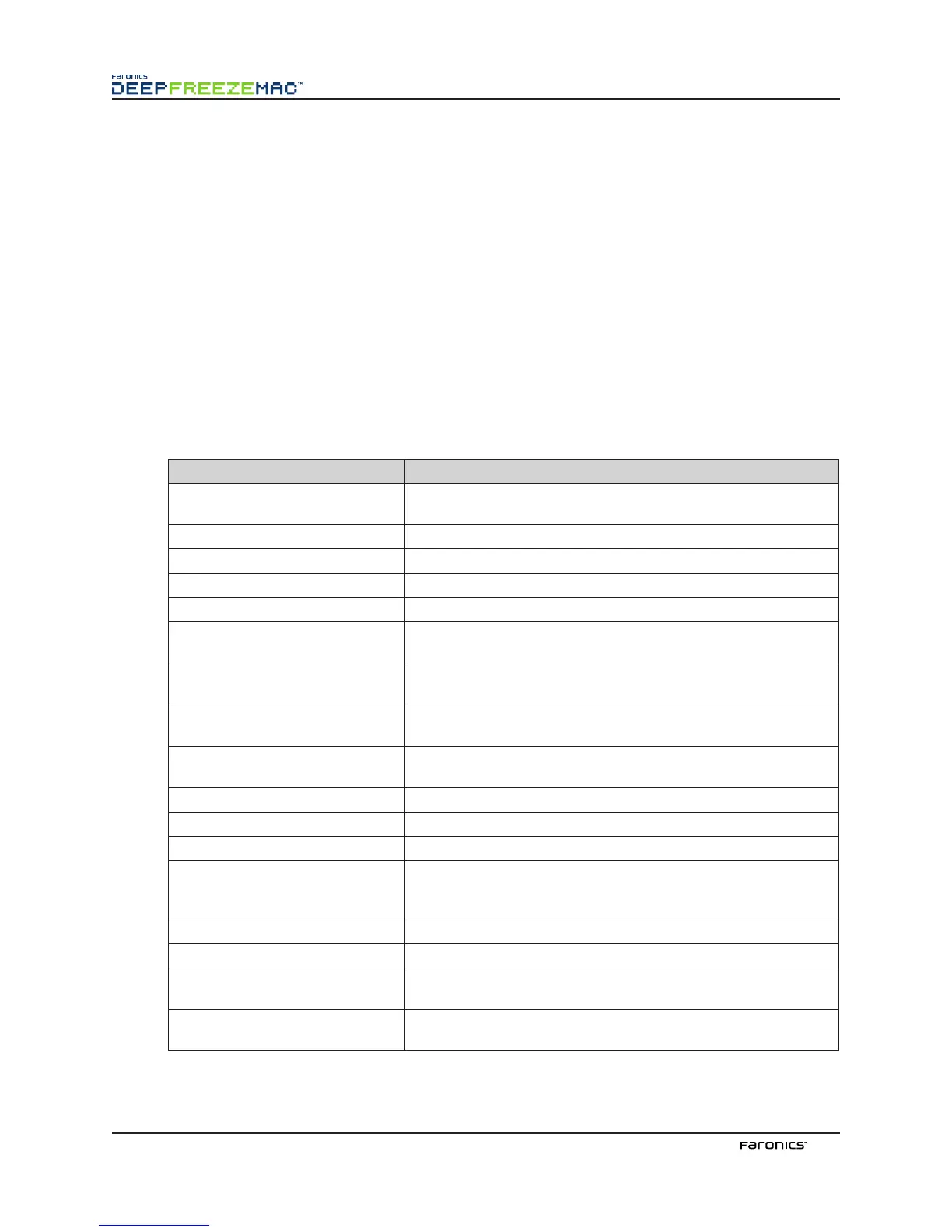
e following commands are deprecated in the current release:
Task(Command) Function
activateSchedule
Activates the scheduled updates on target computer(s); name of
the schedule must be included in the command as a parameter
addUser
Adds user to list
badgeFrozenPartitions
Badges Frozen partitions with Deep Freeze icon
bootFrozen
Sets target computer(s) to restart in a Frozen state
bootThawed
Sets target computer(s) to restart in a awed state
bootThawedFor 5
Sets target computer(s) to restart in a awed state for the next 5
restarts; this number can be customized in the Task Edit window
checkForUpdates
Checks whether the present version of Deep Freeze on the target
computer(s) is the most current
createThawSpace
Creates virtual partition on a Frozen volume where data can be
saved persistently across restarts*
deactivateSchedule
Deactivates the scheduled updates on target computer(s); name of
the schedule must be included in the command as a parameter
deleteUser
Deletes user from list
dontBadgeFrozenPartitions
Hides Deep Freeze icon on Frozen partitions (if configured)
dontRebootInsteadOfLogoff
Restarts target computer(s)
dontTagUserThawSpaces
Prevents user icons from appearing as tags on User awSpaces
(if configured); this option must be used before the awSpace is
created; user icon tags can not be removed aer creation
editUser
Allows administrators to edit the name and password of a user
freezePartition
Designates a partition on target computer(s) to be Frozen
hideFrozenIcon
Configures target computer(s) to hide the Deep Freeze Frozen
icon in the menu bar
hideThawedIcon
Configures target computer(s) to hide the Deep Freeze awed
icon in the menu bar



 To Next Page