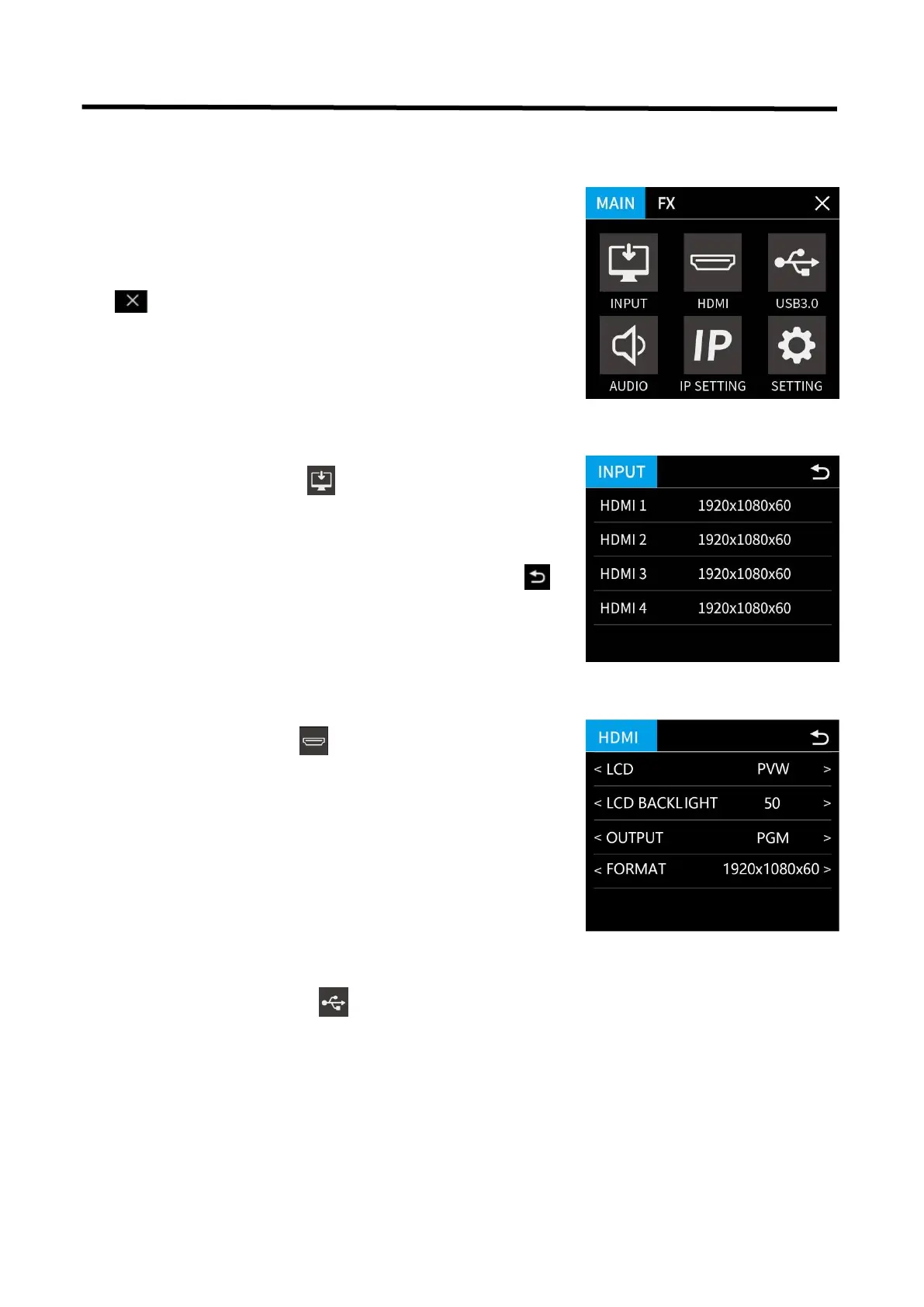
3.2 Main Menu
3.2.1 Input
3.2.2 HDMI
3.2.3 USB3.0
Gently touch【HDMI】icon to enter the sub menu
Select the output and format by touching screen or turning
the knob.
LCD: PVW/PGM
LCD BACKLIGHT: 0~100
OUTPUT: PVW/PGM
FORMAT: 1920×1080@60 (max)
After L2 PLUS is powered on, press【MENU】 button
to enter the main menu which includes: Input,
HDMI, USB 3.0, Audio, IP Setting and setting.
Tap exit main menu
Gently touch【INPUT】icon to enter the sub menu
The input menu displays the information of the input signal
source.
If there is no input source, it displays: NO INPUT. Tap
return to main menu
Gently touch【USB 3.0】icon to enter the sub menu
Select the output and format by touching screen or turning
the knob.
OUTPUT: PVW/PGM
FORMAT: 1920×1080@60 (max)


 To Next Page