Page. 10
4.䎃 Preparing for Operation
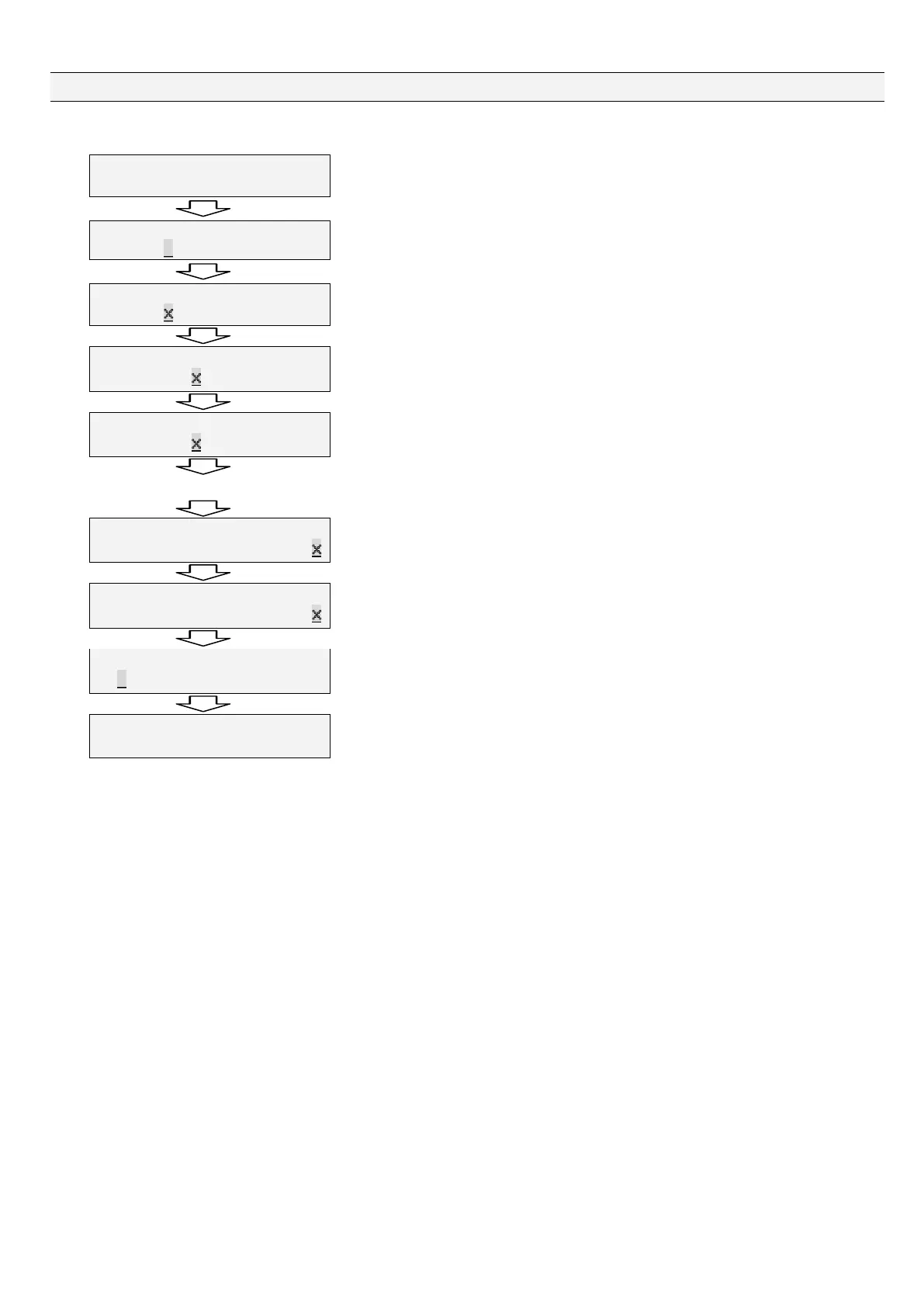
Set the clock right.
9CTPKPI㨉=%?㨉㨉㨉AAAA㨉㨉㨉㨉
46%A.QUVAXQNVCIG㨉㨉㨉AAAA㨉
A warning is displayed to indicate "Set the clock."
Press "Enter."
%NQEM㨉#㨎㨔WUVOGPV㨉㨉AAAA㨉㨉
'06AZZZZZZAAZZZZZZ
In this state, you can set the clock.
%NQEM㨉#㨎㨔WUVOGPV㨉AAAA㨉㨉㨉
'06AZZZZZZAAZZZZZZ
Press "Enter" to set a year. The cursor blinks at a digit you can enter a value.
Press "Ÿ" to select a value. Press "Enter" after selecting a value.
%NQEM㨉#㨎㨔WUVOGPV㨉㨉AAAA㨉㨉
'06AZZZZZZAAZZZZZZ
Press "Ÿ." The cursor moves to a month entry digit.
%NQEM㨉#㨎㨔WUVOGPV㨉AAAA㨉㨉㨉
'06AZZZZZZAAZZZZZZ
Press "Enter" to set a month. The cursor blinks at a digit you can enter a value.
Press "Ÿ" to select a value. Press "Enter" after selecting a value.
Repeat the above to set hours, minutes, and seconds.
%NQEM㨉#㨎㨔WUVOGPV㨉AAAA㨉㨉㨉
'06AZZZZZZAAZZZZZZ
Set seconds after setting minutes.
Press "Ÿ." The cursor moves to a second entry digit.
%NQEM㨉#㨎㨔WUVOGPV㨉㨉㨉AAAA㨉
'06AZZZZZZAAZZZZZZ
Press "Enter" to set seconds. The cursor blinks at a digit you can enter a value.
Press "Ÿ" to select a value. Press "Enter" after selecting a value.
%NQEM㨉#㨎㨔WUVOGPV㨉㨉㨉AAAAA
'06ZZZZZZAAZZZZZZ
Press "Ÿ." The cursor moves to the "ENT" position.
Press "Enter."
5VCPFD[㨉㨉㨉㨉AAAAAAAAAAAAA
AZZZZZZAAZZZZZZ
"Standby" and the current time are displayed on the screen.
Check and make sure the "seconds" value of the clock is changing.
With this, the preparation for operation (initial setting) is completed.


 To Next Page