Page. 17
6.䎃 Setting䎃
䦟
6-3.
䎃 Various settings䎃 (Setting)
䎃
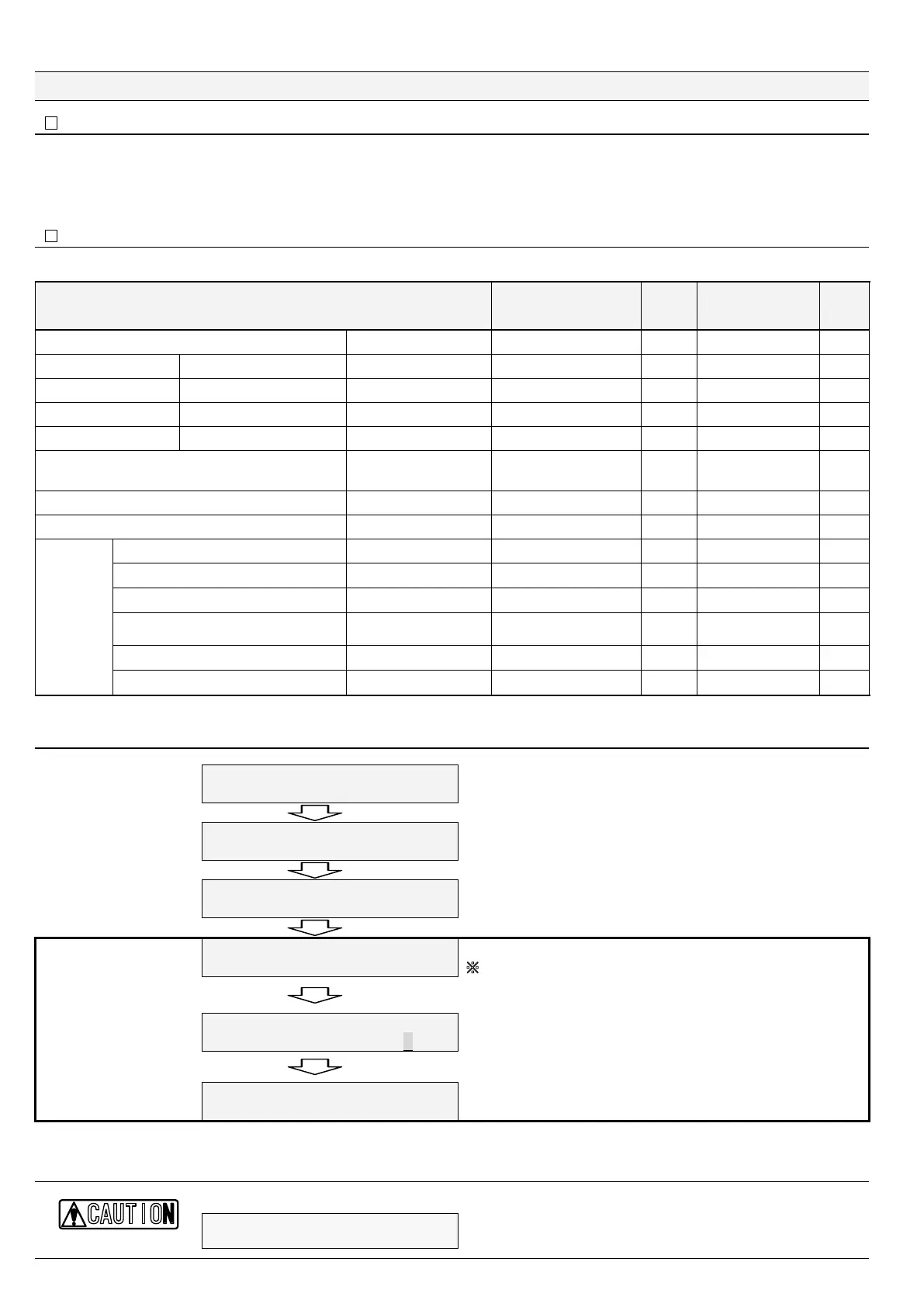
Ɣ You can change settings according to your operating conditions.
Ɣ Keep on pressing "Esc" for 2 seconds or longer in the standby state to change settings.
Ɣ You cannot change settings in the Operation mode.
䦟 6-3-1.
Setting data and ranges
Setting data
Setting items Variable range Step
Value set at
factory
shipment
Units
Warming-up time
Warming up 30䎃 to 300 1 30 sec.
Oil alarming point 1
(alarm signal 1/AL1 lamp)
Oil Alarm 1 5䎃 to 15 1 15 ppm
Oil alarming delay 1
(alarm signal 1/AL1 lamp)
Alarm 1 Delay 0䎃 to 5 1 0 sec.
Oil alarming point 2
(alarm signal 2/AL2 lamp)
Oil Alarm 2 5䎃 to 15 1 15 ppm
Oil alarming delay 2䎃
alarm signal 2/AL2 lamp)
Alarm 2 Delay 0䎃 to 600 10 0 sec.
Alarm suppression
(during warm-up, washing operation, and setting)
Alarm Suppress
Alarm output : OFF /
Alarm suppression: ON
---
ON
(Alarm suppression)
---
Washing timer (automatic washing time)
Auto Washing Time 30䎃 to 600 1 60 sec.
Washing timer (manual washing time)
Man. Washing Time 10䎃 to 600 1 50 sec.
During standby
Stand by Current 0䎃 to 4 1 0 mA
During washing
Washing Current 0䎃 to 4 or 20 to 24 1 4 mA
Exceeding the oil alarming point
Over Oil Alarm Density or 20 to 24 1
Densit
mA
Exceeding the oil concentration of 30
ppm (measuring limit)
Over range Current 20䎃 to 24 1 20 mA
During setting
Maint. Current 0 or 20 to 24 1 0 mA
RECout
With equipment fault
Defect Current 0 or 20 to 24 1 0 mA
䎃
Setting method
Standby䎃
5VCPFD[
ZZZZZZAAZZZZZZ
Keep on pressing "Esc" for two seconds or longer in the standby state.
Clock adjustment menu
/CKPA/GPWAAAAAAAAAAAAAAAA
%NQEM㨉#㨎㨔WUVOGPVAAAAAA㨉㨉A
A clock adjustment item is displayed. Press "Ÿ."
䯴Return to standby press "Esc"䯵
Setting menu
/CKPA/GPWAAAAAAAAAAAAAAAA
5GVVKPIAAAAAAAAAAA㨉AAAAAA
A setting menu item is displayed. Press "Enter."
䯴Return to standby press "Esc"䯵
Warm-up time setting
screen
5GVVKP㨑㨉㨉㨉㨉AAAAAAAAAAAAAA
9CTOKPIAWRAAAAAAAAAZZZUGE
Press "Enter."
䚚䎃
This example sets a warm-up time.
䎃
The cursor blinks at a digit you can enter a value.
Changing a set value
5GVVKP㨑㨉㨉㨉㨉AAAAAAAAAAAAAA
9CTOKPIAWRAAAAAAAAAZZZUGE
The cursor blinks at a value entry digit ("xx" in the example).
Select a value by using "ź" or "Ÿ" and press "Enter." The value is
set and changing ends.
䎃
Returning to the setting
item screen
5GVVKP㨑㨉㨉㨉㨉AAAAAAAAAAAAAA
1KN#NCTOAAAAAAAZZRRO
Press "Ÿ." The next setting item is displayed on screen.䎃
Ɣ The above setting method in a black box is also applicable to the other setting items. (see the next page for the other setting items.)
Ɣ Press "Esc" to stop the setting operation halfway. The setting item screen is displayed back.
The new setting becomes valid after it is saved. Select the screen below and press "Enter" to save it.
%#76+10
5GVVKP㨑㨉㨉㨉㨉AAAAAAAAAAAAAA
5CXGARCTCORTGUUA'PVGT
…(see "Caution" on the next page.)


 To Next Page