Page. 15
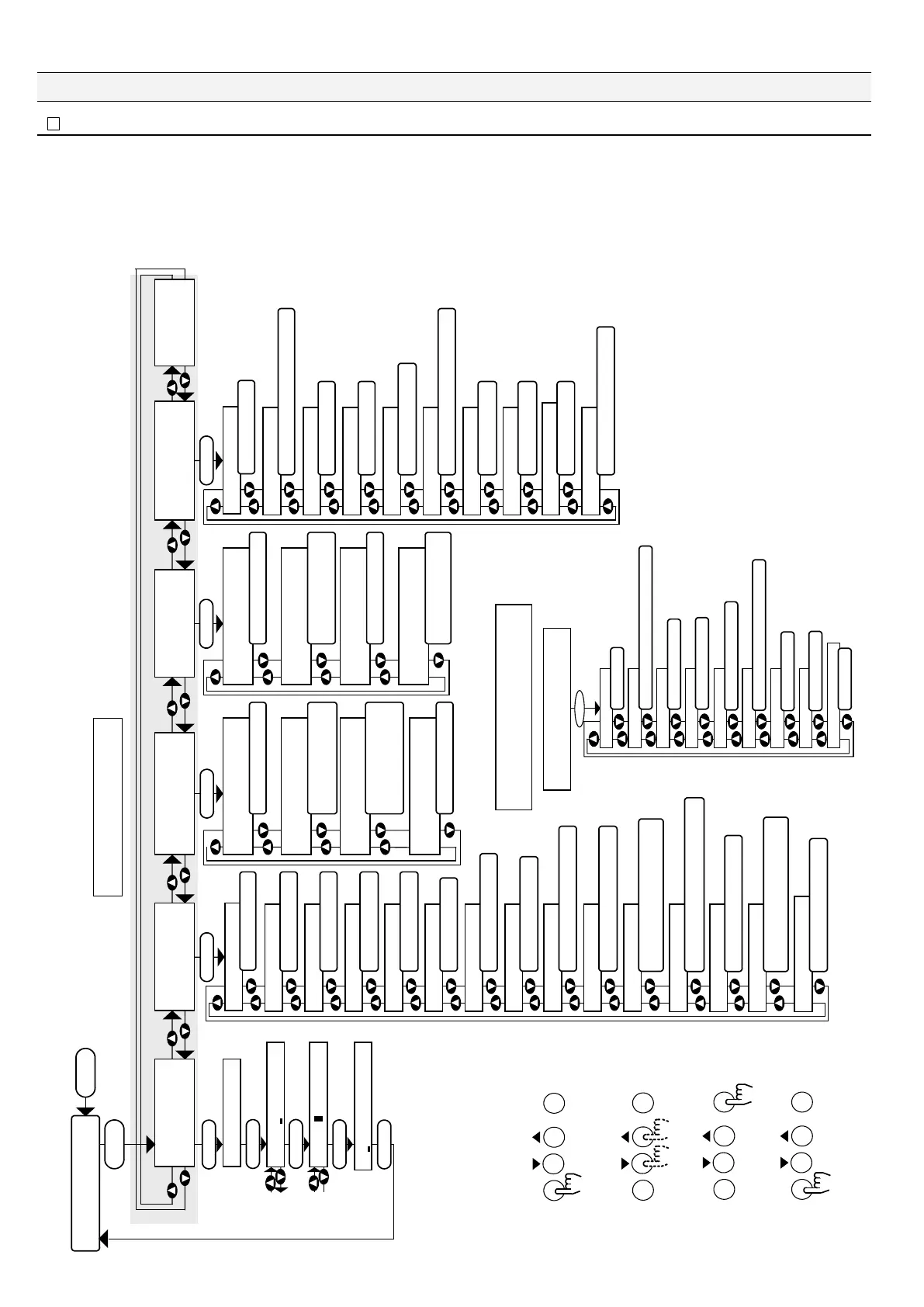
6.䎃 Setting
䦟 6-1. Tabulated list of menu items䎃
Esc Enter
Esc Enter
Esc Enter
1
3
4
Esc Enter
2
Main Menu
5VCPFD[
AAAAZZZZZZAAZZZZZZ
Setting
Test Mode
Clock Adjustment
20xx/xx/xx xx:xx:xx
Esc
Esc
Enter
Enter
Enter
Enter
ENT 20xx/xx/xx xx:xx:xx
ENT 20xx/xx/xx xx:xx:xx
ENT 20xx/xx/xx xx:xx:xx
Enter
Operational Log
All status
Power
Operation
Oil Alarm
Defect
System
Calibration
Test
Dump Log press Enter
䚚2
Available Memory
Enter Enter
Enter
Enter
Maintenance Mode
FOCAS-2000
Firmware X.XX
Warming Up
Oil Alarm1
Alarm1 Delay
Oil Alarm2
Alarm2 Delay
Alarm Suppress
Auto Washing Time
Man Washing Time
Stand by Current
Washing Current
Over Oil Alarm
Over Range Current
Maint Current
Defect Current
Save parm press Enter
Manual running
ExamZero ppm press Enter
MeasureWater press Enter
Current Output
Washing press Enter
Zero Adjust press Enter
Perfomance press Enter
Recover press Enter
All status
Power
Operation
Oil Alarm
System
Calibration
Test
Enter
Defect Alarm
9CTPKPI=(?
(1%#5AECTFAHQWPF
Dump Log press Enter
See Section 6-2.
䚚䎕䎑 Optional function. (Consult your agent of Fellow Kogyo.)
䚚䎔䎑 Mount the FOCAS-1800 operational log memory. The recognition screen
appears. Press "Enter" you can read the content of the memory.
Then, change the memory to the FOCAS-2000 operational log memory.
The FOCAS-2000 operational log memory is a little different in display
items from the FOCAS-1800 operational log memory. For details, see the
FOCAS-1800 instruction manual.
Firmware version
Hold pressed for 2 seconds or more
(Wrong operation prevention)
Return to standby
During standby, a clock time is
displayed as shown below.
All data
Status of the power supply source
Operational status
Oil alarming status
Equipment fault status
Calibrating date
Manual run, etc.
Respective behavioral statuses
Display of the
recognition screen
䚚䎕
Make a selection.
Return to standby.
Standby
Clock setting
Selection
of date
and time
Value
selection
Functions of the panel switches
Hold the switch pressed for two seconds
or more when performing various
settings (malfunction prevention).
Make confirmation.
Warm-up
Oil alarming point 1
Oil alarming delay 1
Oil alarming point 2
Saving the changed value
Current value with the presence
of equipment fault
Current value during setting
Current value with the oil
alarming point being exceeded
Current value during washing
Current value during standby
Manual washing time
Automatic washing time
Alarm suppression
Oil alarming delay 2
Current value at the measuring limit
Various settings Testing function
Maintenance
Manual run
Checking of zero-point
through the upper lid
Checking of zero-point
through the freshwater
line
RECout output test
Manual washing
Zero-point
compensation
Behavioral verification
Return to zero-point
compensation value
Oil alarming status
Equipment fault status
Calibrating date
Manual run, etc.
Status of the memory capacity
Behavioral statuses of valves, etc.
All data
Status of the power supply source
Operational status
Operational log display
䚚
䎔 䇭Display of FOCAS-1800’s
operational log
See Section 6-3. See Section 8-1. See Section 8-2. See Section 8-3.
Caution:
Be sure to turn off the detector before changing operational log memory cards.


 To Next Page