Page. 19
7. Operation and Maintenance
● The FOCAS-2000 oil concentration detector is a high precision instrument.
● It is recommended for you to periodically check and maintain FOCAS-2000 as shown below to assure its performance fora long time.
■ Requirements
Item Maintenance interval Remarks
Sensor cleaning (with brush)
Every 2 weeks or every 10 measurements
whichever comes first.
For cleaning method, see "8-4. Cleaning the
sensor (brush washing)."
Zero-point check Every month
For checking method, see ”8-1-2. Zero-point
check.”
".retlif eht gninaelC .5-8" ees ,dohtem gninaelc roF shtnom 3 yrevE gninaelc retliF
Desiccant (silica gel) check Every month
Replace desiccant when the indicator change in
color as below two types,
①Became pink(normally from blue to light purple)
②Becamered dot on white base(normally black
dot on white base)
For desiccant (silica gel) replacement,
see directions attached to desiccant (silica gel)
which is an optional parts
Replacement of the clock backup
battery
Every 2 years
For battery replacement, see "8-7 Replacing the
clock backup battery."
Accuracy check Every 2 years
Call your local Fellow Kogyo distributor or Sales
Division of Fellow Kogyo.
Performance check
Every 1 year or when the sensor unit is
replaced
Call your local Fellow Kogyo distributor or Sales
Division of Fellow Kogyo.
Update of precision certificate Every 5 years
Call your local Fellow Kogyo distributor or Sales
Division of Fellow Kogyo.
8. Maintenance and Checking
■ 8-1. Testing function
● The oil concentration detector has the following testing functions:
Manual operation, Zero-point check from the upper lid, Zero-point check from the fresh water line, and RECout output test (See "6-1
Tabulated list of menu items.")
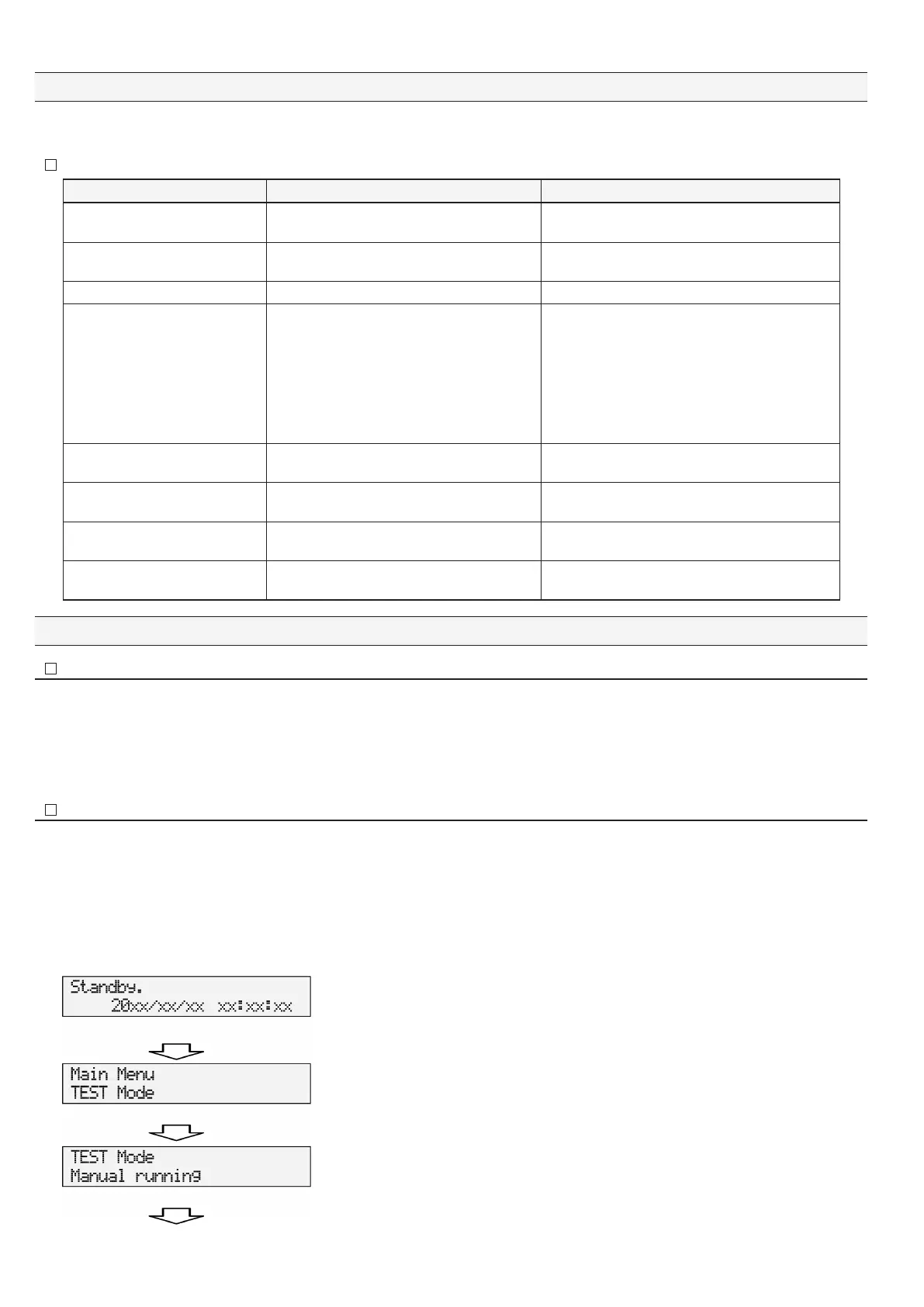
● To execute a testing function, keep on pressing "Esc" for 2 seconds or longer in the standby state. (The testing function is not enabled while
the oil concentration detector is operation.)
● Select a testing function by pressing "▼" or "▲" in the "TEST Mode."
■ 8-1-1. Manual operation (Manual running)
● Used to test-operation the disabled bilge separator or to use the sensor stain check function after manual washing.
● Confirm the standby state. ("Standby" and the current time are displayed on the screen of the oil concentration detector body.
● The manual operation is enabled independently of the ON / OFF state of the pressure switch, but it automatically ends five minutes later.
After the manual operation ends, "Main Menu" is displayed back.
● Select "Manual running" by pressing "▼" or "▲" and press "Enter."
The manual operation starts independently of the pressure of sample water.
Confirm the oil concentration detector is in the standby state. ("Standby" and the current time are
displayed on the screen of the oil concentration detector.)
Close the valves at sample water line andat fresh water line. Open the upper lid of the sensor unit,
and open the drain valve to empty the sensor inside. Close the drain valve and feed mineral
water into the detection tube (to about 80% of the detection tube) from the top of the sensor unit
(from which the upper lid is removed), and close the upper lid. Keep on pressing "Esc" for two
seconds or longer in the standby state.
Press "▲" twice. "Test Mode" is displayed under "Main Menu."
Press "Enter." A screen appears to select a testing function item.
"Manual running" is displayed to enable manual operation.
Press "Enter."
Press "Enter" to go to "manual running." (Continued to the next page.)


 To Next Page