Page. 16
6.䎃 Setting䎃
x Various settings, testing function, operational log viewing and more can be done by using the operation switch.
x䎃 The switch is ineffective during operation. Ensure the status being in standby.
x䎃 During setting, automatic operation is disabled even if the pressure switch is set at the specified pressure (0.03 MPa) or higher.
䦟 6-2. Time correction of the clock (Clock Adjustment)䎃
Ɣ On the Clock Adjustment screen, you can set the clock of the oil concentration detector with the radio time signal.
5VCPFD[
AAAZZZZZZAAZZZZZZ
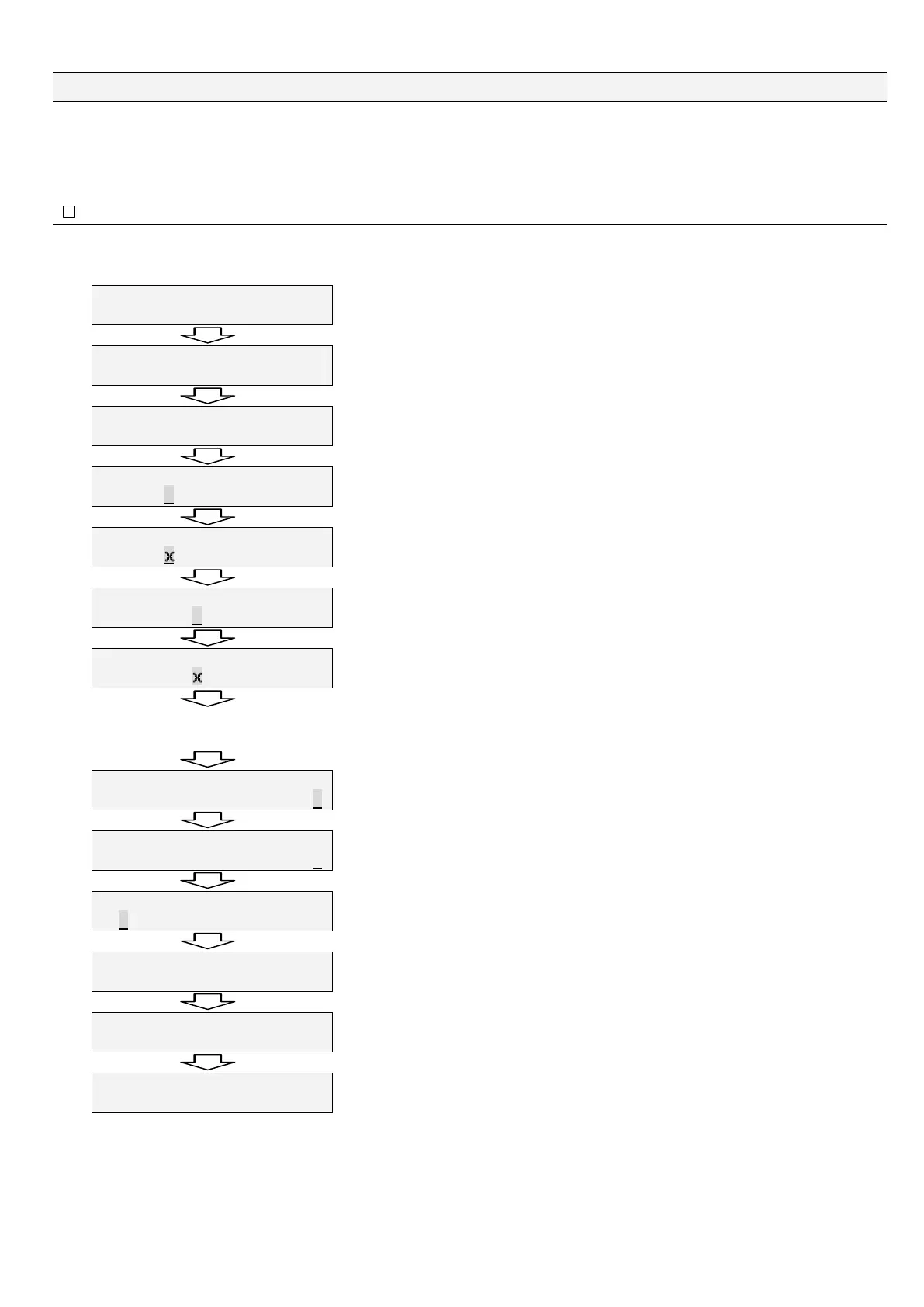
Keep on pressing "Esc" for two seconds or longer in the standby state.
/CKPA/GPWAAAAAAAAAAAAAAA
%NQEM㨉#㨎㨔WUVOGPVA㨉AAAAAA
Main menu for clock adjustment is displayed.
Press "Enter."
%NQEM㨉#㨎㨔WUVOGPV㨉㨉㨉㨉
'06AZZZZZZAAZZZZZZ
A clock setting item is displayed.
Press "Enter."
%NQEM㨉#㨎㨔WUVOGPV㨉㨉㨉㨉
'06AZZZZZZAAZZZZZZ
A clock setting starts.
Press "Enter."
%NQEM㨉#㨎㨔WUVOGPV㨉㨉㨉㨉
'06AZZZZZZAAZZZZZZ
Press "Enter" to set a year. The cursor blinks at a digit you can enter a value.
Press "Ÿ" to select a value. Press "Enter" after selecting a value.
%NQEM㨉#㨎㨔WUVOGPV㨉㨉㨉㨉
'06AZZZZZZAAZZZZZZ
Press "Ÿ." The cursor moves to a month entry digit.
%NQEM㨉#㨎㨔WUVOGPV㨉㨉㨉㨉
'06AZZZZZZAAZZZZZZ
Press "Enter" to set a month. The cursor blinks at a digit you can enter a value.
Press "Ÿ" to select a value. Press "Enter" after selecting a value.
Repeat the above to set days, hours, minutes, and seconds.
%NQEM㨉#㨎㨔WUVOGPV㨉㨉㨉㨉
'06AZZZZZZAAZZZZZZ
Set seconds after setting minutes.
Press "Ÿ." The cursor moves to a second entry digit.
%NQEM㨉#㨎㨔WUVOGPV㨉㨉㨉㨉
'06AZZZZZZAAZZZZZZ
Press "Enter" to set seconds. The cursor blinks at a digit you can enter a value.
Press "Ÿ" to select a value. Press "Enter" after selecting a value.
%NQEM㨉#㨎㨔WUVOGPV㨉㨉㨉㨉
'06ZZZZZZAAZZZZZZ
Press "Ÿ." The cursor moves to the "ENT" position.
Press "Enter." to end the setting.
%NQEM㨉#㨎㨔WUVOGPV㨉㨉㨉㨉
'06AZZZZZZAAZZZZZZ
A clock setting item is displayed.
Press "Esc.”
/CKP/GPW
%NQEM#㨎㨔WUVOGPV
Main menu for clock adjustment is displayed back.
Press "Esc"
5VCPFD[
ZZZZZZAZZZZZZ
Return to standby
With this, the clock setting is completed.


 To Next Page