FEMA ELECTRÓNICA . Series M . M60-C1
13
1.19 Conguraon menu (cont.)
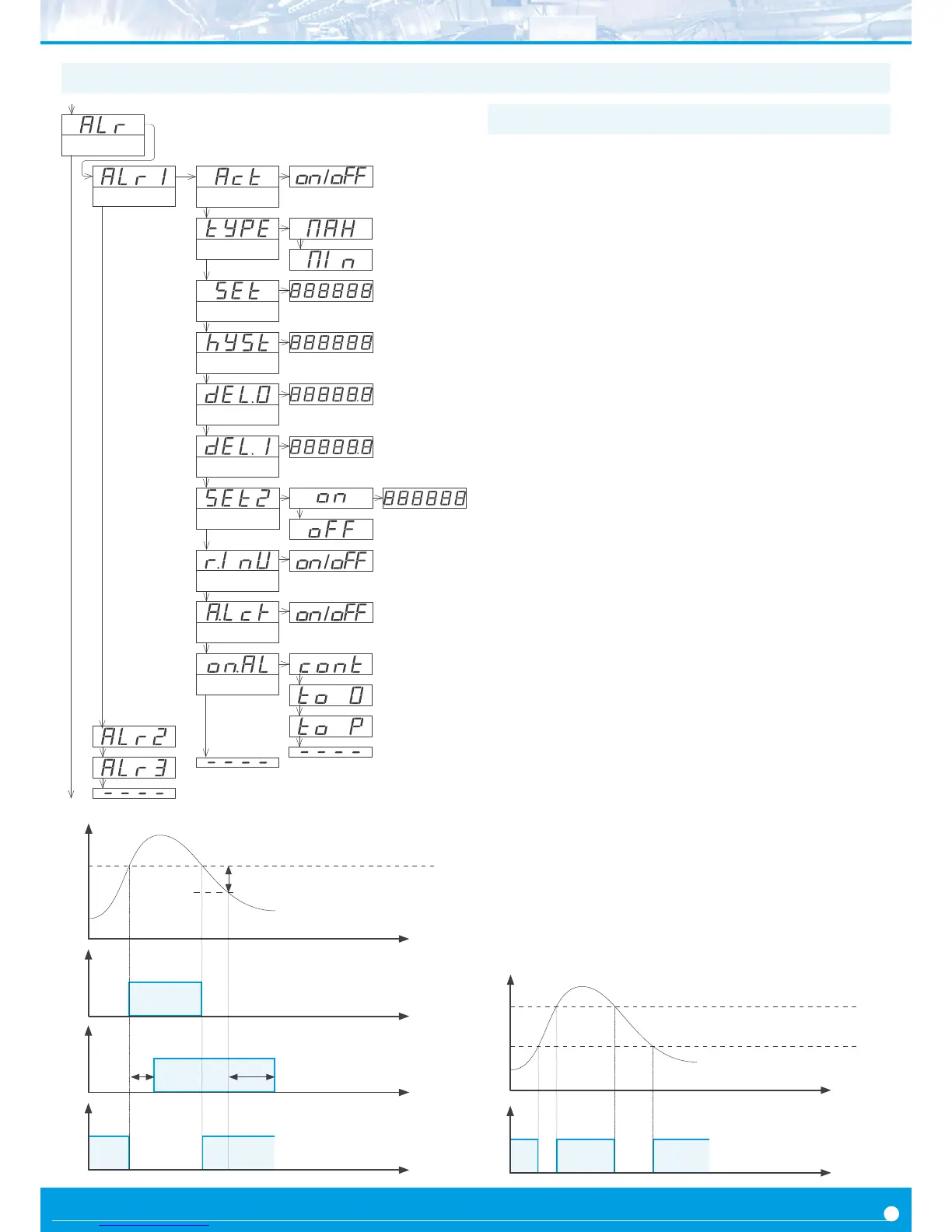
The ‘Alarms’ (‘ALr’) menu congures the independent acvaon of
up to 3 relay outputs, installed with the R1 oponal modules (see
secon 2.1). For outputs up to 4 and 6 relays, see special modules R2,
R4 and R6 at secon 2.6. The alarm states are indicated in the front
display with leds marked as ‘1’, ‘2’ and ‘3’.
To congure an alarm, enter into the alarm menu (‘ALr1’, ‘ALr2’ or
‘ALr3’) and congure the following parameters :
• select ‘Acve’ (‘Act’) to ‘on’
• at ‘Alarm type’ (‘TypE’) select the alarm to act as a maximum type
alarm (‘MAX’) or a minimum type alarm (‘MIn’). The maximum type
alarm (or minimum type alarm) acvates when the display value is
higher (or lower) than the setpoint value.
• at ‘Setpoint’ (‘SEt’) enter the value for the alarm acvaon point.
This parameter is eligible for conguraon through the ‘Fast access’
menu (see secon 1.19.12).
• congure the hysteresis value at ‘Hysteresis’ (‘hySt’). The hyster-
esis applies to the deacvaon process of the alarm. The alarm de-
acvates when the reading has passed the setpoint value plus the
hysteresis value. Hysteresis helps to avoid repeve switching of the
alarm relays, due to uctuang input signals around the setpoint.
• at ‘Acvaon delay’ (‘dEL.0’) congure the delay to apply before
alarm acvaon. The acvaon delay starts counng when the set-
point value is passed. Value from 0.0 to 99.9 seconds.
• at ‘Deacvaon delay’ (‘dEL.1’) congure the delay to apply
before alarm deacvaon. The deacvaon delay starts counng
when the setpoint value plus the hysteresis value, is passed. Value
from 0.0 to 99.9 seconds.
• to work with ‘windowed alarms’ (see graphical example below)
acvate ‘Setpoint 2’ (‘SEt2’) to ‘on’ and then congure the desired
second setpoint value. Second setpoint must always be higher in
value than the rst setpoint.
• the ‘Relay inverted’ (‘r.Inv’) parameter inverts the normal relay
connecons. When set to ‘on’ the relay will be acve when alarm is
inacve. For security applicaons where an inacve relay controls
the shutdown of the system.
• the ‘Locked alarm’ (‘A.Lck’) parameter disables the automac
deacvaon of the alarm. Alarm deacvaon must be performed
manually, by pressing the ‘LE’ front buon (see secon 1.19.15)
• the ‘On alarm’ (‘on.AL’) parameter assigns a predened behav-
iour when alarm is acvated. Select ‘cont’ to connue counng.
Select ‘to_0’ to load ‘0’ on displays. Select ‘to_p’ to load preset
value on display. Parameter ‘dEL.1’ is set to 1 second when ‘to_0’
or ‘to_p’ are selected.
1.19.11 Alarms
On alarm
Connue
To zero
To preset
Alarm 1
Setpoint
Hysteresis
Setpoint 2
Acve
Alarm type
Alarms
Acvaon delay
Deacvaon delay
Relay inverted
Locked alarm
Reading
Time
setpoint
hysteresis
Alarm as maximum,
no hysteresis, no delays
on
o
Time
acvaon
delay
on
o
deacvaon
delay
Time
Alarm as maximum,
with hysteresis and delays
on
o
Time
Alarm as minimum,
no hysteresis, no delays
Reading
Time
Setpoint 2
Setpoint 1
Alarm as minimum,
with double setpoint,
no hysteresis, no delays
on
o
Time


 To Next Page