FEMA ELECTRÓNICA . Series M . M60-C1
15
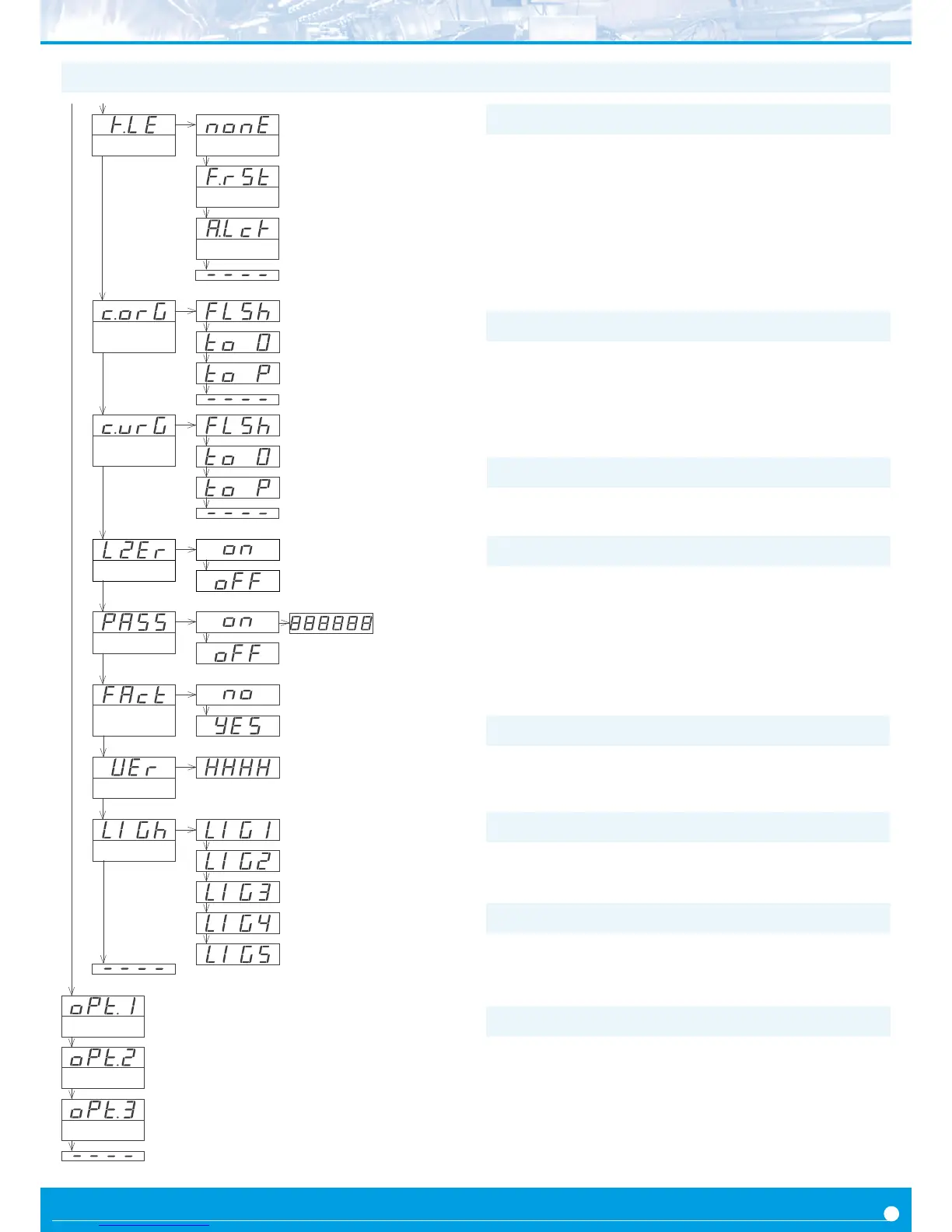
At the ‘Password’ (‘PASS’) menu select a 6 digit code to block access
to the ‘conguraon menu’. Instrument conguraon will not be ac-
cessible to non authorized personnel. To acvate the ‘Password’ se-
lect ‘on’ and introduce the code.
The code will be requested when trying to access the ‘conguraon
menu’ (key ‘SQ’ (<)). The ‘fast access’ menu is not password pro-
tected.
The ‘Version’ (‘VEr’) menu informs of the current rmware version
installed in the module.
1.19.16 Menus ‘Overrange / underrange’
At the ‘Brightness’ (‘LIGh’) menu select the light intensity for the
front leds. With this funcon it is possible to adapt the instrument to
the environment light intensity.
1.19.18 Funcon ‘Password’
Menus ‘OPt.1’, ‘OPt.2’ and ‘OPt.3’ give access to the ‘conguraon
menus’ of the output and control modules installed at slots Opt.1,
Opt.2 and Opt.3.
See secon 2 for a list of output and control modules available for
each slot. The ‘conguraon menu’ of each module is described at
the User’s Manual of each module.
1.19.19 Factory reset
At the ‘Factory reset’ (‘FAct’) menu, select ‘yes’ to load the default
factory conguraon for the instrument (see secon 1.21).
1.19.20 Firmware version
1.19.21 Brightness
The ‘Counter overrange’ (‘c.orG’) and ‘Counter underrange’ (‘c.urG’)
parameters congure the behavior of the instrument when reading
is higher than ‘9999’ (overrange) or lower than ‘-1999’ (underrange).
Select ‘FLSH’ to enter reading into ash mode. Select ‘to_0’ to apply
a reset to ‘0’. Select ‘to_P’ to apply a reset to preset value.
1.19.22 Access to oponal modules
1.19.17 Le zeros
The ‘Le zeros’ (‘L.ZEr’) parameter controls the le zeros on or o.
1.19 Conguraon menu (cont.)
Counter
overrange
Flash
To zero
To preset
Counter
underrange
Flash
To zero
To preset
Le zeros
With le zeros
Without le zeros
Key LE
Front reset
Alarm unlock
No funcon
Opon 1
Conguraon menu for the module installed at Opt.1
Opon
2
Conguraon menu for the module installed at Opt.2
Opon 3
Conguraon menu for the module installed at Opt.3
Password
Version
Factory reset
Minimum
Brightness
Maximum
Standard
The ‘LE’ (3) key at the front of the instrument can be congured to
acvate several funcons. Only one funcon can be assigned to the
‘LE’ (3) key
• the ‘No funcon’ (‘nonE’) value assigns no funcon.
• the ‘Front reset’ (‘F.rSt’) value asigns the reset funon.
• the ‘Alarm unlock’ (‘A.Lck’) value assigns the manual unlock of the
alarms funcon, for instruments with the ‘Locked alarms’ (‘A.Lck’)
funcon acvated (see secon 1.19.11)
1.19.15 Menu ‘Key LE’


 To Next Page