FEMA ELECTRÓNICA . Series M . M60-C1
14
1.19 Conguraon menu (cont.)
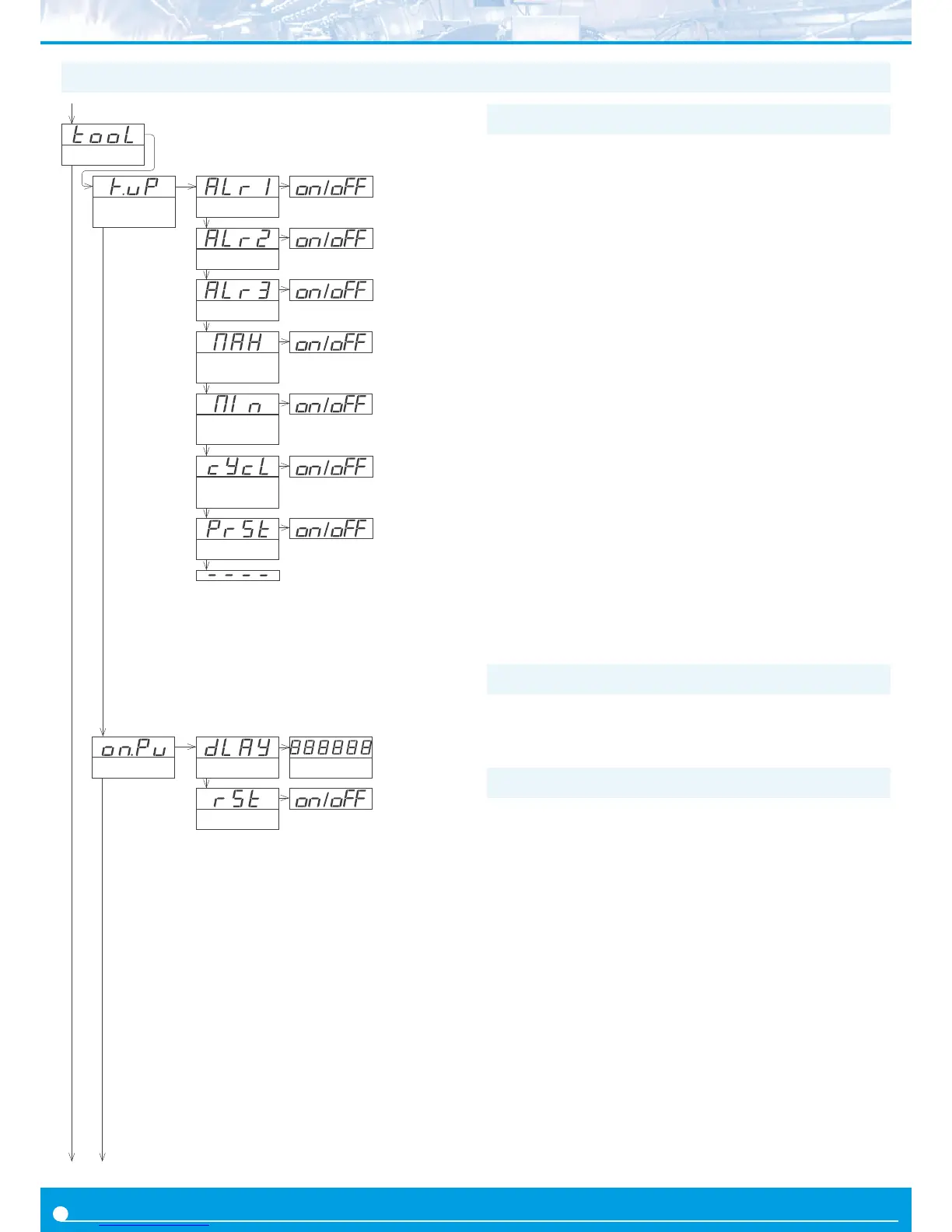
The ‘On Power Up’ (‘on.Pu’) menu congures funcons to apply at
start-up. It applies only to instrument restart aer power loss. It does
not apply to instrument restart due to change in conguraon.
• parameter ‘Delay’ (‘dLAy’) assigns a waing me in seconds. The
instrument waits the congured me before starng normal func-
on. During this waing me, the display shows all decimal points
on in ash mode, all alarms are in ‘oFF’ state, there is no signal acqui-
sion and there is no communicaons or control being performed.
Aer the congured me is over, the instrument starts in normal
funcon. Delay value between 0 and 200 seconds.
Applicaon - the start-up process for an automaon system implies
that dierent parts of the system (engines, actuators, controllers, ...)
have dierent start-up mes. The ‘Delay’ funcon gives me to the
instrument to wait unl the slowest part of the system is fully func-
onal before execung acons on the system (signal reading, relay
acvaon, ...)
• the ‘Reset’ (‘rSt’) parameter will execute a reset of the counter
each me the instrument is restarted.
1.19.14 Menu ‘On Power Up’
Tools
Key UP
(‘fast access’)
Memory of
maximum
Memory of
minimum
Setpoint 1
Setpoint 2
Setpoint 3
Memory of
cycles
Preset value
On power-up
Delay Seconds
Reset
The ‘UP’ (5) key at the front of the instrument gives access to a list
of funcons congurable by the operator. See secon 1.17 for an ex-
planaon on how to operate the ‘fast access’ menu.
The ‘Key UP (Fast access)’ (‘K.uP’) menu allows to select which func-
ons will be accessible through the ‘fast access’ menu. Select ‘on’ to
acvate each funcon.
• the ‘Setpoint
1’ (‘ALr1’) funcon allows to visualize and modify the
alarm 1 setpoint through the ‘fast access’ menu.
• the ‘Setpoint
2’ (‘ALr2’) funcon allows to visualize and modify the
alarm 2 setpoint through the ‘fast access’ menu.
• the ‘Setpoint
3’ (‘ALr3’) funcon allows to visualize and modify the
alarm 3 setpoint through the ‘fast access’ menu.
• the ‘Memory of maximum’ (‘MAX’) or ‘Memory of minimum’
(‘MIn’) funcons allow to visualize the maximum or minimum read-
ing value stored in memory. To reset this value, visualize the memory
value at the ‘fast access’ menu with key UP (5) and when message
‘rSt’ is displayed, press (<) to reset.
• the ‘Memory of cycles’ (‘cYcL’) funcon allow to visualize and reset
the memory of cycles. To reset this value, visualize the memory value
at the ‘fast access’ menu with key UP (5) and when message ‘rSt’
is displayed, press (<) to reset. The memory of cycles countes ‘+1’
each me a reset alarm occurs (‘on_AL’ / ‘to_0’ or ‘to_P’) or a reset
by ‘overrange’ / ‘underrange’ occurs.
• the ‘Preset value’ (‘PrSt’) funcon allows to visualize and modify
the preset value congured.
1.19.12 Fast access
If only a single funcon is selected for the ‘fast access’ menu, press-
ing the the ‘UP’ (5) key will shortly display the funcon name and
then automacally jump to the funcon value.
1.19.13 Super fast access


 To Next Page