FEMA ELECTRÓNICA . Series M . M60-C1
20
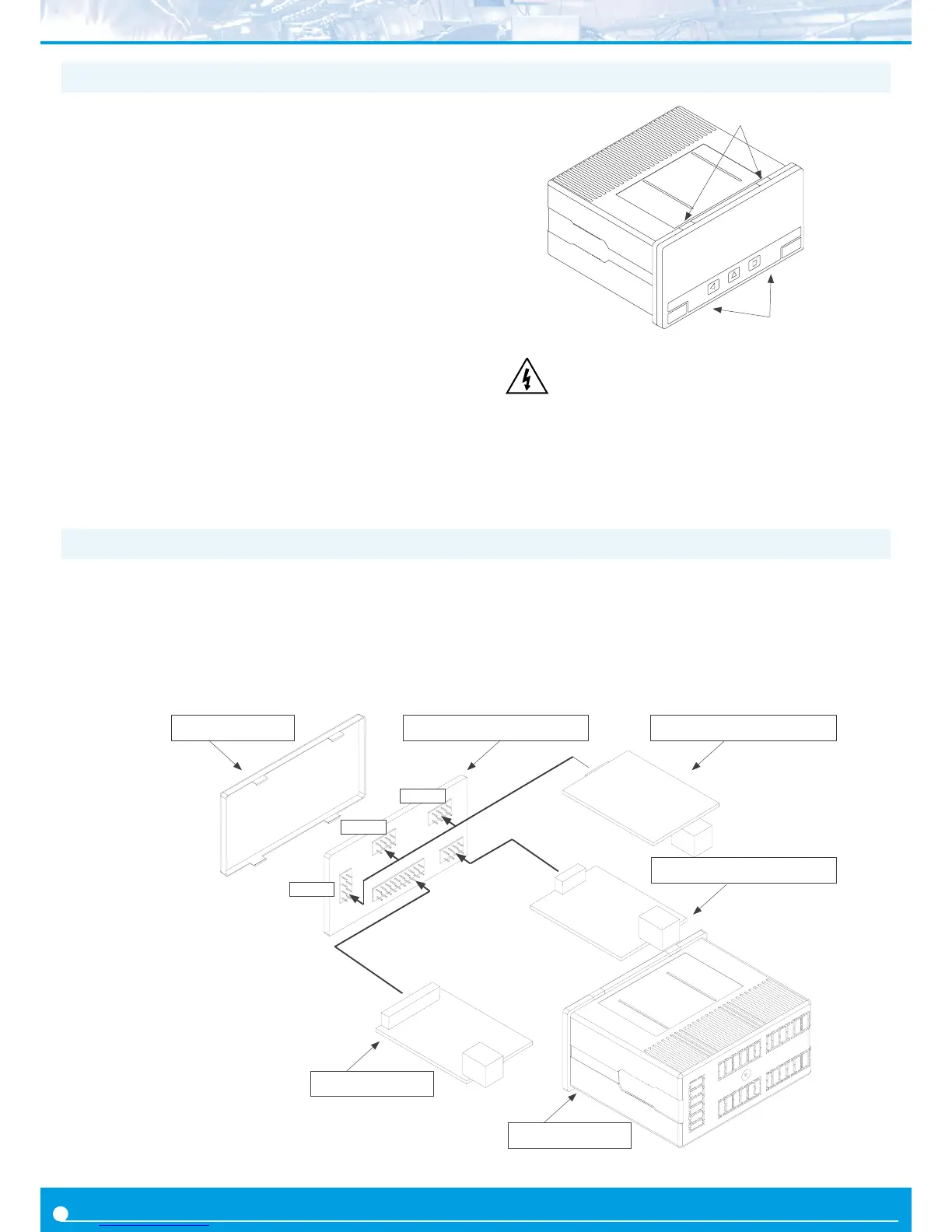
1.22 To access the instrument
A
B
Risk of electric shock. Removing the front cover will
grant access to the internal circuits. Disconnect the
input signal to prevent electric shock to the operator.
Operation must be performed by qualied personnel
only.
Front Filter Display Module Oponal Control Modules
Input Signal Module
Housing
Power Supply Module
Opt.3
Opt.2
Opt.1
1.23 Modular system
M Series panel meters are designed to create a modular system. This
modular system allows for addion, replacement or substuon of
any of the internal modules conforming the instrument. Below is a
graphic explanaon for the posion of each module.
You may need to access the inside of the instrument to add or re-
place internal modules. Use a at screwdriver to unlock the upper
clips marked with ‘A’. Then unlock the lower clips marked with ‘B’ and
remove the front cover. Let the inside of the instrument slide out of
the housing.
To reinsert the instrument make sure that all modules are correctly
connected to the pins on the display module. Place all the set into
the housing, assuring that the modules correctly t into the internal
guiding slides of the housing. Once introduced, place again the front
cover by clipping rst the upper clips ‘A’ and then the lower clips ‘B’.
Important - If your instrument was delivered with the IP65 front
seal opon, accessing the inside of the instrument will permanently
break the IP65 seal on the areas of clips ‘A’ and ‘B’.


 To Next Page