FEMA ELECTRÓNICA . Series M . M60-C1
8
Decimal point
Press ‘SQ’ (<) for 1 second to access the ‘conguraon menu’.
For a descripon on how to operate inside the menus see secon
1.17. For a full vision of the ‘conguraon menu’ structure see
secon
1.20.
To congure the inial set up of the instrument, select the funcon
mode, the decimal point posion, scale the reading and congure
the mode selected and the sensor.
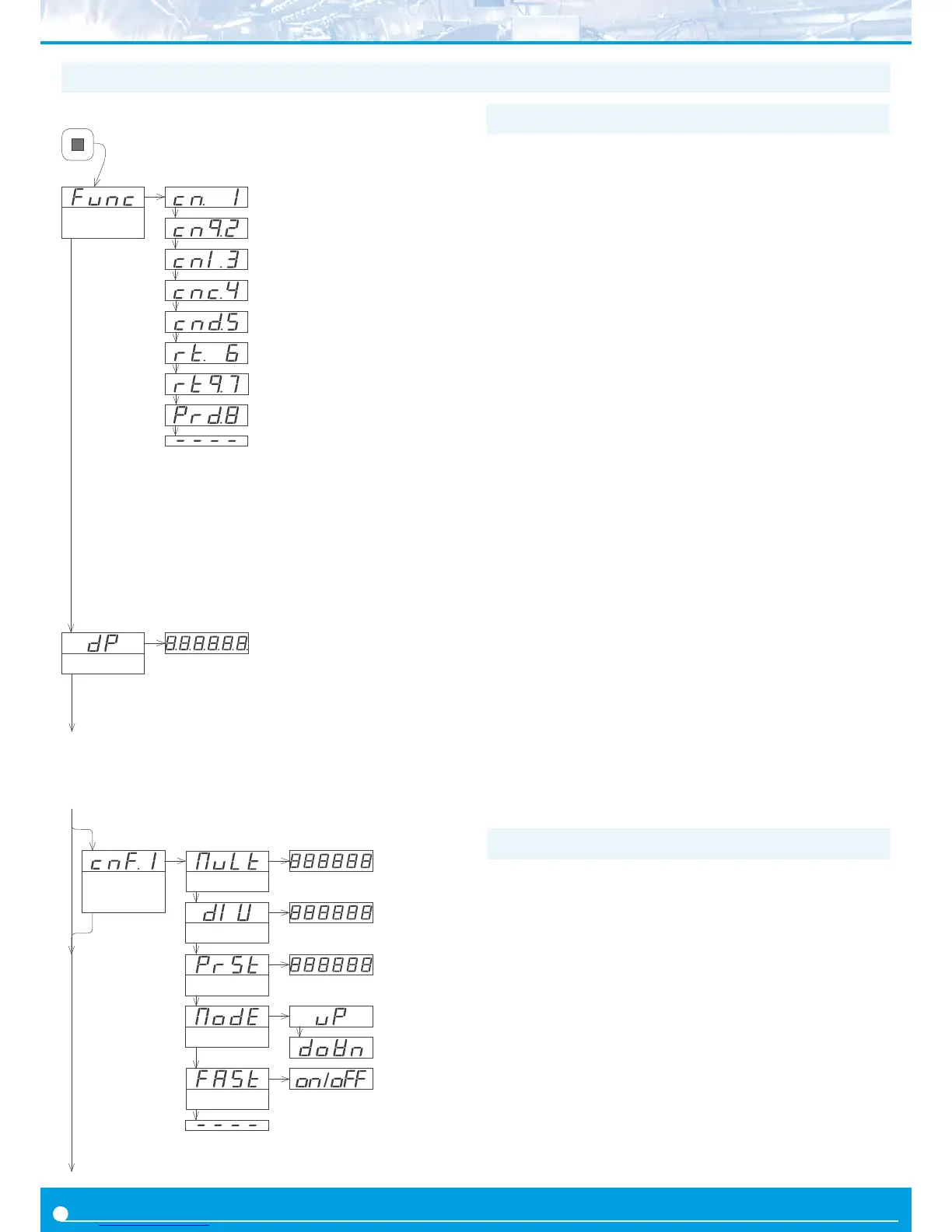
Enter the ‘Funcon mode’ (‘Func’) menu and select the desired func-
on, from the 5 counng modes, 2 ratemeter modes and the period-
meter mode available.
• ‘Counter’ (‘cn. 1’) - normal counter mode. Impulses input at chan-
nel A. Channel B disabled.
• ‘Counter quadrature’ (‘cnq.2’) - counter mode for quadrature sig-
nals. Impulses input at channel A and B, in quadrature.
• ‘Counter + inhibion’ (‘cnI.3’) - counter mode with inhibion con-
trol. Impulses input at channel A. Inhibion control on channel B.
• ‘Counter + control add / substract’ (‘cnc.4’) - counter mode with
control for add / substract. Impulses input at channel A. Control for
the add or substract funcon on channel B.
• ‘Counter dierenal’ (‘cnd.5’) - counter mode with dierenal
funcon. Impulses received at channel A add. Impulses received at
channel B substract.
• ‘Ratemeter’ (‘rt.6’) - ratemeter mode. Impulses input at channel
A. Channel B disabled.
• ‘Ratemeter quadrature’ (‘rtq.7’) - ratemeter mode for quadrature
signals. Impulses input at channel A and B, in quadrature.
• ‘Periodmeter’ (‘Prd.8’) - periodmeter mode. Impulses input at
channel A. Channel B disabled.
Access the ‘Decimal point’ (‘dP’) menu to select the decimal point
posion. Move the decimal point by pressing the ‘LE’ (3) key.
Congure the funcon mode selected (‘cnF.2’ to ‘cnF.8’). See sec-
ons 1.19.2 to 1.19.9.
Congure the sensor at the ‘SnSr’ menu. See secon 1.19.10.
Funcon
mode
Counter
Counter quadrature
Counter + inhibion
Counter + control add / substract
Counter dierenal
Ratemeter
Ratemeter quadrature
Periodmeter
Conguraon menu for mode ‘counter’ (‘cn.1’). Total impulses re-
ceived are mulplied by the value of the ‘mulplier’ (‘MuLt’) register
and divided by the ‘divider’ (‘dIV’) register. Result is refreshed on the
display.
• assign the value for parameter ‘Mulplier’ (‘MuLt’) from 1 to
999999.
• assign the value for parameter ‘Divider’ (‘dIV’) from 1 to 999999.
• assign the value for ‘Preset’ (‘PrSt’) from -199999 to 999999. Reset
acvaon loads on display the preset value.
• select the counng mode (‘ModE’) to ‘uP’ for upwards counng
(impulses received add) or ‘doWn’ for downwards counng (impuls-
es received substract).
• to acvate the ‘FAST’ mode (‘FASt’) select ‘on’. See secon 1.16 for
more informaon on the ‘FAST’ mode.
1.19.2 Conguraon for ‘cn.1’
The next menu accesses the conguraon parameters for the ‘funcon mode’ (‘Func’)
selected. Conguraon parameters are slightly dierent for each ‘funcon mode’. In
the next entries, all 7 possible conguraon menus are explained, ‘cnF.1’ to ‘cnF.7’, one
for each ‘funcon mode’.
Mulplier
1 to 999999
Divider
1 to 999999
Conguraon
counter
Mulplier
Divider
Preset
Preset value
-199999 to 999999
Mode
Up
Down
‘FAST’ mode
1.19 Conguraon menu
1.19.1 Inial set-up


 To Next Page