36
NAMING SETLISTS
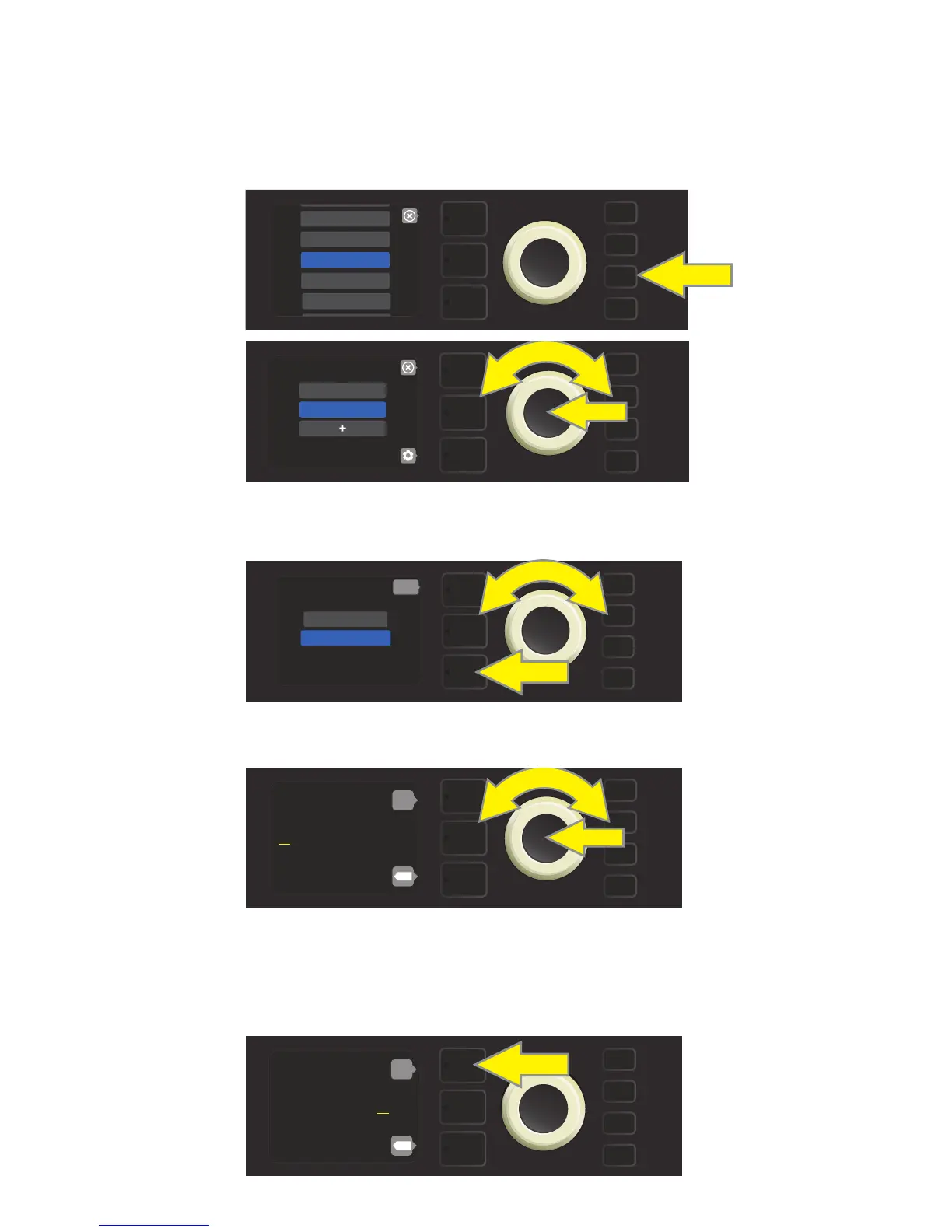
For personalized organization, a Setlist can be given a name other than its numerical designation (i.e., “SET-
LIST 1,” SETLIST 2,” etc.). This can be any name the user wants. To name a Setlist, rst press the MENU utility
button and use the ENCODER to scroll to and select SETLISTS, then use the ENCODER to scroll to the Setlist
to be renamed (see illustrations below).
Press the LAYER BUTTON corresponding with the “gear” icon, then use the ENCODER to scroll to and select-
the “RENAME SETLIST” option (see illustration below).
Use the ENCODER to enter a new name using the process described on page 11 (see illustration below).
When entering a new Setlist name is completed, press the LAYER BUTTON corresponding to the onscreen
prompt “done.” The Setlist menu will then appear with the newly named Setlist in place (see illustrations be-
low and on next page).
MENU
CLOUD PRESETS
TUNER
BLUETOOTH
PRESET ORGANIZER
SETLIST
MENU
SETLIST 1
SETLIST 2
back
MENU
RENAME SETLIST
DELETE SETLIST
S e t l i s t 2
ENTER NAME:
back
X
C o u n t B a s s y
ENTER NAME:
back
X















 To Next Page