Pag 41
MDS DIRECT
MDS DIRECT
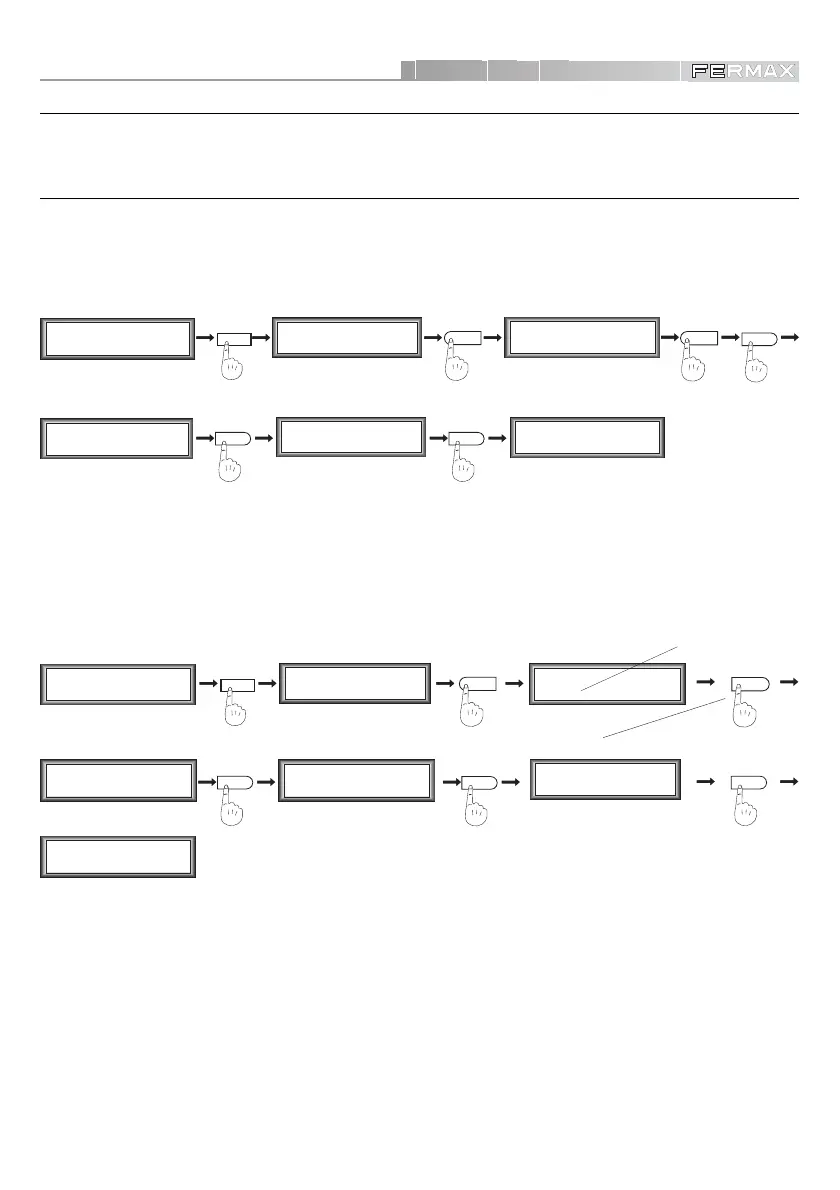
PANEL SETUP
The panel configuration will depend on the operations to be carried out in the system.
General Entrance Panels
These are installed in the General Entrances to a Residential Area.
• General Entrance Panel Setup
7
General Ent. (0/1)
General Ent. (0/1)
1OK
1
M1 2 3 4
mCoPaDeCi
MAIN MENU
2
P1 2 3 4 5 6 7
aTmc d P B L G
SECONDARY MENU
%
%%
P1 2 3 4 5 6 7
aTmc d P B L G
SECONDARY MENU
M1 2 3 4
mCoPaDeCi
MAIN MENU
• Assigning General Entrance Panel Number
If the Residential Area has more than one General Entrance (several panels), a panel number must be
assigned to each of them, following the steps described below. These steps will be repeated for each
of the different General Entrance panels.
VERY IMPORTANT NOTES:
9 If there are General Entrance/s and MDS Direct Guard Unit, the General Entrance panels must
be programmed from number 1 onwards. They must NEVER be programmed with value 0.
The same must be taken into account if MDS Direct panels are to be combined with MDS Digital
or Mds City panels, (NEVER programmed with value 0).
The same number must NEVER be repeated in different General Entrance panels.
MAIN MENU
4
%
Plate Nr. (0-9)
1
Plate Nr. (0-9)
3
3
M1 2 3 4
mCoPaDeCi
MAIN MENU
2
P1 2 3 4 5 6 7
aTmc d P B L G
SECONDARY MENU
Plate Nr. (0-9)
3 OK
P1 2 3 4 5 6 7
aTmc d P B L G
SECONDARY MENU
%
M1 2 3 4
mCoPaDeCi
%
For example:
Panel 3
(default value)













 To Next Page