Pag 52
MDS DIRECT
MDS DIRECT
A
M1 2 3 4
mCoPaDeCi
MAIN MENU
SECONDARY MENU
%
M1 2 3 4
mCoPaDeCi
MAIN MENU
1
C1 2 3 4 5 6 7
o+ - MT R D Pc
SECONDARY MENU
C1 2 3 4 5 6 7
o+ - MT R D Pc
2
Opening Code
7 7 7 8 8 8 N 0004
%
(Position code
number)
(Keys 1 and 2 to select the
code of the system)
1
2
Code erased
7 7 7 8 8 8 ; N 0004
Opening Code
%
Opening Code
1 2 3 4 5 6 N 0001
M1 2 3 4
mCoPaDeCi
MAIN MENU
SECONDARY MENU
%
M1 2 3 4
mCoPaDeCi
MAIN MENU
1
C1 2 3 4 5 6 7
o+ - MT R D Pc
SECONDARY MENU
C1 2 3 4 5 6 7
o+ - MT R D Pc
For example:
7 7 7 8 8 8
1
Opening Code
_ _ _ _ _ _
Opening Code
7 7 7 8 8 8 N 0004
%
(Position number
code)
8
7
+
7
+
7
++
8
+
8
NOTE :
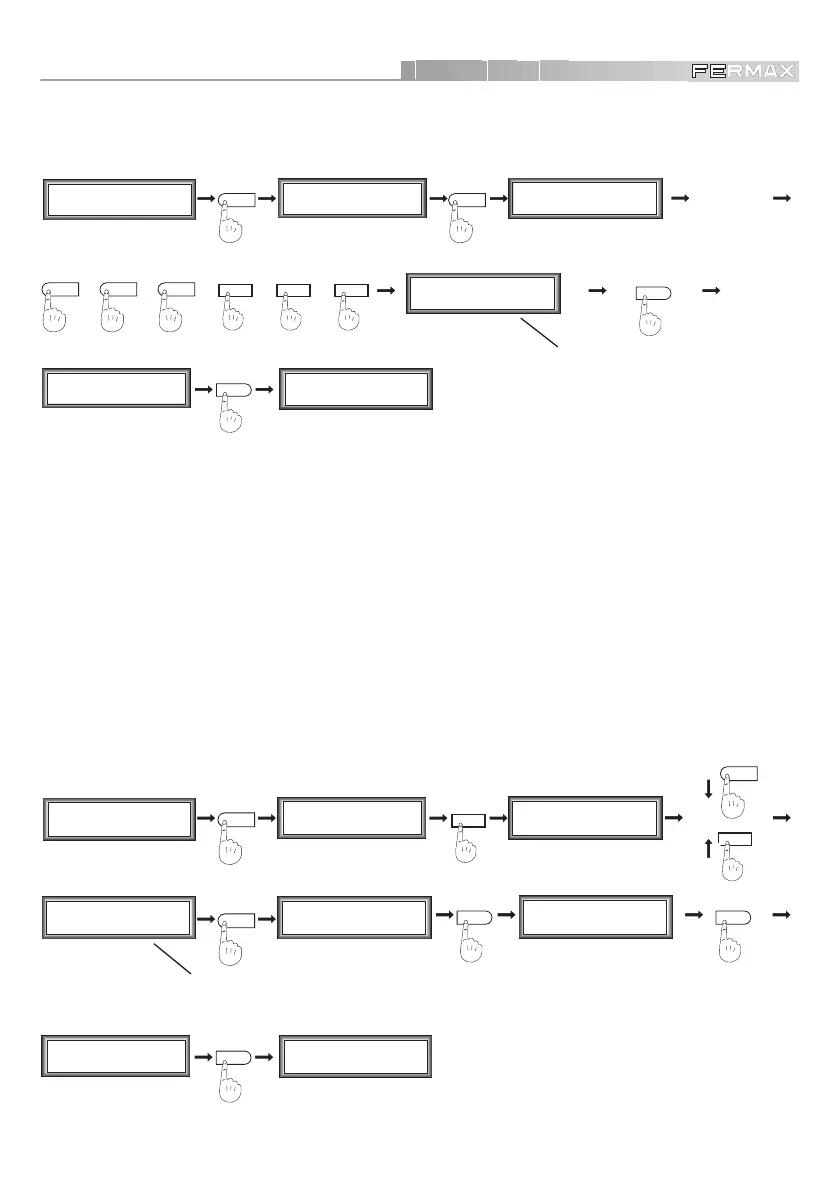
9 To enter a new code, select option ‘1’. The system will ask for a 6-digit code regardless of the
number of digits selected. In this way, we can ensure that in the case of changing to more digits,
those not used will have a known value.
• Input an Access Code
• Delete an Access Code
To enter all the codes to open the door from the keypads of the different system users.
To remove the codes we do not wish to keep in the system. These would be deleted one by one.
Selecting option ‘2’, you can erase a code from the memory. To do this, you can use keys ‘1’ and ‘2’ to
view them, pressing ‘A’ if you wish to delete one, or else ‘’ to return to the code menu.













 To Next Page