Pag 53
MDS DIRECT
MDS DIRECT
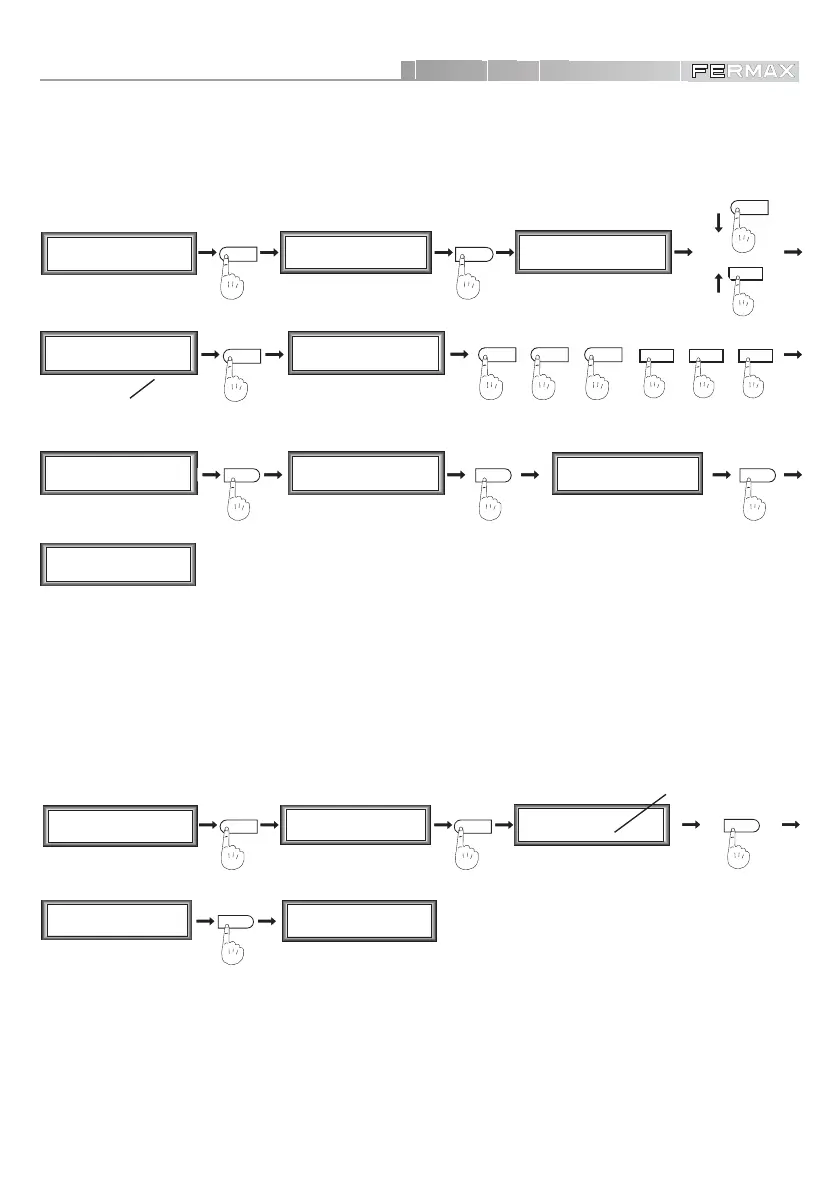
• Modify an Access Code
A
M1 2 3 4
mCoPaDeCi
MAIN MENU
SECONDARY MENU
1
C1 2 3 4 5 6 7
o+ - MT R D Pc
(Position code
number)
1
2
Opening Code
_ _ _ _ _ _ ; N 0004
Opening Code
1 2 3 4 5 6 N 0001
3
5
7
+
4
+
4
++
5
+
8
Opening Code
7 7 7 8 8 8 N 0004
% %
SECONDARY MENU
C1 2 3 4 5 6 7
o+ - MT R D Pc
Code modified
7 4 4 5 5 8 N 0004
%
Opening Code
7 4 4 5 5 8 N 0004
M1 2 3 4
mCoPaDeCi
MAIN MENU
(Keys 1 and 2 to select the
code of the system)
To modify the open door code of a system user.
We can change a code in memory by means of option ‘3’. To do so, once selected with keys ‘1’ and
‘2’, press ‘A’, enter the new code and confirm with ‘’. Press ‘’ to exit this option.
• TOTAL Access Codes Entered in System.
In order to know how many Access Codes are stored in the system.
Pressing ‘4’ you obtain the total number of codes registered in the memory. Press ‘’ to go back to
the codes menu.
M1 2 3 4
mCoPaDeCi
MAIN MENU
SECONDARY MENU
%
M1 2 3 4
mCoPaDeCi
MAIN MENU
1
C1 2 3 4 5 6 7
o+ - MT R D Pc
SECONDARY MENU
C1 2 3 4 5 6 7
o+ - MT R D Pc
(The total number of codes
stored in memory)
Total codigos
0 0 3 8
4
%
For example: 38 codes













 To Next Page