Pag 40
MDS DIRECT
MDS DIRECT
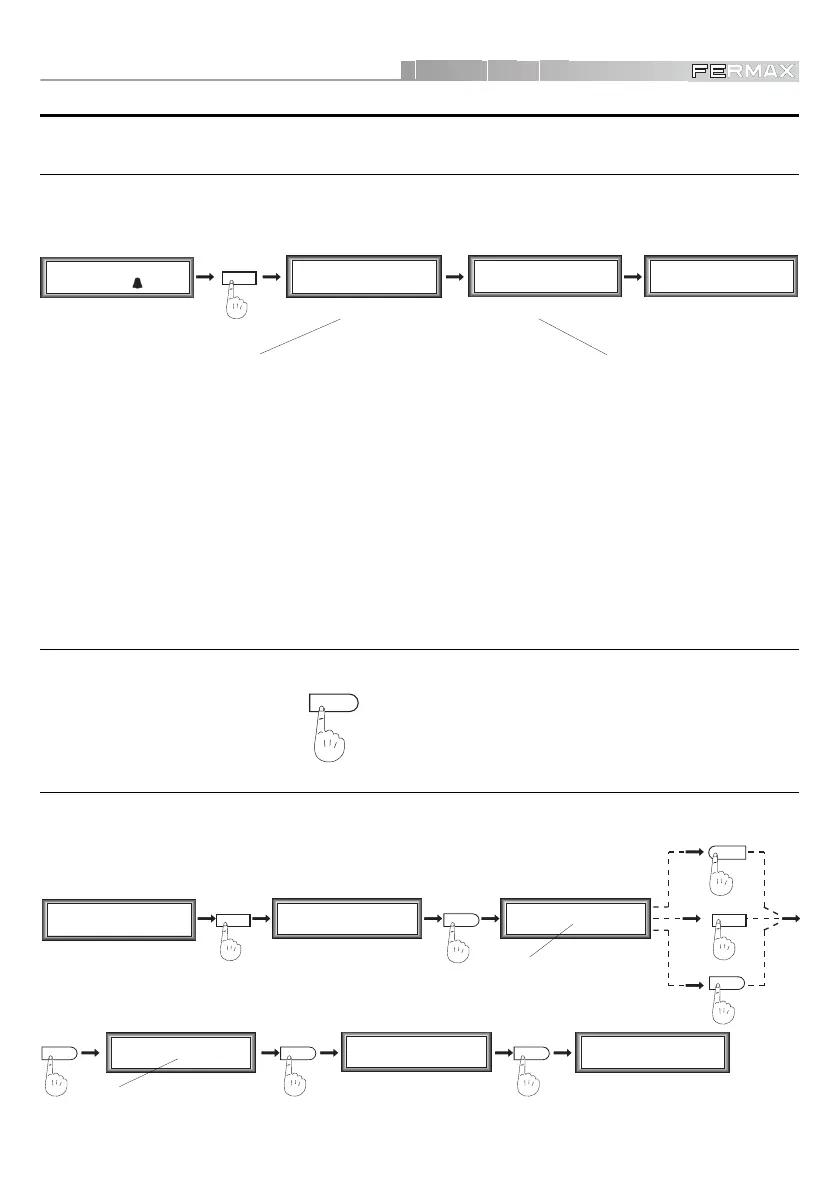
We advise carrying out the initial configuration in line with the following steps:
INITIAL SETUP
LANGUAGE SELECT
%
M1 2 3 4
mCoPaDeCi
MAIN MENU
2
P1 2 3 4 5 6 7
aTmc d P B L G
SECONDARY MENU
6
1
Spanish
2
English
French
Language (1 - 3)
1
3
SECONDARY MENU MAIN MENU
%%
P1 2 3 4 5 6 7
aTmc d P B L G
M1 2 3 4
mCoPaDeCi
Language (1 - 3)
2 OK
(For example, English)
The panel can operate in three different languages: Spanish, English and French, by selecting 1, 2 or
3, respectively. Select the desired language as explained below.
%
ENTER PROGRAMMING MODE
To enter programming mode we must always follow these steps, to access the MAIN MENU. From the
Main Menu we can then access the different SECONDARY MENUS according to the option selected.
EXIT PROGRAMMING OR ANY OTHER MENU
To exit Programming Mode, the Main Menu or the different Secondary Menus, press the bell button
%
as many times as necessary.
MAIN MENU
0
M1 2 3 4
pCoPaDeCi
Enter Code:
------
A%21A%
ENTER
PROGRAMMING MODE
Programming Code:
-----
19025
Dial Flat Number
and press
FIRST
Programming
Code
SECOND
Programming
Code
(default value)
NOTES:
9 The secondary programming code 19025 can be replaced by another. See section « Change
Programming Code». The primary Programming Code CANNOT be changed.
In the first programming code
A%21A%
, the length of the same may vary depending on the number
of digits selected for the system. See section «Assigning Number of Digits». Regardless of the
number of digits chosen for the system, the second programming code 19025 will always have 5
digits.













 To Next Page