Pag 42
MDS DIRECT
MDS DIRECT
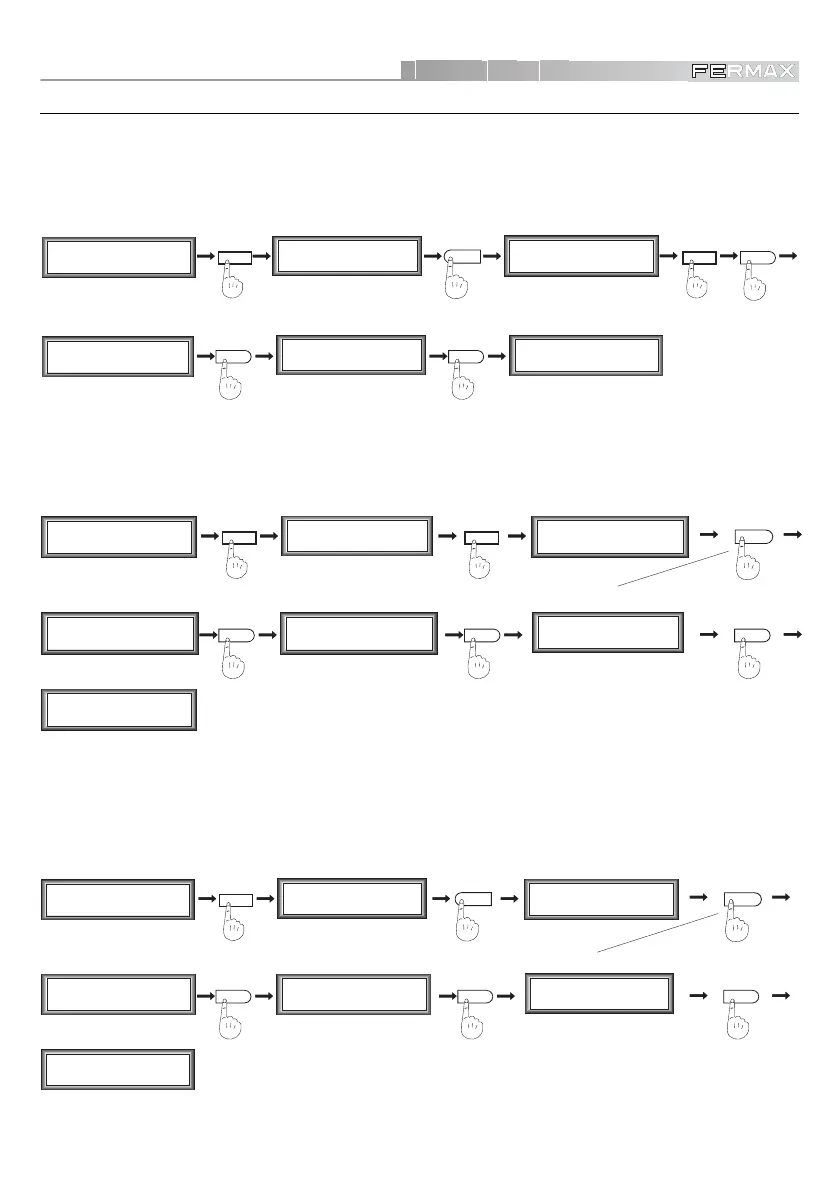
InnerBlock Panels
These are installed at the entrance to each of the Blocks that make up a Residential Area.
• Assigning Block Number to Panels
These panels must be programmed with their corresponding BLOCK number.
• Setup as Inner Block Panel
7
General Ent. (0/1)
General Ent. (0/1)
0OK
M1 2 3 4
mCoPaDeCi
MAIN MENU
2
P1 2 3 4 5 6 7
aTmc d P B L G
SECONDARY MENU
%
%%
P1 2 3 4 5 6 7
aTmc d P B L G
SECONDARY MENU
M1 2 3 4
mCoPaDeCi
MAIN MENU
0
%%
Block Nr. (00-99)
0 0
Block Nr. (00-99)
9
9
M1 2 3 4
mCoPaDeCi
MAIN MENU
2
P1 2 3 4 5 6 7
aTmc d P B L G
SECONDARY MENU
Block Nr. (00-99)
09 OK
P1 2 3 4 5 6 7
aTmc d P B L G
SECONDARY MENU
%
M1 2 3 4
mCoPaDeCi
MAIN MENU
5
For example:
Block 9
• Assigning Inner Block Panel Number
If there are several panels within the same block , the number of each of these panels must be
programmed.
4
%%
Plate Nr. (0-9)
1
Plate Nr. (0-9)
3
3
M1 2 3 4
mCoPaDeCi
MAIN MENU
2
P1 2 3 4 5 6 7
aTmc d P B L G
SECONDARY MENU
Plate Nr. (0-9)
3 OK
P1 2 3 4 5 6 7
aTmc d P B L G
SECONDARY MENU
%
M1 2 3 4
mCoPaDeCi
MAIN MENU
For example:
Panel 3













 To Next Page