Pag 61
MDS DIRECT
MDS DIRECT
Cut out and give a copy of this section to each of the users with the data.
NOTE:
9 The
ON/OFF switch must be ON. For long periods of absence, turn off the Monitor
using this switch, (the monitor will not receive calls).
F
L
A
T
M
O
N
I
T
O
R
H
I
G
H
R
E
S
O
L
U
T
I
O
N
2
1
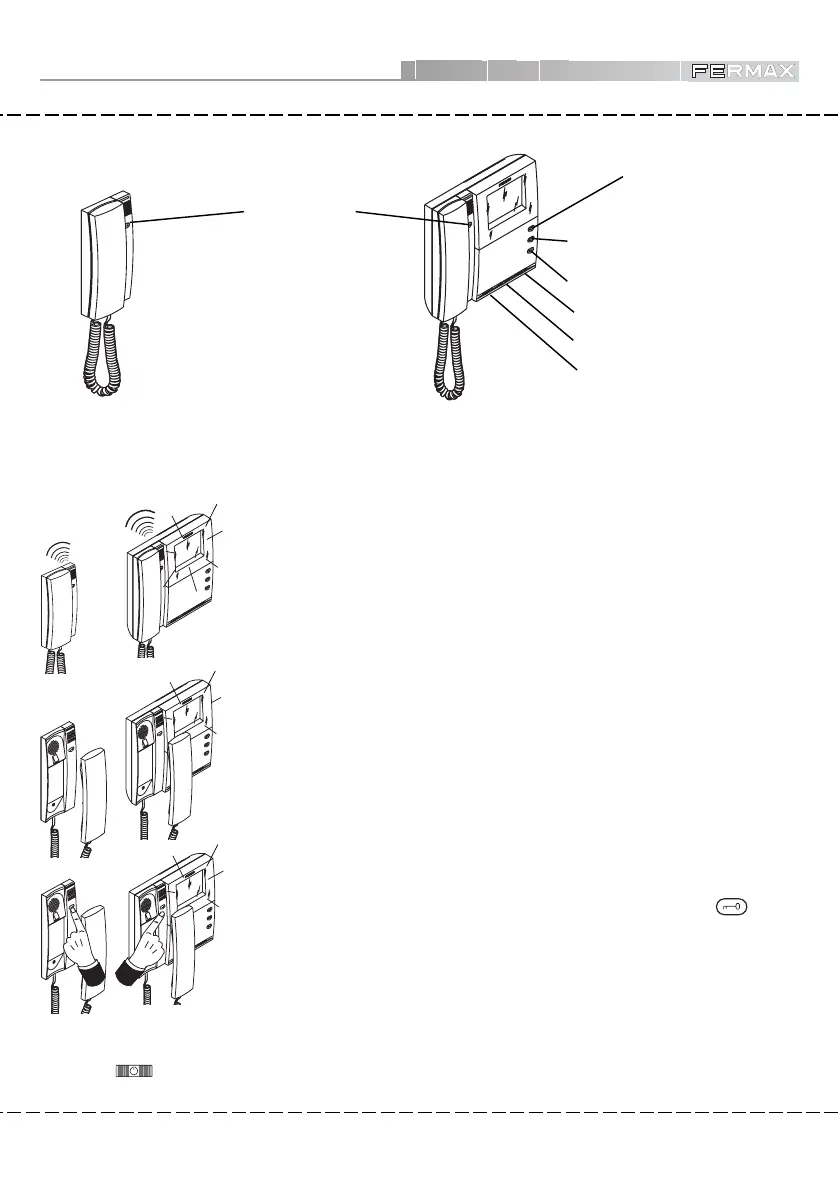
When you pick up the handset or monitor you can talk to the caller.
• Answer the call
When you make a call from the Outdoor Panel a call tone is heard both at the outdoor
panel and the telephone or monitor (depending on the installation). Monitor screens
will light up.
Any additional equipment sets in the apartment will also sound.
Calls from the Guard Unit/Concierge will have a different tone (continuous) and the
monitor screens will not light up.
• Call
While talking to the caller it is possible to open the door by pressing the
button
on the phone or monitor.
• Open Door to Caller
FLAT MONITOR
HIGH RESOLUTION
2
1
F
L
A
T
M
O
N
IT
O
R
H
IG
H
R
E
S
O
L
U
T
I
O
N
2
1
• House Terminals
OPEN DOOR
Button
(*) 2nd CAMERA Connection
(*)ADDITIONAL BUTTON
BRIGHTNESS Control
(*) These Monitor buttons will be set up in line with the model of monitor installed in the apartment and
the type of installation.
ON/OFF Switch
CONTRAST Control
Citymax Telephone
(*) AUTO SWITCH-ON
Button
FLA
T M
O
N
ITOR
H
IG
H RES
O
LU
TION
2
1
CitymaxMonitor
Will depend on type of installation (Telephone or Monitor).
• House Terminals Operation (Telephone-Monitor, depending on installation).













 To Previous Page