8
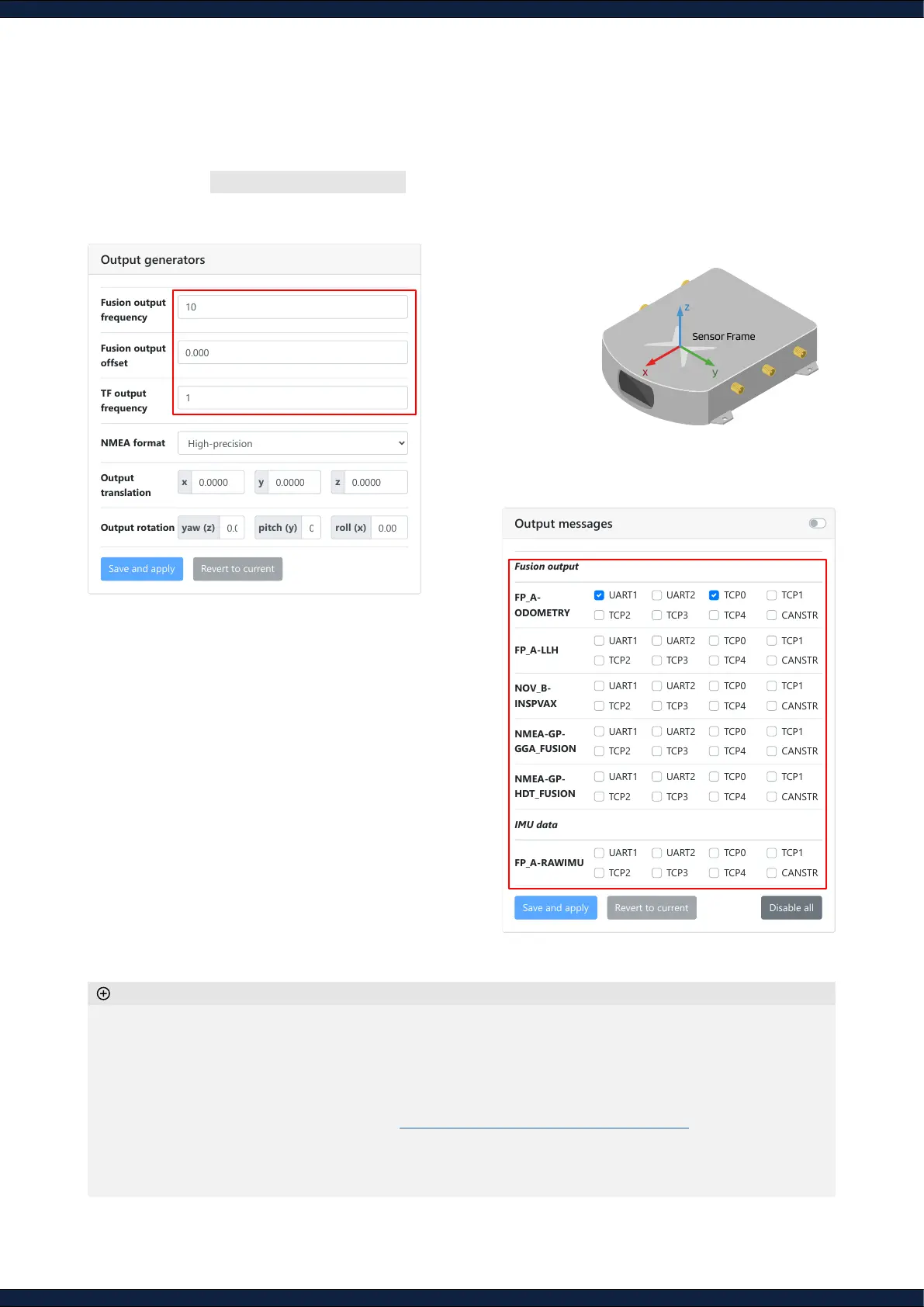
Step 6: Congure output
1. Navigate to Configuration ↪ I/O to the
Output generators
section
2. Set the
Output frequency
(Hz),
Output translation
(m), and
Output rotation
(degrees)
3. Navigate to
Output messages
section and
select the desired messages and output
channels
◦ The output translation is set relative to the 'X' on the sensor
◦ The high-precision NMEA format contains non-standard elds which allow higher precision in the timing,
position, and heading values
◦ A higher output frequency requires a higher I/O bandwidth. For example, IMU messages require signicant
bandwidth and should be enabled with discretion
◦ All available messages are documented at https://docs.xposition.com/fd/i-o-messages
◦ For the LLH output, the sensor assumes that the correction data employs the WGS84 geodetic datum
◦ Enabling more messages will consume more CPU resources and might impact the sensor's performance.
Only enable them when necessary, preferably on one port only
Additional information
I/O Configuration
Output generators
Fusion output
frequency
Fusion output
offset
TF output
frequency
NMEA format
Output
translation
Output rotation
Fusion output
FP_A-
ODOMETRY
FP_A-LLH
NOV_B-
INSPVAX
NMEA-GP-
GGA_FUSION
NMEA-GP-
HDT_FUSION
IMU data
FP_A-RAWIMU
Disable all
UART1 UART2 TCP0 TCP1
TCP2 TCP3 TCP4 CANSTR
UART1 UART2 TCP0 TCP1
TCP2 TCP3 TCP4 CANSTR
UART1 UART2 TCP0 TCP1
TCP2 TCP3 TCP4 CANSTR
UART1 UART2 TCP0 TCP1
TCP2 TCP3 TCP4 CANSTR
UART1 UART2 TCP0 TCP1
TCP2 TCP3 TCP4 CANSTR
UART1 UART2 TCP0 TCP1
TCP2 TCP3 TCP4 CANSTR
2
I/O Configuration
Output generators
Fusion output
frequency
Fusion output
offset
TF output
frequency
NMEA format
Output
translation
Output rotation
Fusion output
FP_A-
ODOMETRY
FP_A-LLH
NOV_B-
INSPVAX
NMEA-GP-
GGA_FUSION
NMEA-GP-
HDT_FUSION
IMU data
FP_A-RAWIMU
Disable all
UART1 UART2 TCP0 TCP1
TCP2 TCP3 TCP4 CANSTR
UART1 UART2 TCP0 TCP1
TCP2 TCP3 TCP4 CANSTR
UART1 UART2 TCP0 TCP1
TCP2 TCP3 TCP4 CANSTR
UART1 UART2 TCP0 TCP1
TCP2 TCP3 TCP4 CANSTR
UART1 UART2 TCP0 TCP1
TCP2 TCP3 TCP4 CANSTR
UART1 UART2 TCP0 TCP1
TCP2 TCP3 TCP4 CANSTR
3



 To Next Page