11
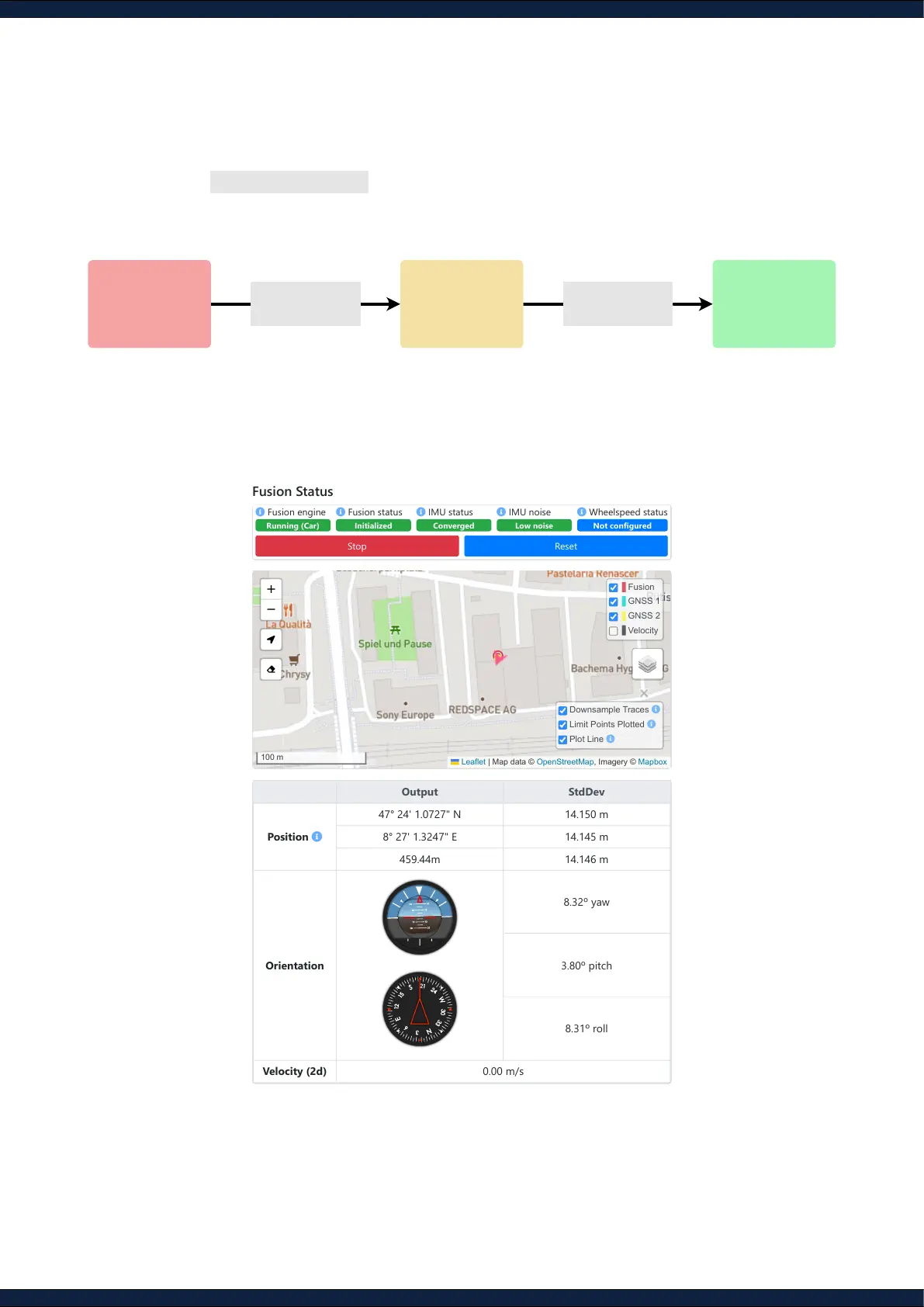
Step 9: Start the Fusion engine
1. Navigate to Status ↪ Fusion
2. Click the
Start
button and head into an open area with a clear view of the sky to achieve an
“RTK
xed”
on both GNSS receivers. This process should take less than 2 minutes
3. Ensure that all message outputs on the status page are activated and the arrow in the map is
accurately indicating the heading of the sensor
NOT STARTED
Wait for GNSS
IMU-GNSS
Inertial-GNSS
fusion
VIO-GNSS
Visual-inertial-
GNSS fusion
RTK Fix on both
GNSS receivers
Calibrate IMU and
Wheel-speed
Output StdDev
Position
47° 24' 1.0727" N 14.150 m
8° 27' 1.3247" E 14.145 m
459.44m 14.146 m
Orientation
8.32º yaw
3.80º pitch
8.31º roll
Velocity (2d) 0.00 m/s
Fusion
GNSS 1
GNSS 2
Velocity
Downsample Traces
Limit Points Plotted
Plot Line
Leaflet | Map data © OpenStreetMap, Imagery © Mapbox



 To Next Page