9
Step 7: Check GNSS status
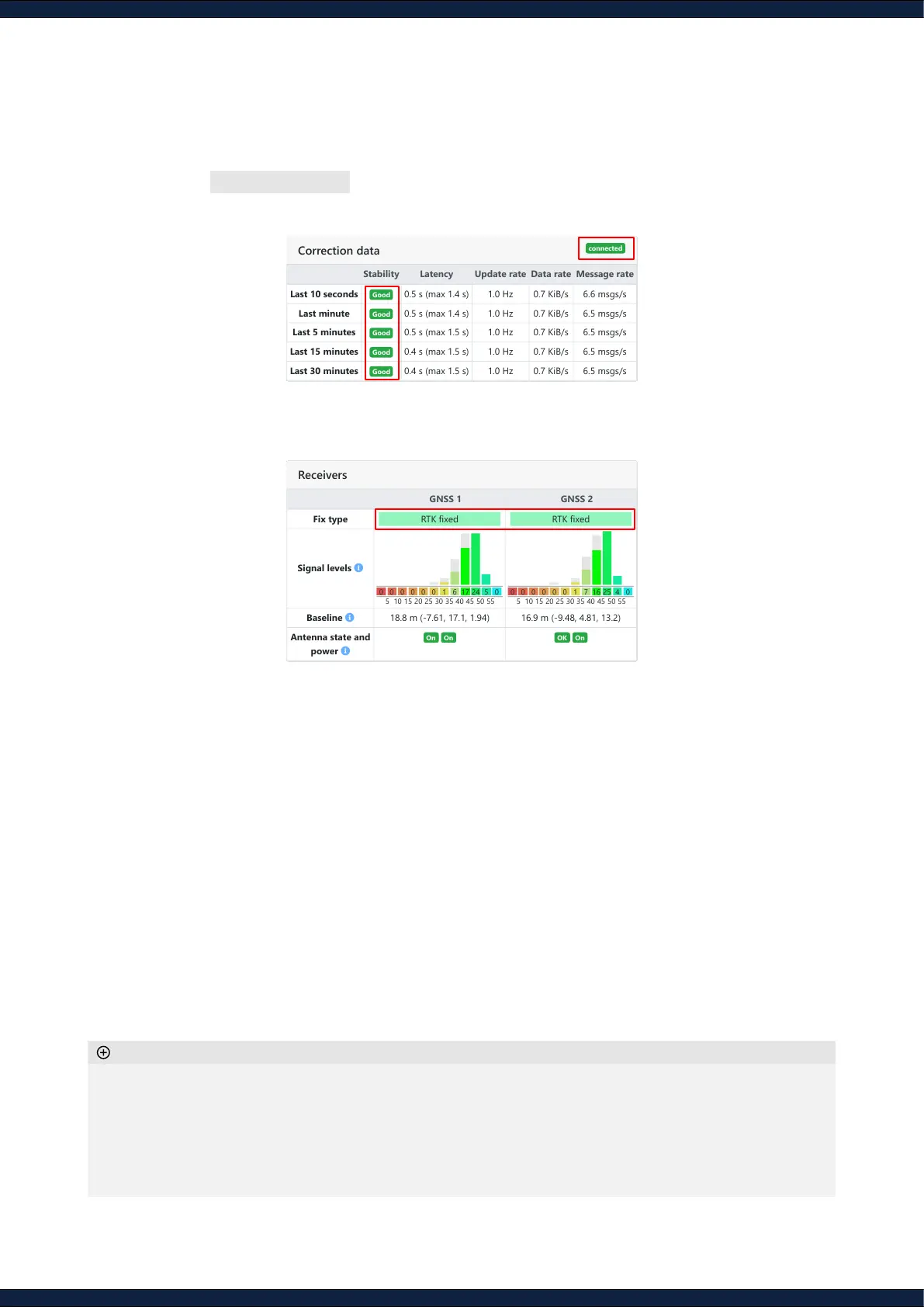
1. Navigate to Status ↪ GNSS
2. Ensure the correction data is connected and stable
3. Ensure both of the GNSS receivers to be of
“RTK Fixed”
status
◦ Initialize outdoors, as some casters require an initial position estimate to provide corrections
◦ Most signals should ideally be above 42 dBHz
◦ Antenna state and power should be
OK
and
On
◦ If an RTK xed is not achieved in less than two minutes, move away from obstructions, ensure no USB3
devices or unshielded cables are near the GNSS antennas, and verify that your selected base-station is
closer than 25km
Additional information
GNSS 1 GNSS 2
Fix type RTK fixed RTK fixed
Signal levels
Baseline 18.8 m (-7.61, 17.1, 1.94) 16.9 m (-9.48, 4.81, 13.2)
Antenna state and
power
On On OK On
0 0 0 0 0 0 1 6 17 24 5 0
5 10 15 20 25 30 35 40 45 50 55
0 0 0 0 0 0 1 7 16 25 4 0
5 10 15 20 25 30 35 40 45 50 55
Stability Latency Update rate Data rate Message rate
Last 10 seconds Good 0.5 s (max 1.4 s) 1.0 Hz 0.7 KiB/s 6.6 msgs/s
Last minute Good 0.5 s (max 1.4 s) 1.0 Hz 0.7 KiB/s 6.5 msgs/s
Last 5 minutes Good 0.5 s (max 1.5 s) 1.0 Hz 0.7 KiB/s 6.5 msgs/s
Last 15 minutes Good 0.4 s (max 1.5 s) 1.0 Hz 0.7 KiB/s 6.5 msgs/s
Last 30 minutes Good 0.4 s (max 1.5 s) 1.0 Hz 0.7 KiB/s 6.5 msgs/s



 To Next Page