Instructions:
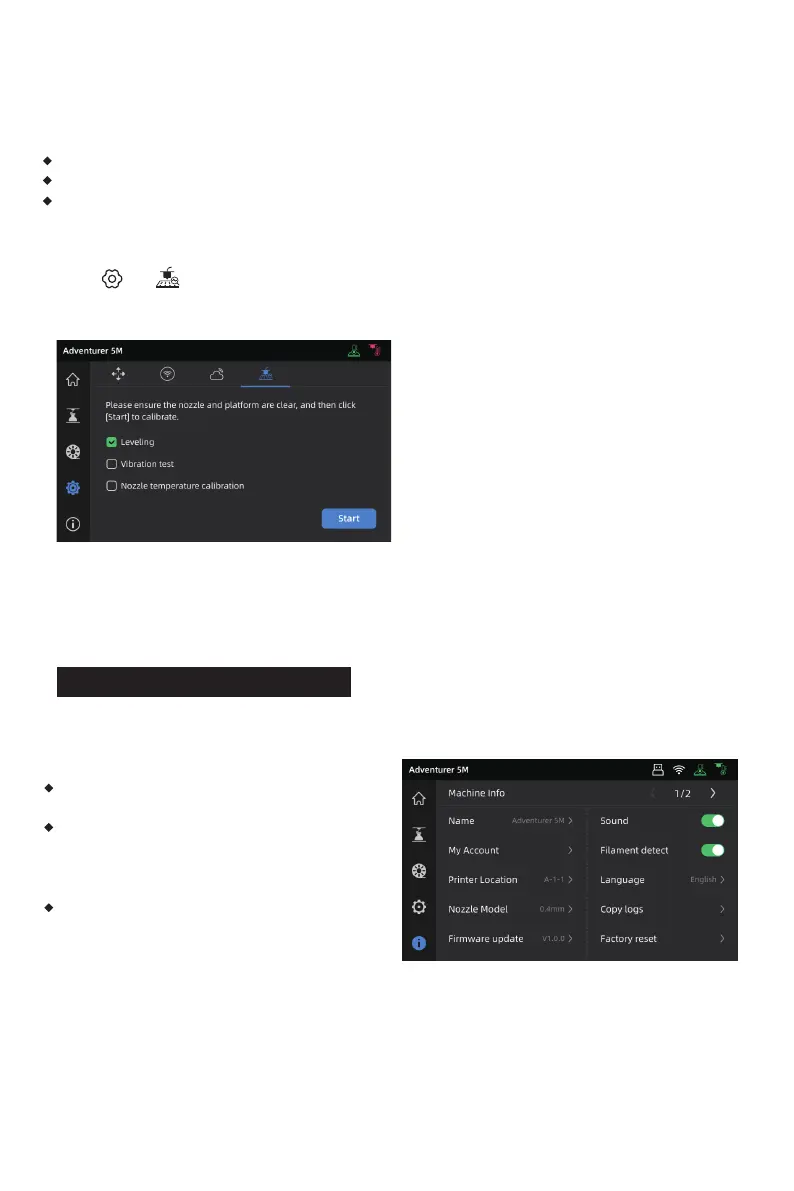
Click [ ] - [ ] to enter the leveling and calibration interface. Choose [Leveling] or [Vibration
test], click [Start], and the printer will automatically perform the corresponding operation.
(Note: Before calibration, ensure there are no foreign objects on the platform or at the nozzle tip.)
Note on when to perform PID calibration: This can be performed after replacing the nozzle or
when the nozzle temperature is abnormal.
5.2 Other Function Settings
In the information interface, you can enable or disable sound and filament detection, and perform
firmware updates.
When [Filament detect] is enabled, the printer
will stop printing if filament runs out mid-print.
When connected to a wireless network, click
[Firmware update] to view the current version,
check for updates, and perform online firmware
updates.
Printer Name and Location: Users can customize
the name and location as desired.
When to perform vibration compensation:
When there is noticeable ghosting and ringing on 3D prints;
After adjusting the tension of the synchronous belt;
When the printer has been unused for a long time and is now being restarted.
29















 To Next Page