Print Preheat Tools
First Print
12
Print Time
L Extruder
1:11
30℃
0%
R Extruder
Platform
30℃ / 50℃
30℃ / 210℃
DM-test-L-PLA
DM-test-L-PLA
DM-test-R-PLA
DM-40mmCUBE-L-PLA
Print
Copy
Delete
DM-test-L-PLA
Print Time: 1:11
..
Dreamer快速启动指南Quick St.
Dreamer说明书 Use Guide
FlashPrint切片软件
Happy3D软件安装包 Software
测试文件Test Files
视频Video
The model file in SD card has been
set, it can be printed directly.
The “L” after the filename represent
using Left exdruder to print,
“R” represent using right extruder to print.
Notes
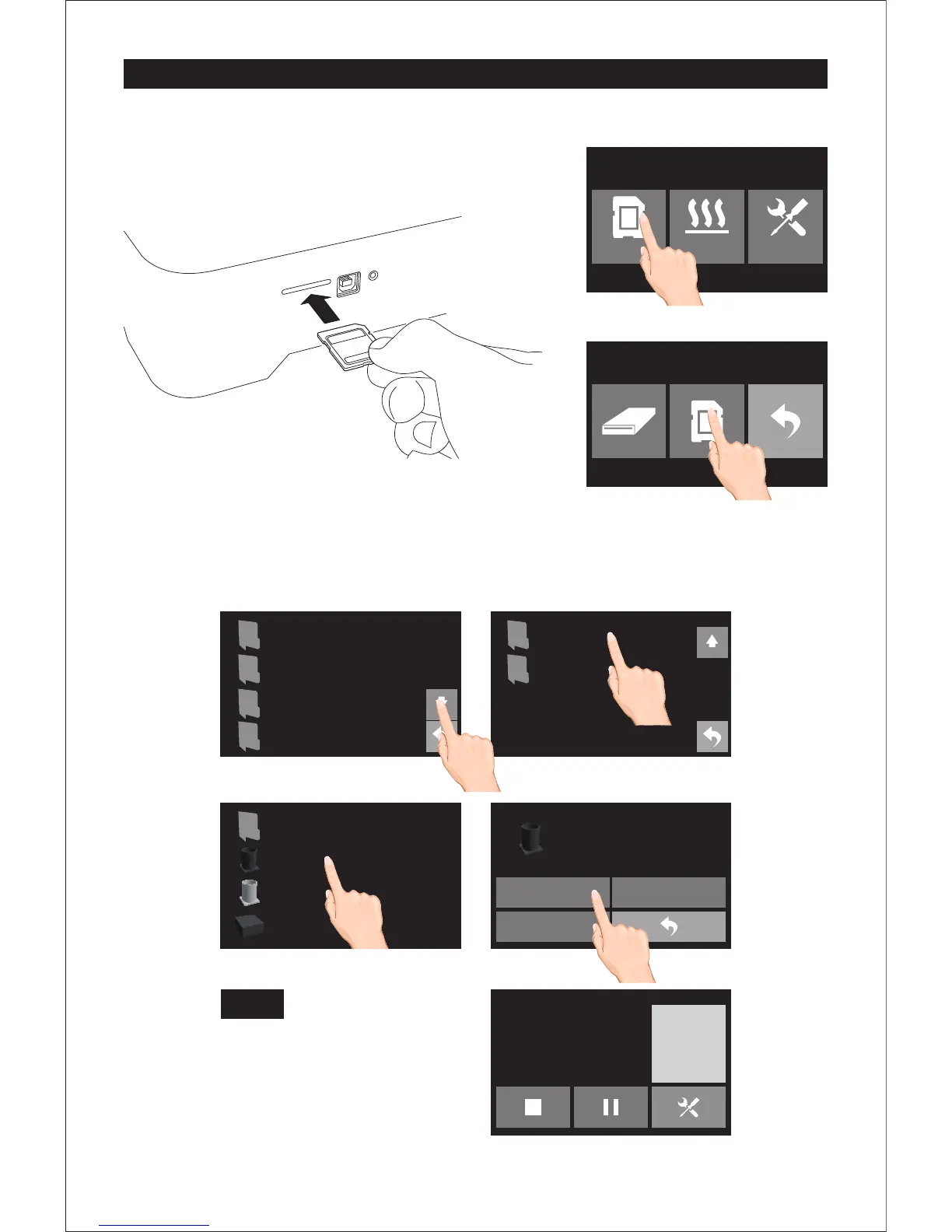
1. Insert SD card into SD card slot which on the right side of printer.
2. Tap [Print]-[SD card], turn to next page, tap [Test Files],
select the file [DM-test-L-PLA], then tap [print]. Once heated, the printer will
start printing automatically.















 To Next Page