12
FEC: Flash Exposure Compensation
M: Manual Flash
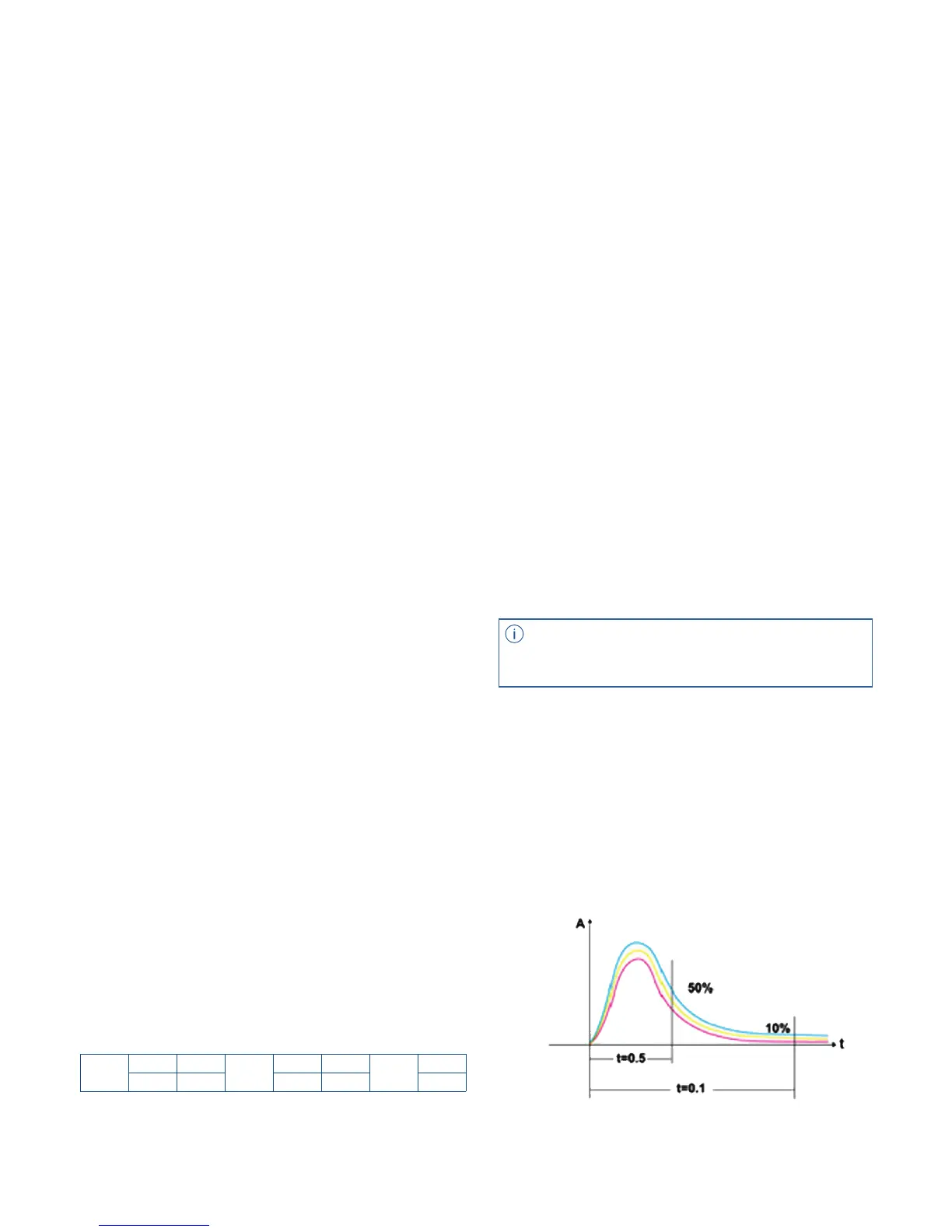
Flash Duration Display
Flash Output Range
With FEC function, the eVOLV200 can adjust
the auto exposure bias from -3 to +3 in 1/3rd
stops. It is useful in situations where minor
adjusting of the TTL system is needed based
on the environment.
Press <MODE > Selection Button to enter Manual
mode. The LCD panel will display “M”. The ash
output is adjustable from 1/1 (full power) to
1/128th power in 1/3rd stop increments. To obtain
a correct ash exposure, use a hand-held ash
meter to determine the required ash output.
The following table makes it easier to see how the
stop changes in terms of f/stop when you increase
or decrease the ash output. For example, when
you decrease the ash output to 1/2, 1/2-0.3, or 1/2-
0.7, and then increase the ash output to more than
1/2, 1/2+0.3, 1/2+0.7, and 1/1 will be displayed.
Figures displayed when reducing ash output level --->
<--- Figures displayed when increasing ash output level
1. Press the <SET> Function Button and ash
exposure compensation amount will be high-
lighted on the LCD panel.
2. Set the ash exposure compensation amount.
• Turn the Select Dial to set the amount.
• “0.3”means 1/3 stop, “0.7”means 2/3 stop.
• To cancel the ash exposure compensation, set
the amount to “+0”.
3. Press < SET > button again to conrm the
setting.
In M manual ash mode, press the < C.Fn >
button for 2 seconds to enter the menu. Select the
C.FN-F2 and choose the S1 function, so that this
ash can function as an optically triggered S1
secondary slave ash with the built-in optic
sensor. With this function, the ash will re
in synch when the main ash res, the same
‘real-time’ response that is realized by R2 radio
triggers. This creates multiple lighting eects
without the use of radio systems.
Long press on the <C.Fn> button for 2 seconds to
enter the menu. C.FN-F2 to choose S2 function,
so that this ash can also function as an optically
triggered S2 secondary slave ash with the built-in
optic sensor while in M manual ash mode. This is
useful when strobes have pre-ash function. With
this function, the optical sensor on the eVOLV200
will ignore a single “preash” from the main
(master) ash and will only re in response to the
second, actual ash from the main unit.
Flash duration refers to the length of time that
from ash’s ring to reach the half peak at
maximum. The half peak at maximum is usually
expressed as t=0.5. In order to provide the
photographer with more concrete data, this
product adopts t=0.1. The dierence between
t=0.5 and t=0.1 is shown in the following picture.
1. Press <MODE > button so that < M > is displayed.
2. Turn the Select Dial to choose a desired ash
output amount.
Setting FEC:
S1 Optical Slave Setting
S2 Optical Slave Setting
• S1 and S2 optic triggering is only available
in M manual ash mode.
1/1
1/1-0.3 1/1+0.7
1/2
1/2-0.3 1/2-0.7
1/4
...
1/2+0.7 1/2+0.3 1/4+0.7 1/4+0.3 ...



 To Next Page