16
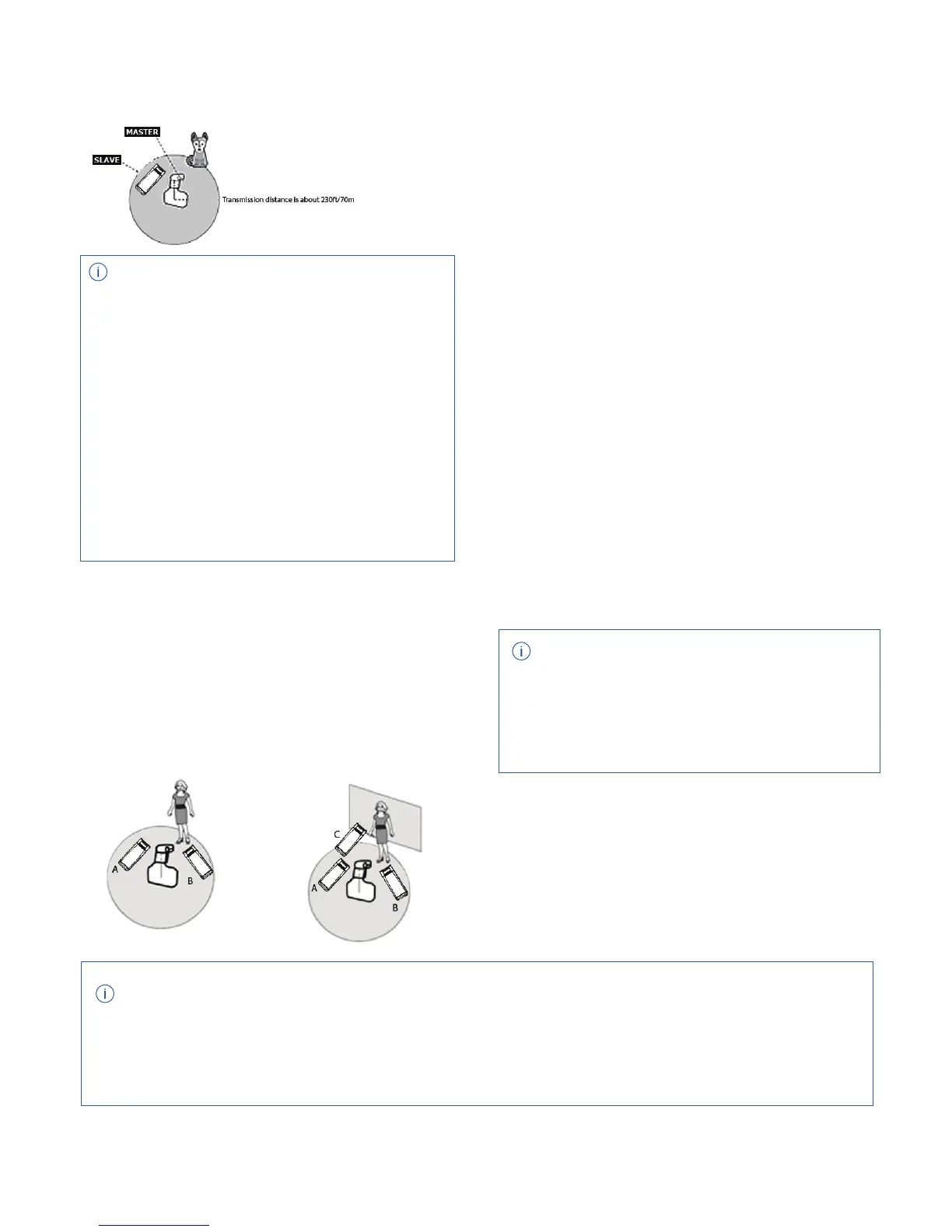
Positioning and Operation Range
(Examples of R2 wireless ash setup)
Optical Wireless Flash Mode
R1 Wireless Remote
Control Function
You can assign the slave units into two or three
groups and perform TTL autoash while changing the
ash ratio (factor). In addition, you can set and shoot
with a dierent ash modes for each ring group, for
up to 5 groups.
See the Manual Mode section on page 12
for Optical Slave instructions.
The ash unit is built in with a Wireless Control
Port so that you can wirelessly adjust the power
level of the ash and the ash triggering.
To control the ash wirelessly, you need a R1
remote control set both on-camera and on
the eVOLV200. Insert the receiver end into the
Wireless Control Port on the ash (g B/6) and
insert the R1 transmitter onto the camera hot
shoe. Settings made on the hotshoe-mounted
transmitter will be wirelessly
communicated to the ash with the R1 receiver.
Then you can press the camera shutter release
button to trigger the ash. You can also hold the
transmit end at hand to control your o-camera
ash.
The Sync Cord Jack is a Φ3.5mm plug. Insert
the trigger cord plug into the socket and the
ash will be red synchronously with the
camera shutter.
R2 Wireless Multiple Flash Shooting
Sync Triggering
TTL Auto ash with
one slave unit
• For full instructions on the use of R1
series remote control, see its user manual.
• Turn o the eVOLV200 wireless function.
• Before shooting, perform a test ash and
test exposure for ratios.
• The transmission distance might be shorter
depending on the conditions such as
positioning of slave units, the surrounding
environment and weather conditions.
• When frequent interruption or
interference of the R2 wireless signal, please
change the wireless channel.
TTL Auto
with Two
Slave
Groups
TTL Auto with
Three Slave
Groups
• Flash Mode: TTL, M, Multi
• Sync Mode: First-curtain sync, second-cur-
tain sync and High-speed sync
• Control the power level
• Modeling Lamp: turn on or o
• Audio Signal: turn on or o
When using the eVOLV200 and any R2 family ash trigger together, the R2 transmitter unit can
control the ash function such as:



 To Next Page