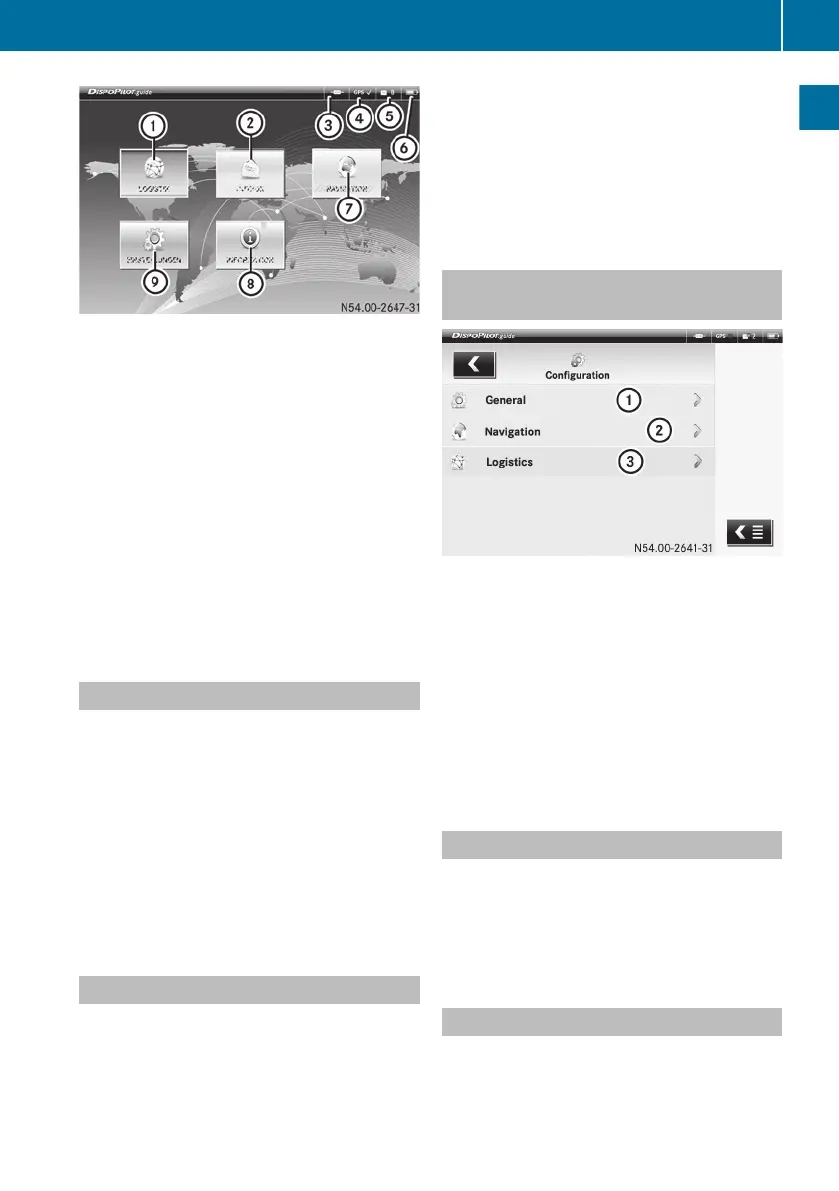
Example: portal
:
LOGISTICS service
;
OUTBOX
=
Network connection display
?
GPS signal
A
Inbox status indicator
B
Battery charge status
C
NAVIGATION
D
System information
E
SETTINGS
The number of services displayed by Dispo-
Pilot depends on the service package
ordered.
Switching on DispoPilot
DispoPilot
starts automatically when the igni-
tion is switched on.
Switching on the device using the Ü but-
ton is only necessary in exceptional circum-
stances.
X
To switch on DispoPilot manually:
press
the Ü (Y page 8) button.
X
To call up the portal from other applica-
tions: press the M button
(Y page 8).
Basic functions
You can call up DispoPilot services and
menus from the portal.
R
î LOGISTICS
(depending on the frame-
work agreement for the vehicle)
R
í NAVIGATION (Y page 18)
Use the NAVIGATION menu to enter desti-
nations and start route guidance.
R
ì SETTINGS (Y page
10)
Use the SETTINGS menu to set the default
settings of DispoPilot.
R
ñ INFORMATION (Y page 15)
Selecting menus from within applica-
tions
Example: settings menu
:
General
;
Navigation
=
Logistics
When selecting menus, there are usually two
options:
R
press the appropriate menu twice.
R
press the r symbol to the right of the
appropriate menu.
Switching back to the portal
X
Press the q
symbol at the top left (more
than once if necessary).
or
X
Press the M button
(Y page 8).
Opening/closing a service menu
If
you are already using one of the services or
menus, you can quickly switch to another ser-
vice via the service menu.
Portal
9
Overview and operation
Z


 To Next Page