X
To open a service menu: press the ü
symbol.
X
To close a service menu:
press the ý
symbol.
DispoPilot status displays
Symbol Meaning
è
DispoPilot is connected to the
FleetBoard
®
Server.
é
DispoPilot is not connected to
the FleetBoard
®
Server.
ò
ó
ô
Battery charge status display.
:
Battery charge low.
õ
The battery is being charged.
ö
Valid GPS signal available.
ë
No valid or sufficiently strong
GPS signal available.
ê
Unread messages in the inbox.
å0 No unread messages in the
inbox.
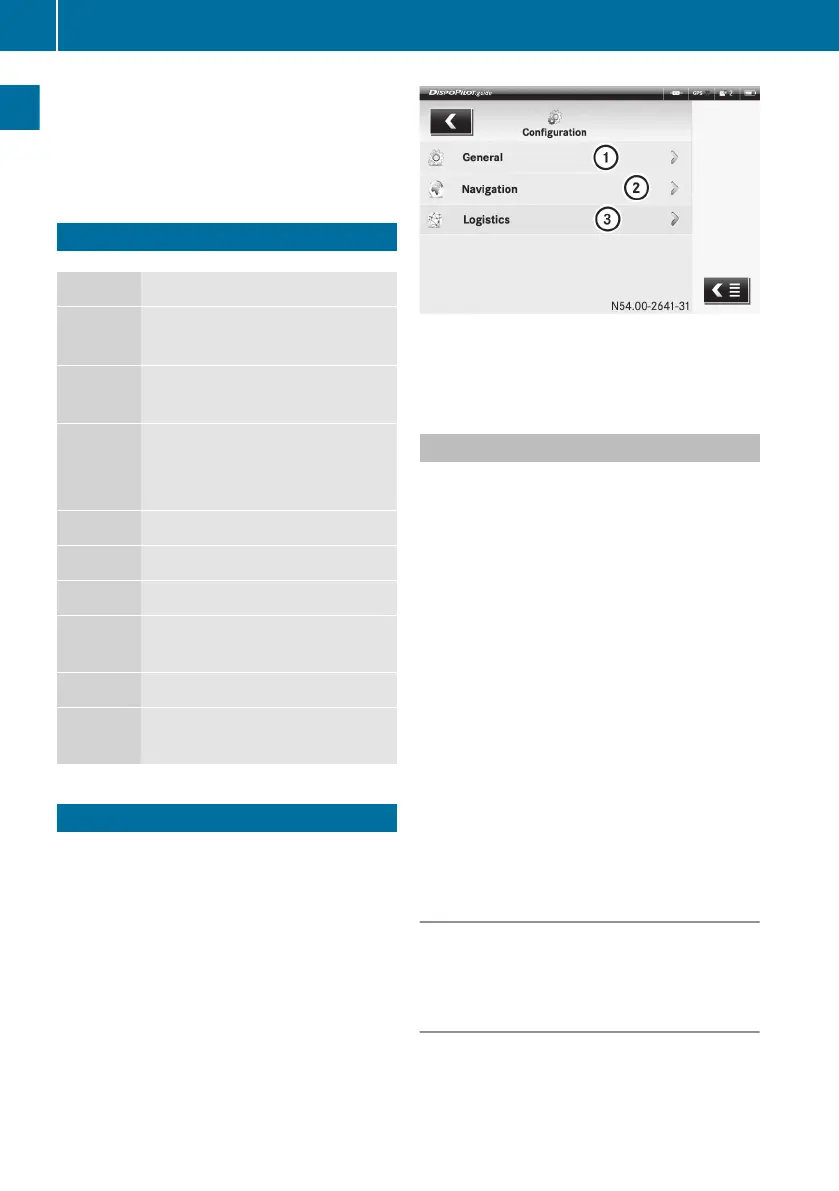
DispoPilot settings
You can alter the settings in the following
areas:
R
General
R
Navigation
R
Logistics
:
General
;
Navigation
=
Logistics
General settings
The following menus are available:
Country settings
R
Language
R
Country code (time zone)
R
Date format
R
Unit of length
Display
R
Brightness
R
Screen saver
R
Smooth scrolling
Audio
R
Volume
Barcode profile
R
FleetBoard
®
standard
R
EAN128
Calling
up the "General settings" menu
X
Select SETTINGS ì.
X
Select the General menu.
Setting the language
Use this function to set the language used on
the DispoPilot screen.
X
Select the Country settings menu.
X
Select the Language menu.
10
DispoPilot settings
Overview and operation


 To Next Page