FleetBoard
®
Navigation
G
WARNING
Operating mobile information systems and
communications equipment while driving will
distract
you from traffic conditions. You could
then lose control of the vehicle. There is a risk
of an accident.
Only operate these devices when the vehicle
is stationary.
The navigation system calculates the route to
the destination without taking into account,
for example:
R
traffic lights
R
stop signs and right-of-way signs
R
parking and stopping restrictions
R
lane narrowings
R
other road and traffic controls and regula-
tions
The navigation system may give incorrect
driving recommendations if the information
on the digital map is not the same as the
actual surroundings, for example if the rout-
ing or the direction of a one-way street has
been changed.
For this reason, you must always observe
road and traffic rules and regulations during
your journey. Traffic regulations always take
precedence over the navigation system's rec-
ommendations.
You can use the NAVIGATION function to:
R
get guidance to any given address
R
get guidance to a saved destination
R
get guidance to your home address
R
get guidance to POIs
R
display the surroundings for the vehicle's
current position
There are two different navigation display
types:
R
2D map display
R
3D map display
i
FleetBoard
®
Navigation only works when
a satellite signal is received (Y page 10).
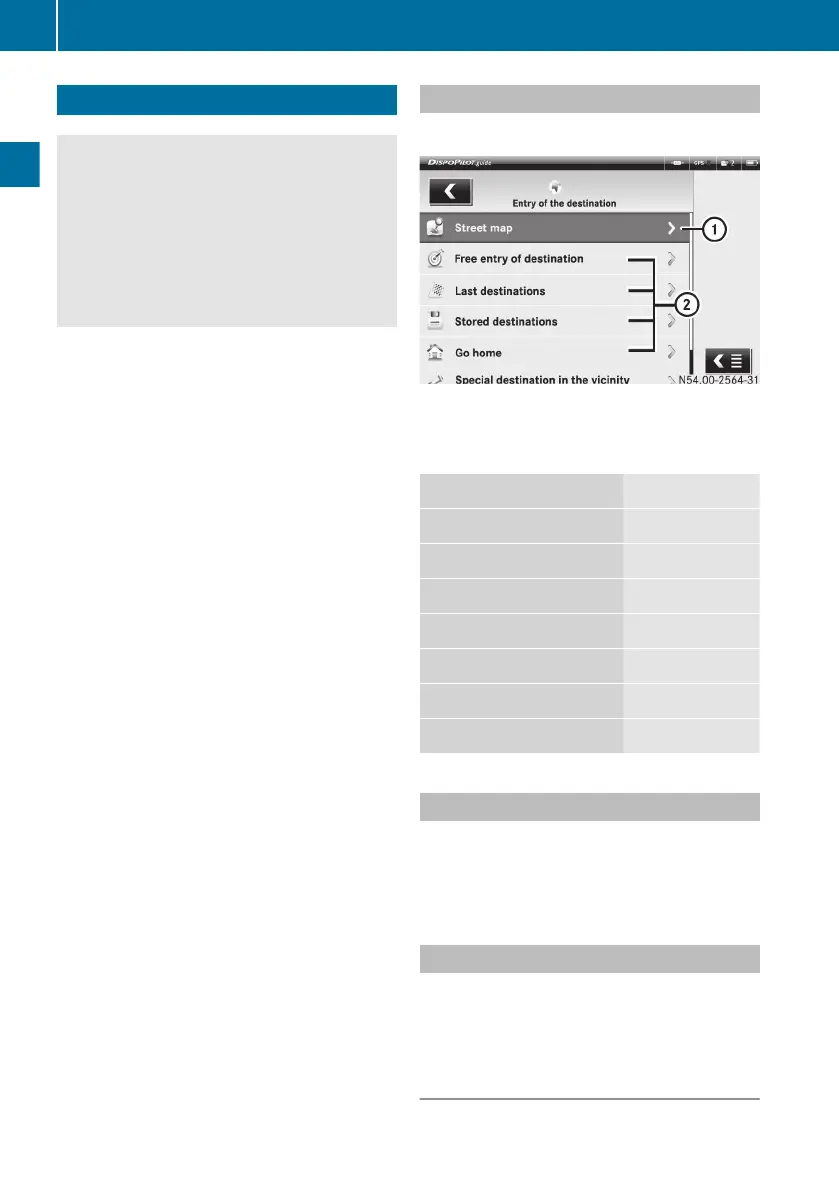
Starting navigation
X
Select NAVIGATION í.
:
To display the current position on the map
;
Destination entry options
The following menus are available:
Page
Street map (Y page
18)
Entering any destination (Y page
18)
Last destinations (Y page
19)
Stored destinations (Y page
20)
Go home (Y page
21)
POIs in the vicinity (Y page
21)
POIs in a location (Y page
21)
Street map
Use this function to display the map of your
current location.
X
Select the Street map menu.
Entering any destination
X
Select the Free entry of destination
menu.
Entering the town, post code and coun-
try
X
Select the ú symbol.
18
FleetBoard
®
Navigation
FleetBoard
®
Navigation


 To Next Page