X
Enter a destination.
X
Select symbol ;.
The following menus are available:
R
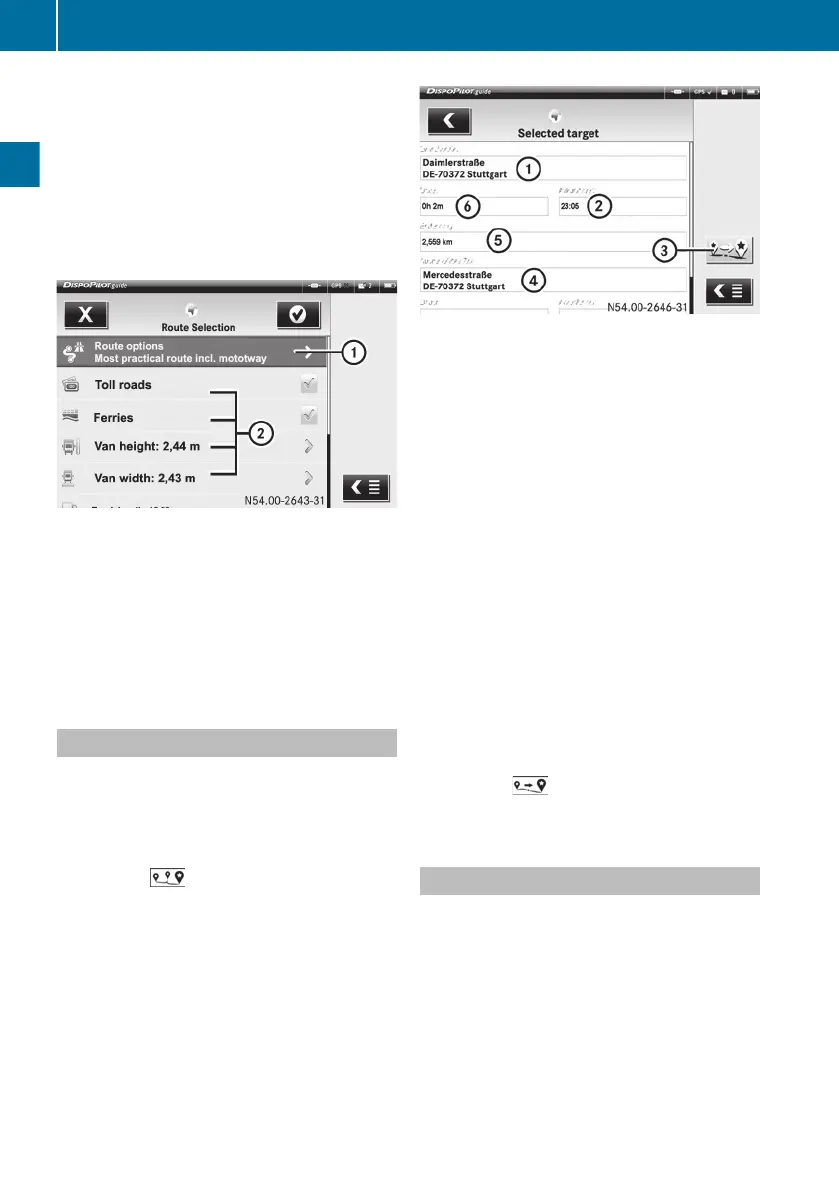
Route options
R
Toll roads
R
Ferries
R
Truck/van characteristics
:
Route options
;
Route settings
X
Select the desired route options and set-
tings.
X
Confirm with the ÷ symbol.
The route is calculated and navigation to
the destination entered is started.
Entering an intermediate destination
You can enter an intermediate destination
during navigation.
X
Press the ú symbol.
X
Press the ñ symbol.
X
Press the symbol on the right of the
screen.
:
Intermediate destination address
;
Arrival time at intermediate destination
address
=
To skip an intermediate destination
?
Final destination address
A
Distance to intermediate destination
B
Time to intermediate destination
X
Enter an intermediate destination.
X
Confirm with the ÷ symbol.
The route is calculated.
DispoPilot guides you to the intermediate
destination. As soon as you have reached
the intermediate destination, DispoPilot
automatically continues with navigation to
the final destination.
To skip an intermediate destination:
X
Press the ú symbol.
X
Press the ñ symbol.
X
Press the
symbol on the right of the
screen.
Selecting a saved destination
X
Select the Stored destinations menu.
X
Select the desired destination.
The destination address is shown.
X
Confirm with the ÷ symbol.
The route is calculated and navigation to
the selected destination is started.
20
FleetBoard
®
Navigation
FleetBoard
®
Navigation


 To Next Page