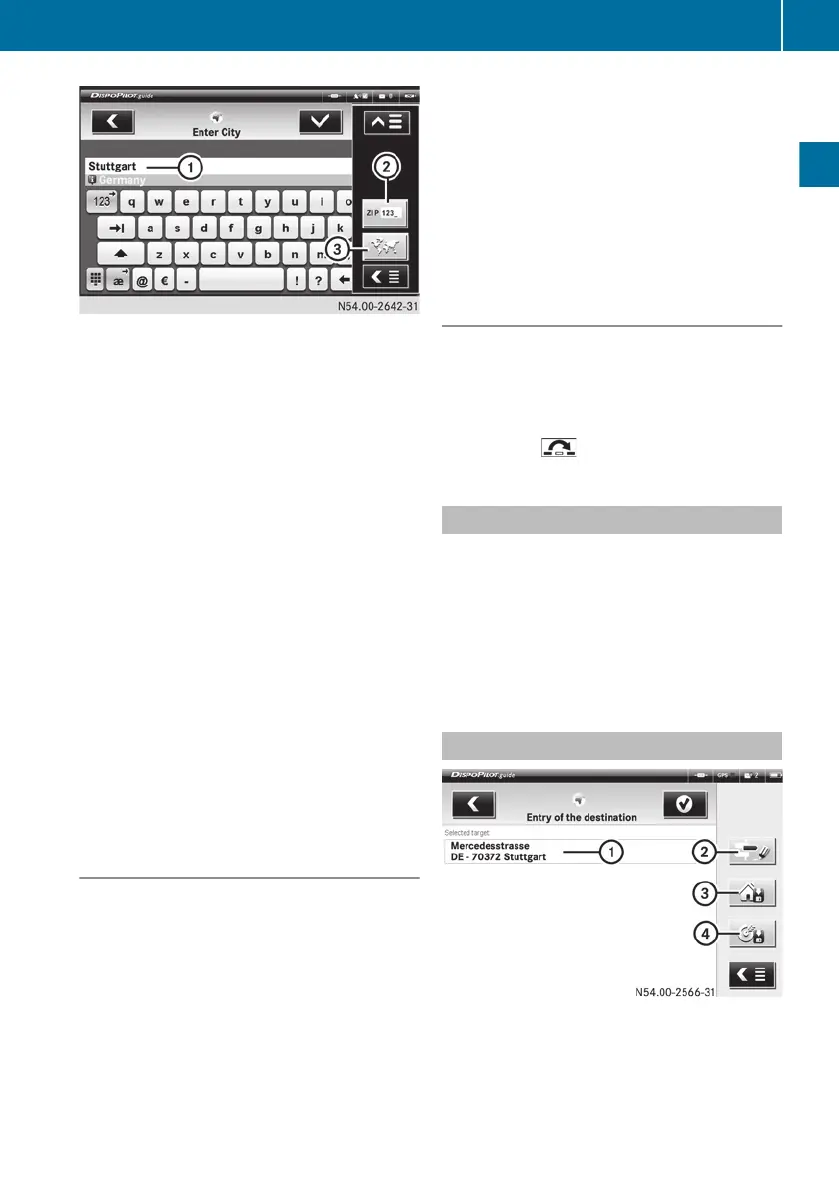
:
To enter the name of a town
;
To enter a postcode
=
To select a country
X
In entry field :,
enter a town or post code
of the country already selected.
or
X
Change the country. To do so, select sym-
bol = and after selecting the country,
enter the town.
If you only enter the first few letters of the
city, DispoPilot automatically searches for
possible cities once it has received confir-
mation.
X
Confirm with the ÷ symbol.
If there is more than one possible entry, a
menu appears.
X
In this case, select the correct entry from
the menu.
X
Confirm with the ÷ symbol.
Navigation can only start after at least the
country and town have been entered.
Entering a street and house number
X
Enter a town or postcode.
An
entry field for the street name appears.
X
Enter the street.
If you only enter the first few letters of the
street, DispoPilot automatically searches
for possible streets once it has received
confirmation.
X
Confirm with the ÷ symbol.
If there is more than one possible entry, a
menu appears.
X
In this case, select the correct entry from
the menu.
X
Enter the house number in the entry field.
X
Confirm with the ÷ symbol.
DispoPilot displays the destination
address.
X
Confirm with the ÷ symbol.
DispoPilot calculates the route.
Skipping entries
You can skip the entry of a street.
X
Enter a town or post code and confirm for
the destination entry.
X
Select the ú symbol.
X
Select the symbol.
Selecting the most recent destination
This list contains the last ten destinations.
X
Select the Last destinations menu.
X
Select the desired destination.
X
Confirm with the ÷ symbol.
The route is calculated and navigation to
the selected destination is started.
Altering the route settings
:
Selected destination
;
To alter the settings
=
To save the destination as the home
address
?
To enter the destination name
FleetBoard
®
Navigation
19
FleetBoard
®
Navigation
Z


 To Next Page