FF20 IH EN 74-215-051 v1.02.doc Version: 1.02 Page 13 of 21
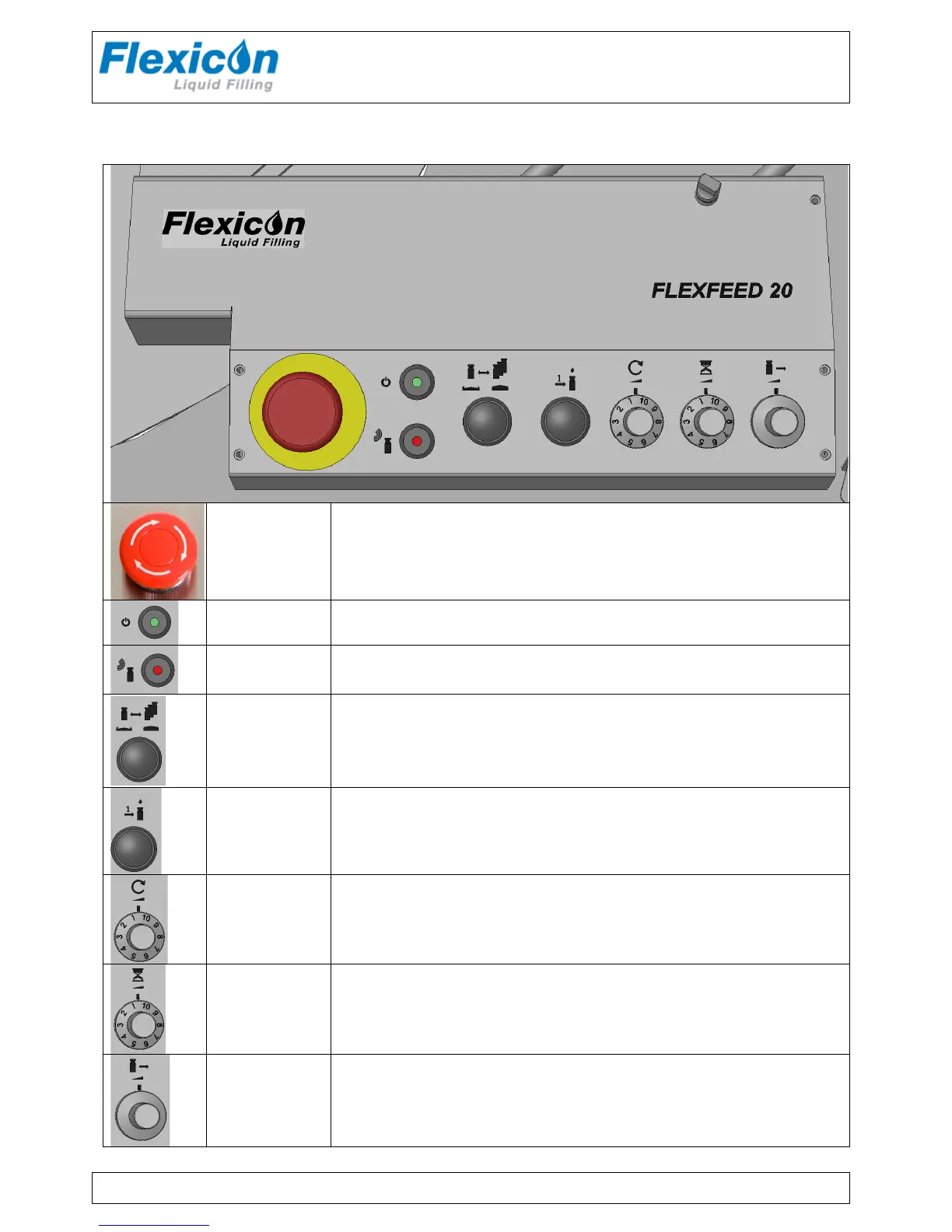
5 Control panel
Emergency
Switch
Stops the machine immediately and ventilates the compressed air.
Power Indicator; lights when power is on.
Sensor
Bottle sensor indicator.
Lights when a bottle is present in front of the sensor.
Manual mode /
Automatic mode
Manual mode = Each bottle is moved through the filling area manually.
See “Release”
Automatic mode = Each bottle is moved through the system automatically
Release
Is used together with manual mode, only
When release is pressed the ejector will move once and push the bottles one
step further in the bottle sluice.
Round-table
Speed
Potentiometer for setting the speed of the round table.
1 = slow 10 = fast
Filling Delay
Potentiometer for adjusting the delay between each filling
1 = minimum time (~ fast process of bottles),
10 = maximum time (~ slow process)
E.g. if filling volume is small a high delay value can be an advantage.
Ejector Speed
Regulates the speed of the ejector.
Faster: Turn counter clockwise
Slower: Turn clockwise.
If the speed is too high, narrow bottles may fall over in the sluice.



 To Next Page