7.2 Commissioning
To start up the filling system, please follow these steps:
1. Select your filling programme
2. Prepare the digital I/O connections according to the selected filling programme (see chapter 4.2.3)
3. Set up and calibrate the scale (see chapter 6)
4. Enter the process parameters for the selected filling programme as explained in chapter 7.3 and 7.6
5. a. If you don‟t use recipes: Enter Target, tolerance and preset values as explained in chapter 7.4
b. If you use recipes: Enter the recipes as explained in chapter 7.5
6. Perform tests and optimise the filling process
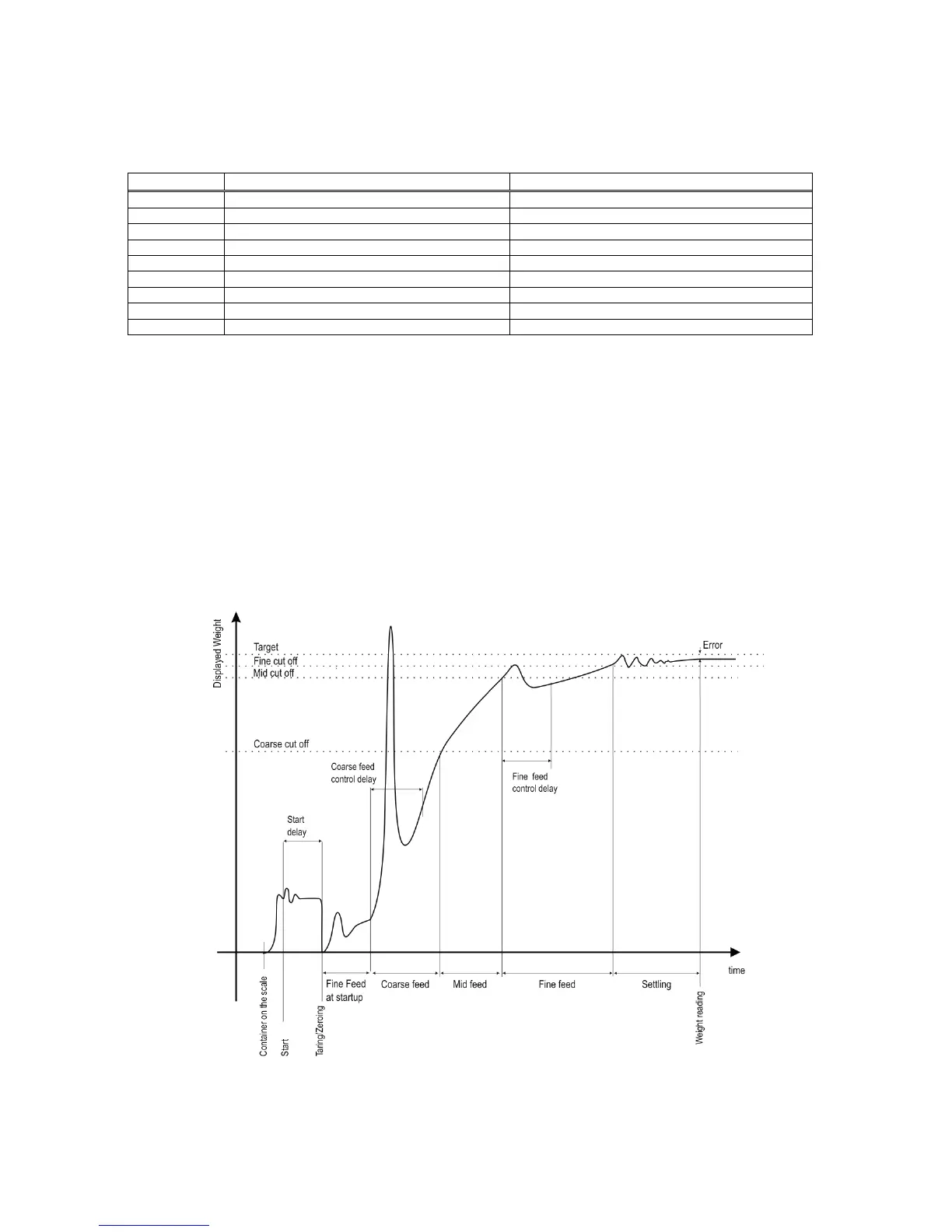
You can find the meaning of the filling parameters in the filling cycle diagram shown below (Fig. 7.1). In this
diagram the instrument does not follow the weight during coarse and fine feeding control delay periods. This
increases the reliability of the system. The actual weight value is read out at the end of the settling time. This
allows for better tolerance control and / or cut-off point adjustment.
Figure 7.1 Typical filling cycle diagram (displayed weight vs time)
You can change the target and preset values very quickly via keys. If you use the recipe memory, you can
select the recipe (set of target, preact, dribble, tolerance, coarse, middle, fine) to spare time for different filling
applications.


 To Next Page