FT-13 Technical Manual, Rev. 1.40 March 2013
8.6 ProfiNet Option
Indicators which are equipped with the ProfiNet option can be connected to a PLC bus as described below.
8.6.1 Electrical Connections
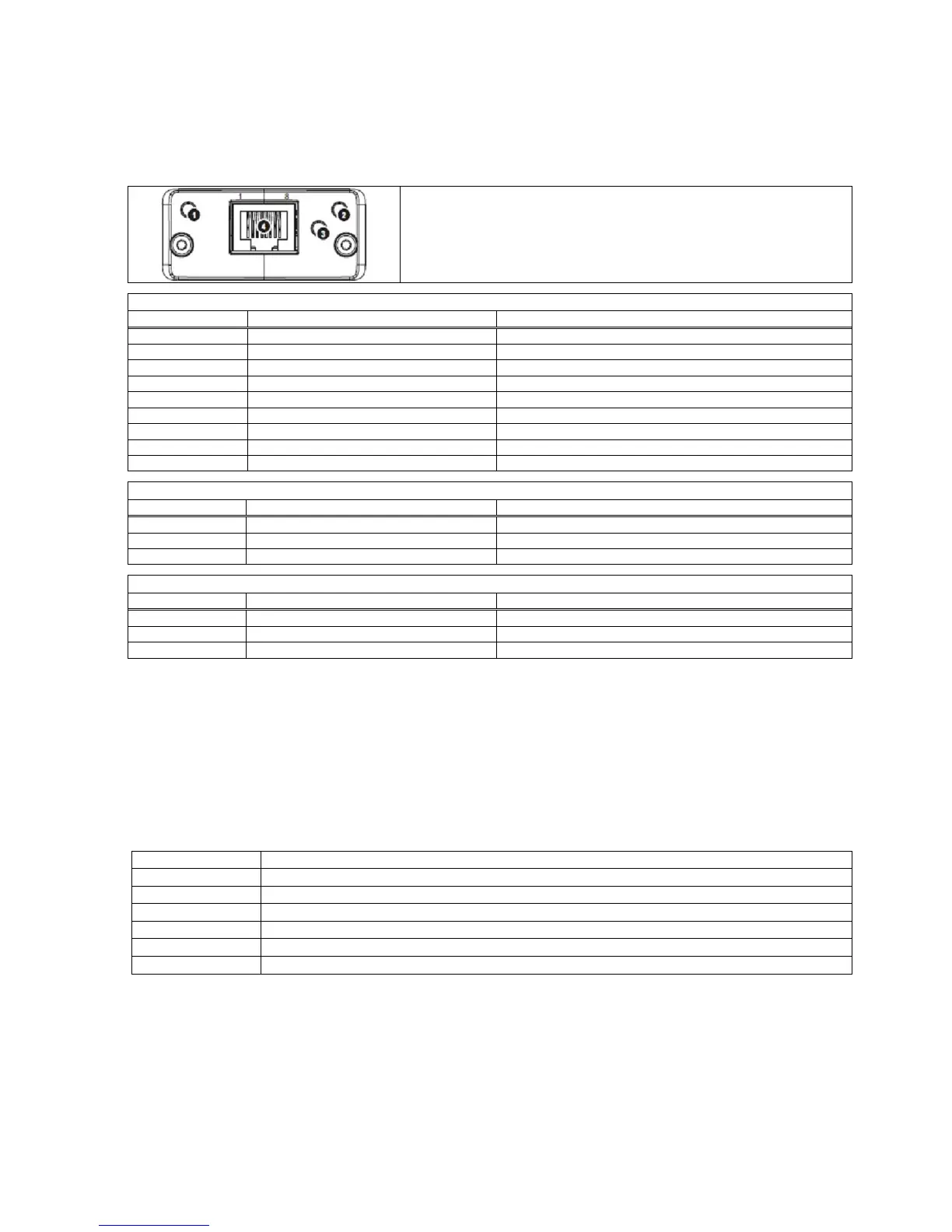
ProfiNet Interface:
1. Network Status LED
2. Module Status LED
3. Link/Activity LED
4. Ethernet Connector (100 Mbit/s, full-duplex)
No power or not initialized
No power or ProfiNet module is in initialization state
Initialized, diagnostic event(s) present
Service tool to identify the node on the network
There is an exception error
Re-energize the instrument. If seen again, change module
No link, no communication present
Ethernet link established, no communication present
Ethernet link established, communication present
8.6.2 Setup
[0--] Interface Block
[03-] ProfiNet
[036 X ] Data Format
0 : Signed 32 bit integer
1 : Signed 32 bit floating point
There are 7 setup parameters for ProfiNet network:
Enabled Dynamic Host Configuration Protocol automates network parameters. Default is „Disable‟.
If DHCP is disabled, define IP address manually. Default is „192.168.16.250‟
If DHCP is disabled, define subnet mask manually. Default is „255.255.255.0‟.
If DHCP is disabled, define default gateway manually. Default is „192.168.16.254‟.
If DHCP is disabled, define primary DNS manually. Default is „208.67.222.222‟.
If DHCP is disabled, define secondary DNS manually. Default is „208.67.220.220‟.
Enter a unique host name to the instrument. Default is „ ‟
The ProfiNet communication will be configured by the EtherX PC software. EtherX can be installed from the
Flintec Product CD-ROM. The EDS file is available on a CD which is supplied together with the instrument.
After the setup of these parameters and the hardware connection as described above, the data interface can
be used as described in Appendix 4.
Important hint: During the setup the ProfiNet output (weight value and status bits) will not be updated.
8.6.3 Data Structure
See Appendix 4.


 To Next Page