FT-13 Technical Manual, Rev. 1.40 March 2013
8.3.2 Setup
There are several setup parameters for the Ethernet network as described below:
Device name on the network. Default is “ “
The numeric code that identifies all computers that are connected to the internet.
Default is “92.168.16.250”
Ethernet connection point of the device. Default is “10001”
Network point that acts as an entrance to other networks. Default is “192.168.16.254”
Defines a range of IP addresses in a network. Default is “255.255.255.0”
Primary DNS server IP address
Secondary DNS server IP address
The Dynamic Host Configuration Protocol provides dynamically allocated IP
addresses to computers on a network, if it is enabled.
Automatic connection to any device on the network
IP address of the PC or device which should be connected automatically
Ethernet connection point of the device which should be connected automatically
Important hint: During the setup the Ethernet output (weight value and status bits) will not be updated.
Setup by using the Ether X Software:
For older instruments the configuration will be done by the Ethernet Device Installer PC
software, see separate document on the Flintec Product-CD.
Install the Ether X software from the Flintec Product-CD to any PC on the network
Start the Ether X software
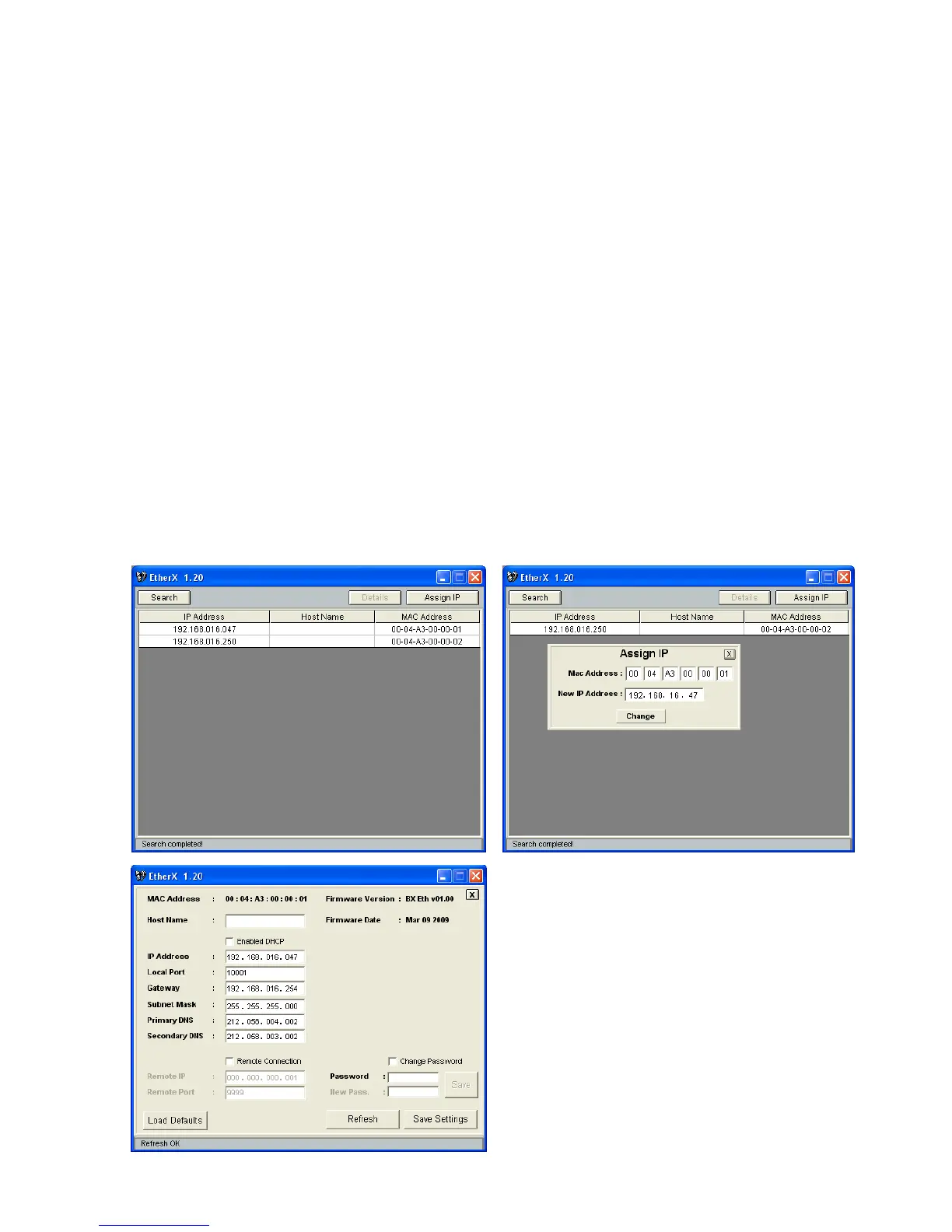
After pressing the “Search” button the software lists the FT-1x devices on the network as shown in
the figure below
The IP address of any device may be changed after clicking the “Assign IP” button
Click the “Details“ button to open the parameter window as shown below.
The parameter window presents information like
Firmware Version of Ethernet option board and it helps
to edit resources like Host Name, Gateway, DNS
server etc.
After changing any parameter, enter the password and
click the “Save Settings” button.
The default Password is “123456”.
The “Load Defaults” button resets the device to the
default settings.


 To Next Page